The Adventures of Bruto
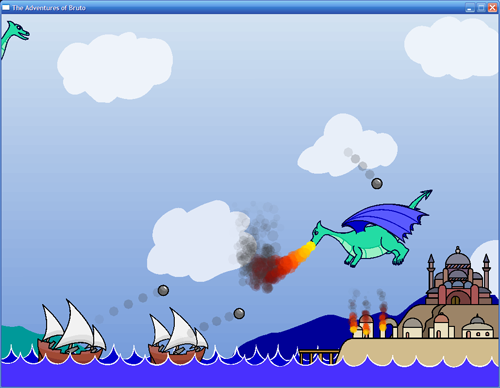
Amber commented on a previous post, expressing interest in playing the game I mentioned there. Here is a link to download it:
You will need to have the Isis Game Engine installed in order to play. Unzip bruto.zip and double-click bruto.iss to launch it (if you didn't use the Isis installer, run bruto.iss with the 'ivmconsole' program).
You control the dragon and must protect your hometown from marauding invaders. Fly around using the I, J, K, and L keys. Spacebar breathes fire, and the F key sucks in air in order to shoot fireballs (if you don't like those controls, you can edit dragon.iss in notepad and change them). You win after defeating 20 ships, or you lose when your town and castle are destroyed.
If you don't want to download the game but still want to see it in action, here is a WMV video of me playing. Note that the video has no sound because the game has no sound. Here's a low-quality YouTube copy of the video:
Isis
A couple of people were curious about the game engine behind Osiris, so I have written up a little page about it:
There's not much on that page yet, but it has an introduction to IsisScript and a couple of sample games. There are also links to the installer as well as the source code if you are interested in checking it out.
Google stats
As I mentioned in a previous post, one of my goals for this web site was to be the #1 Google result for a search for my name. As of yesterday (June 26th 2006), this site had been around for little under a month and I had captured the #3 spot, even beating out the other Eric Faller who owns http://www.ericfaller.com/. The #1 and #2 spots were still being held by the GameDev club at the University of Colorado. Ironically, I created those pages while back in college and now I can't get rid of them (grr).
Yesterday Microsoft posted a Scoble video of my coworker Savraj and me explaining what we work on all day. Within one day, that page shot to the #1 spot on Google for a search for my name (#2 for Savraj). Less than 1 day for the #1 spot! I was very surprised. Unfortunately that page already seems to have been linked by a lot of other bloggers, so it will probably be very difficult for me to beat it any time soon.
The video isn't that bad, but unfortunately I had a very bad haircut when it was shot, and I and do a poor job of speaking clearly to the camera. I also manage to screw up one demo 4 times in a row, after I had just said something like "Oh yeah, I do this all the time" :). If you are interested in checking out my office and seeing what I do all day, check out the video. (Yes I realize that if I link to it too, that will only make it worse)
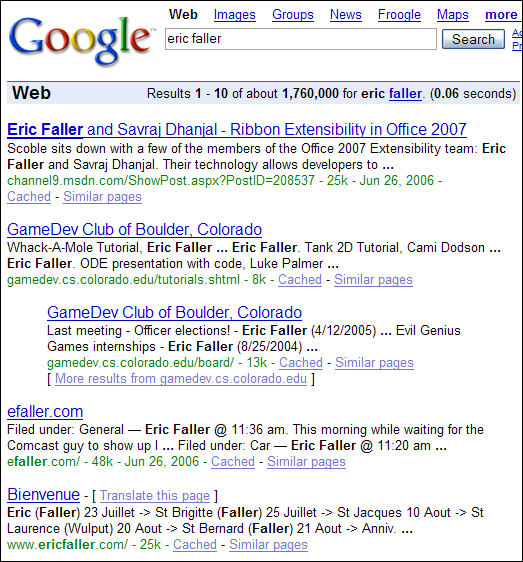
Google results as of June 27th 2006
SD vs HD
Fortunately, my problems with the video quality of the DCT-3412 cable box ended up not being so bad, for the simple reason that all of the channels I receive seem to be digital, so they can all be recorded via Firewire (as long as they are not protected with DRM). Also, connecting the MCE via S-Video instead of the RF tuner increased the video quality for shows I can't record with Firewire.
Once that was all working, I did some tests to see how noticeable the difference between SD and HD really is. Here are some pictures:

Standard Definition
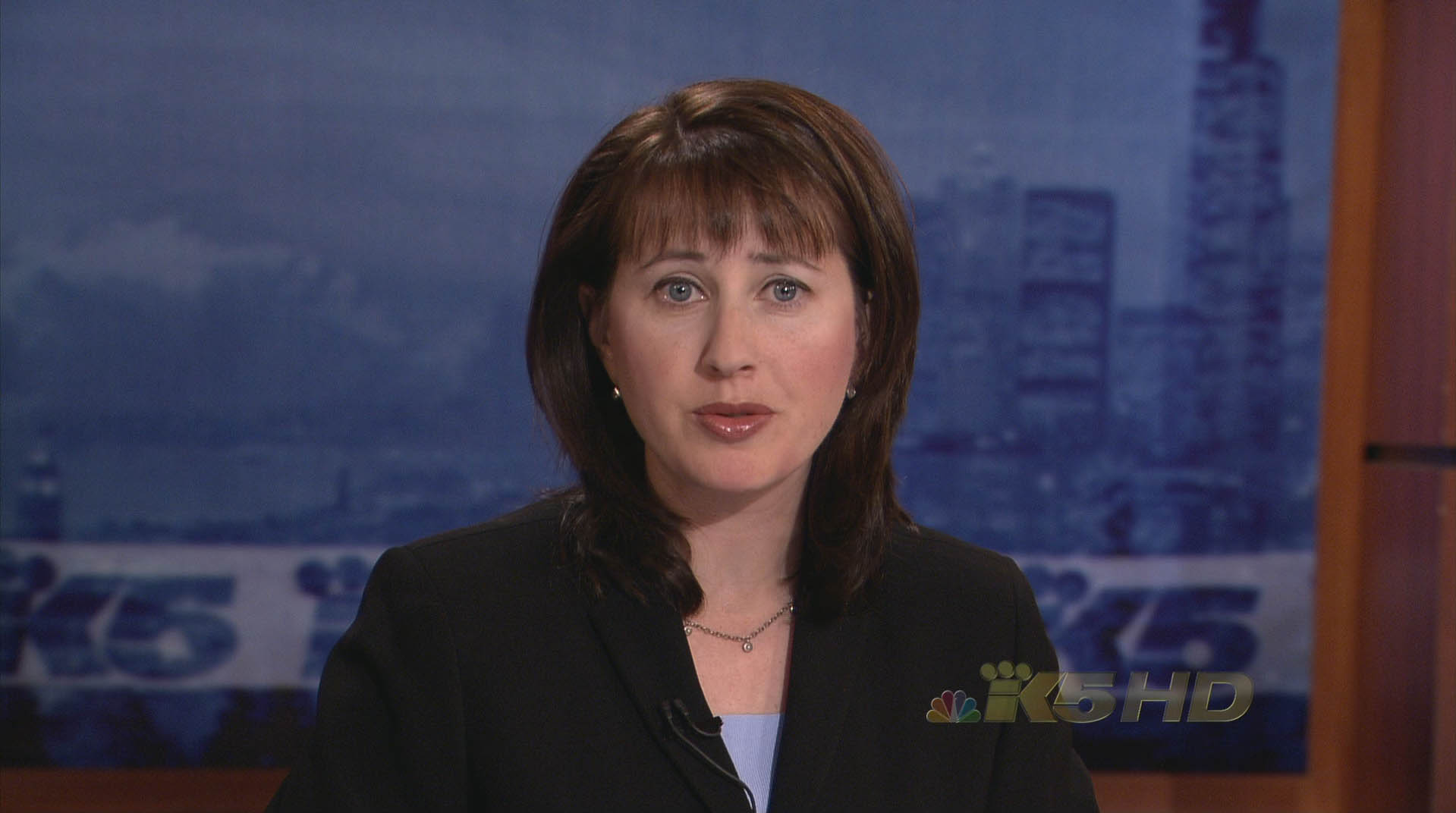
High Definition
Obviously the HD screenshot has been shrunk to SD, so they look about the same here (except that the HD shot is in 16:9). Click the HD thumbnail to see it in its full resolution (HD 1080i).
Here are the two shots scaled to the same size, for an easier comparison:

Standard Definition

High Definition
The last shot clearly shows HD's better picture quality, but ironically the newscaster actually looks a bit better and younger in the SD shot, since the blurriness of SD masks wrinkles and imperfections, while HD hides nothing. (I'm definitely not the first to note this irony)
Mac Mini Media Center
Last week I finally caved to peer pressure and got cable TV installed. Instead of actually watching any TV shows, I went right to work on getting the TV signal hooked up to my computer so that I could record and watch TV on it.
Unfortunately my computer is very loud and heats up my room whenever it's on, so I couldn't imagine leaving it on all the time in order to record TV shows. So I looked around for a small & quiet, yet still somewhat powerful computer. I decided to get one of the new Intel Mac Minis:
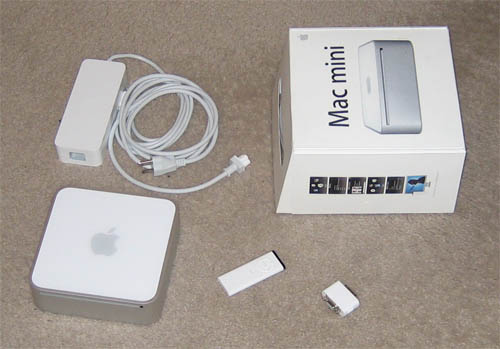
So far it has been pretty good. It has its pros:
- Small
- Quiet
- Intel Core Duo processor
- DVI & digital audio out
and cons:
- Weak integrated graphics
- No CD eject button
- Some of the hardware doesn't work under Windows
- No expansion capabilities (i.e. for a TV tuner)
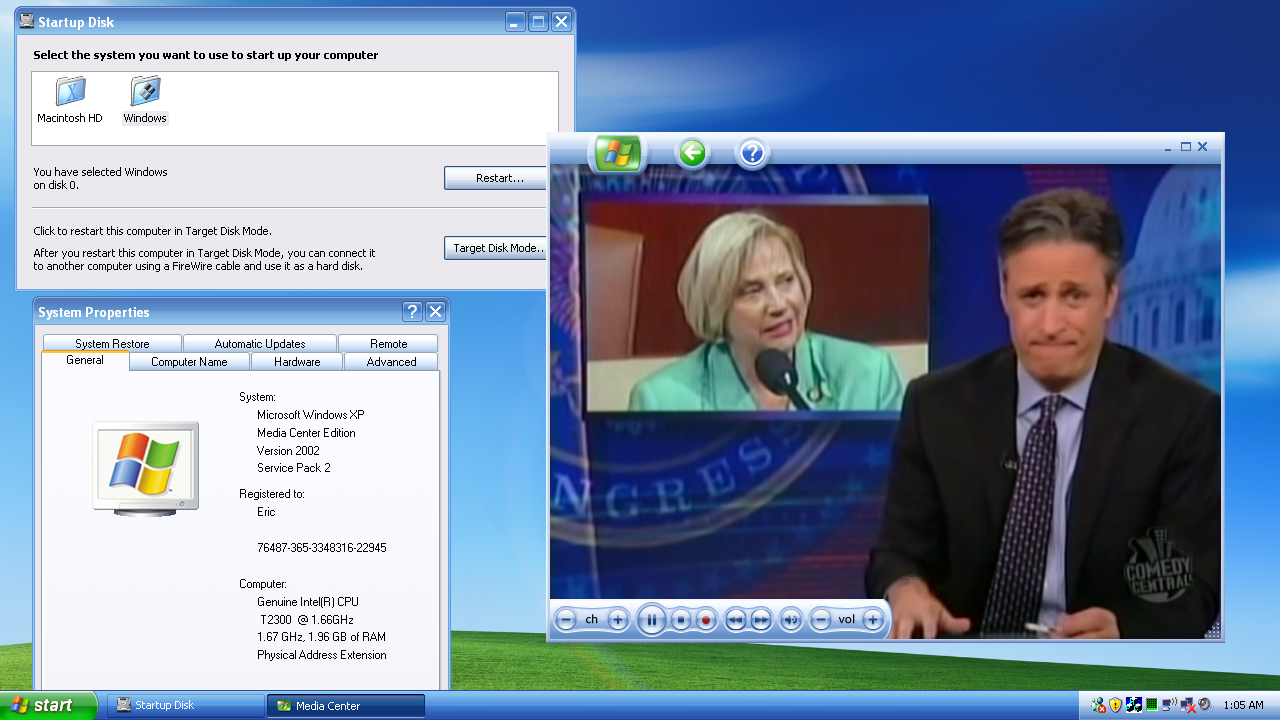
Surprisingly, it was fairly easy to install Windows XP Media Center Edition 2005 on it. I only had a couple of problems:
- I had to burn my own install DVD since Apple's Boot Camp software only likes XP Home & Professional
- I hit the infamous and deceiving "Setup cannot find the EULA" error message, which was caused by the large hard drive getting formatted incorrectly by Mac OS X, so I had to re-partition it by hand
For the TV tuner I got a Hauppauge Win-TV-PVR-USB2-MCE:
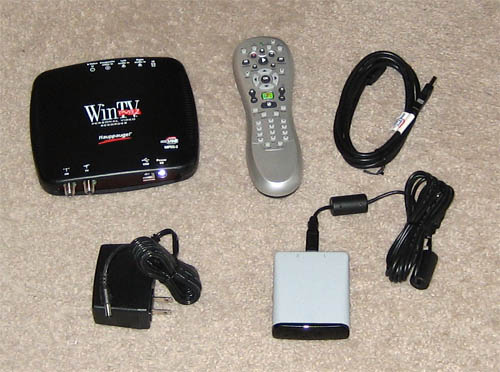
I thought this would be a good tuner (even though it's USB), but unfortunately I was disappointed. The video quality is noticeably blurry when compared to component output from the cable box. I haven't figured out yet whether it is the fault of the RF encoder on the cable box or the USB tuner, but it could probably be either one (or both).
The tuner quality was not supposed to be a problem in either case, since I was planning to grab the raw digital video directly off of the cable box using Firewire and Tim Moore's set-top box controller software (recommended by my friend Mike). Unfortunately that plan didn't work out so well either, because Comcast gave me the new cheapo Motorola DCT-3412 STB, instead of the good DCT-6412, which included an MPEG2 encoder and could output any channel over Firewire:

So I can only record analogue channels using the blurry tuner, although digital (and HD) channels should work fine over Firewire, once the kinks are all worked out.
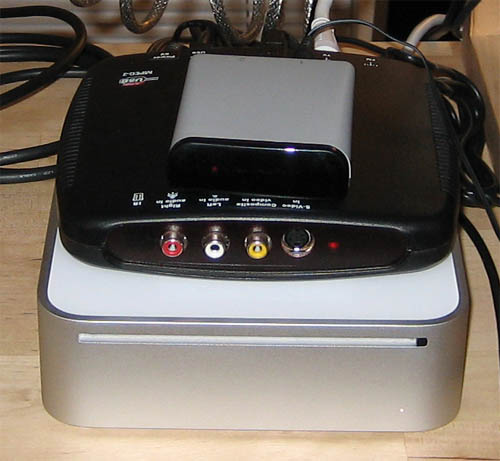
Ultimately it didn't work out as well as I had hoped, but it should still be OK since I can always record analogue shows on the Comcast box and watch them there. Here's a picture of the final 'Mac Mini Media Center':
And here is a screenshot at 720p (linked to full version):
Osiris
I've been asked a few times for a copy of Expedition: Osiris, an educational computer game I worked on while in college. Unfortunately some of the images of Egyptian artifacts that are in the game are copyrighted by the university, so the game cannot be distributed publicly. But, I did get permission to create a "public domain" version of the game, as long as all the artifact images were obscured. Today I finally got around to doing it. Here are download links: (they are about 17 MB each)
- Osiris for Windows (Installer-less version)
- Osiris for Mac OS X (PPC only, sorry)
The system requirements are pretty modest: a 1 GHz processor and a 32 MB video card should play the game just fine.
Here is a medium quality WMV video of me playing the game for a few minutes: Osiris Video. It's a big file but it should stream OK. Here's a low-quality YouTube copy:
The purpose of the game is to teach the basics of a freshman 'Archaeology 101' class. You play the role of a college professor who organizes an Egyptian dig and are supposed to learn how to do the following things:
- Acquire funding
- Create a team of graduate students, specialists and local workers
- Manage the digging process to maximize efficiency and minimize artifact breakage
- Fend off attacks from mummies, crocodiles, scorpions, thieves and evil genies
- Manage team morale and energy while keeping within the budget
- Interpret your findings
- Publish your results in respectable journals to increase your prestige
Here are a couple of screenshots:
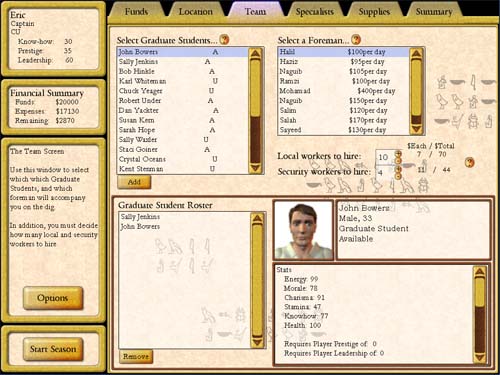
Setting up the team
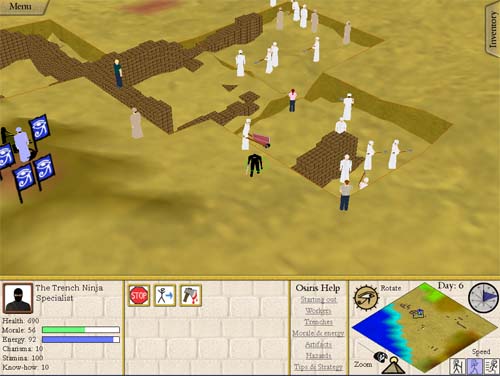
Managing the dig
FSAA mini-benchmark
Have you ever looked at the FSAA settings in the control panel for your graphics card and wondered what the real visual difference is between them?

I was curious myself and decided to do a mini benchmark test. I pulled up a game I wrote a while ago called "The Adventures of Bruto" where you fly around as a dragon and fend off a naval attack. All of the graphics in the game are vector images, so it is a good visual test case for FSAA:
I took screenshots of the game at each FSAA setting level for a comparison. Here are closeups of the castle at 0x, 2x, 4x and 8x:

0x

2x

4x

8x
Overall the screenshots seem to confirm the idea that "more is better" when it comes to FSAA, but once you get past 2x the improvements don't seem to be that noticeable. I'll probably leave games on 2x or 4x and bump up other settings like model/texture detail if I need to make a tradeoff.
Car mods
One nice feature of modern Volkswagen (and Audi) cars is that their electronics systems are wired up using the Controller Area Network (CAN) protocol. This makes it very easy for the VW dealers and technicians to hook up their diagnostic computers to the cars and run tests and change car settings using simple PC software. Fortunately for us, it also makes it easy for enthusiasts and hobbyists to plug into their cars, tweak settings, and re-enable features that VW 'forgot' to enable (and to disable annoying features).
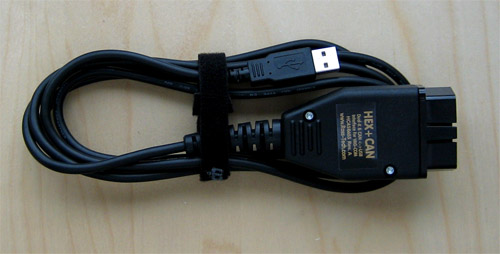
The first thing I needed was a USB-CAN cable so that I could hook my laptop up to my car:
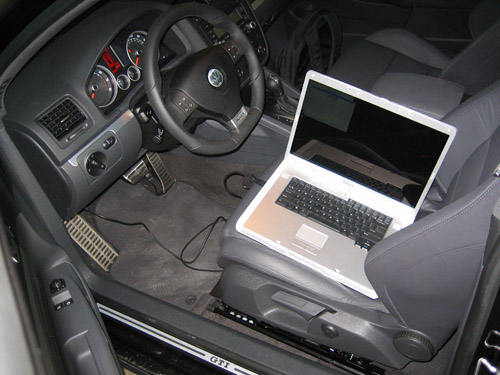
Once I got that (thank you, internet), I hooked it up to the car:
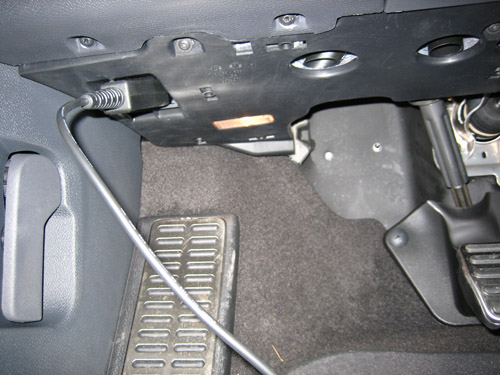
It attaches underneath the steering wheel:
Naturally Volkswagen does not give away its diagnostic software for free (they would lose money if people could diagnose cryptic "Service Needed." messages by themselves), so I used the "VAG-COM" software made by the enthusiasts over at Ross-Tech. It's actually pretty good software (even though it looks a bit amateurish). Here are some screenshots:
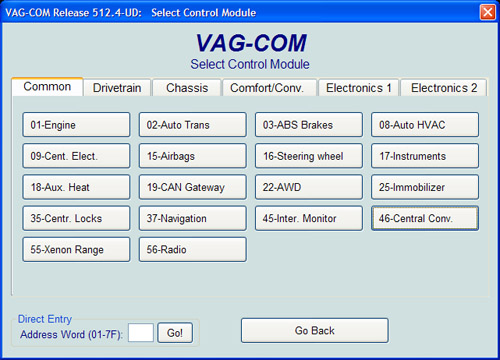
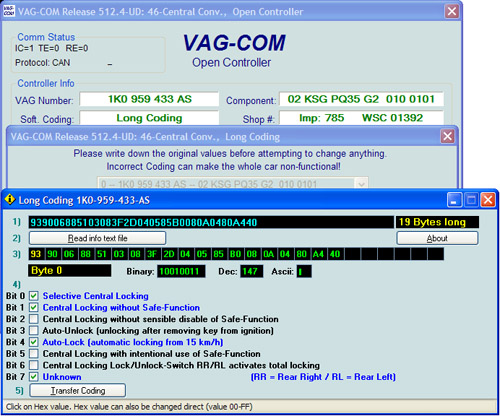
There were literally hundreds and hundreds of options that could be modified. I was afraid to modify most of them without doing more research (especially ones dealing with things like engine timings and the air-fuel mixture). But, I was able to find and fix most of the settings that had been annoying me:
- Disable the annoying "Beep!" whenever I lock the car (I switched it to flash the tail-lights instead).
- Re-enable the Daytime Running Lights (DRLs). For some reason the VW dealer had disabled this feature without telling me. Now that I have had the DRLs on for a while, I think I see why they did that. It does get rather annoying that it's essentially impossible to ever turn off the headlights.
- Switch the DRLs to use the fog lights instead of the main beams (I eventually switched this back)
- Enable the option to open and close the windows from the remote.
- Enable the option to open/close the sunroof from the remote and the keyhole in the door.
- Force the 'unlock' button on the remote to unlock the passenger side door as well (by default you have to push it twice and hold it)
- Stop the car from automatically locking itself when the trunk door is closed.
Most of these "convenience" options are disabled on purpose (or not made available in the in-dash menu system) by Volkswagen in order to cripple the car. The GTI is essentially the same car as the Audi A3 (VW owns Audi), so they needed to create artificial reasons for people to pay thousands of extra dollars for the A3, even though it has exactly the same engine, transmission, chassis, and in-car computer.
I wasn't able to fix a couple of things I wanted (such as the option to have the passenger-side mirror automatically tilt down when going in reverse), but overall I am pretty happy with how it turned out
LEGO Robot
A few weeks ago I was at the mall and I walked by a LEGO Store. I had heard of these, but I did not realize that there was one nearby. Naturally, I had to go in. When I came out, I had $200+ worth of LEGOs, and a membership in their "Loyalty Discount Card" program.
The most interesting thing I got was a Mindstorms kit. The Mindstorms kit lets you build little LEGO robots out of electric motors, wheels, gears, and things like that. Somehow I missed out on them when I was a kid, but I have them now.
I always wanted to make a wireless rover bot that could drive around the floor and take pictures of things. I was able to make a robot like that in college, but it had a bunch of wires hooked to it for power and control, so it wasn't as cool as it could have been. Now, with the Mindstorms kit I realized I had everything I would need. I could build a little robot out of LEGOs and attach my cell phone to it. The cell phone would direct the robot and send pictures back to my laptop, where I would be controlling the whole thing.
It ended up being more difficult than it sounded, primarily because the LEGO computer could only communicate via infrared, and it was a proprietary protocol (not IrDA), so the IR port on my cell phone would not work. I solved the problem by ripping the IR PCB out of the Mindstorms transmitter, attaching it to a handy Bluetooth serial port, and hooking it up to a RC car battery pack. Unfortunately the IR transmitter required 9V and the Bluetooth receiver required 5V, so I had to add a regulator into the mix, but it turned out OK:
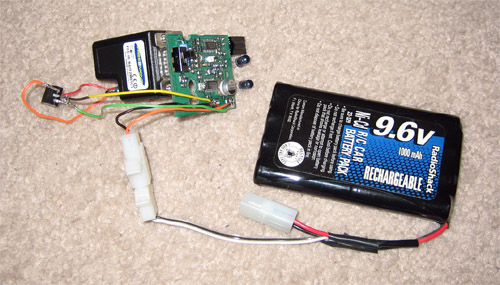
Now my phone could communicate wirelessly with the LEGO controller over Bluetooth. Luckily the protocol had already been previously reverse-engineered by a Stanford student with far too much time on his hands, so I didn't have to do that too.
The next thing to do was to build a robot that could house the battery and hold the cell phone up. I wanted it to be able to turn around and rotate in place, so I came up with a 3-wheeled design:
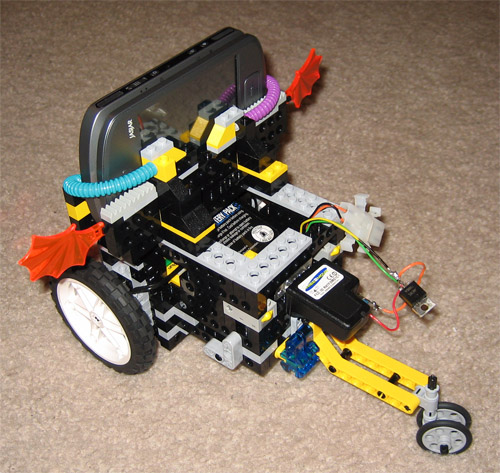
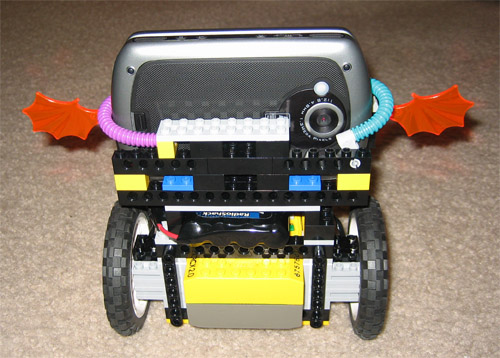
It ended up being a bit top-heavy, but it works pretty well.The last thing to do was to get a video-conferencing program to run on the phone and transmit video back to my laptop. I figured this would be the easiest part of the project, but it ended up being the most difficult, because I had to write my own by hand. I was shocked to find that there were no Pocket PC video conferencing programs that worked with Windows Mobile 5.0 over WiFi. Microsoft Portrait was almost exactly what I needed, but unfortunately it had not been updated in several years and did not work with my phone's camera.
I started from an SDK sample that captured JPEG images and made a little program that sends a stream of images to a PC over WiFi. It's a bit slow since it doesn't use a real video codec, but it's still surprisingly fast. It updates at about the speed of a USB webcam. Here's a screenshot of the PC half of the software:
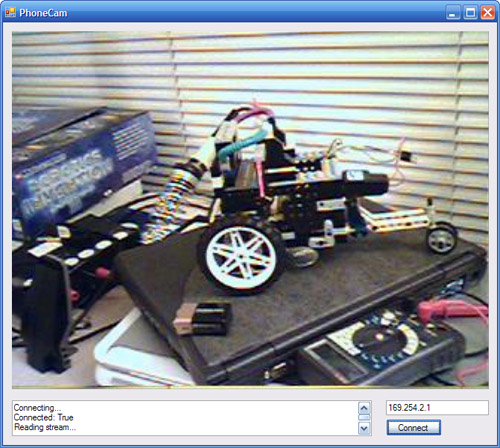
Finally I had everything in place and was able to drive the robot around and see where it was going from my computer. Awesome!
Here is a video of me driving it around:
Fast pictures
After my previous post I realized that I forgot to include pictures of the 'fast', which is (arguably) one of the best features of the GTI.
Volkswagen ads claim "A 'fast' comes standard on every GTI," so when I got the car I was expecting the fast to come inside of it. Needless to say, I was disappointed to learn that I would get it in the mail in "4 to 6 weeks". Luckily I got mine a bit 'fast'er than that. Here is a picture:
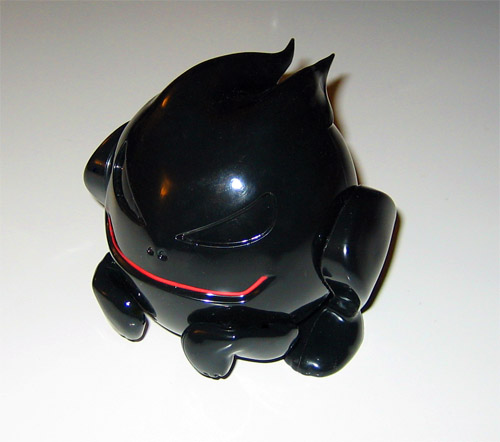
It's made of very shiny plastic, which seems to be different from the more matte-looking material used in the TV ads. Its arms and legs rotate and it has a set of interchangeable tails:
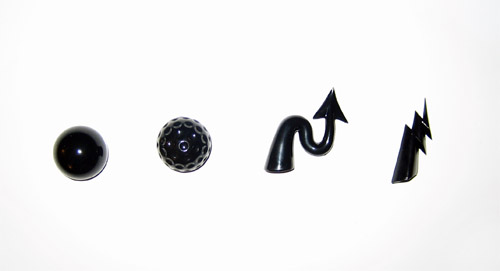
Overall it's pretty cool. Every car should come with tiny plastic representation of its Freudian id. 🙂
Me

Apps


Search
Archives
- July 2013
- May 2013
- April 2013
- March 2013
- February 2013
- January 2013
- December 2012
- November 2012
- October 2012
- September 2012
- August 2012
- July 2012
- May 2012
- April 2012
- March 2012
- February 2012
- January 2012
- December 2011
- November 2011
- October 2011
- September 2011
- August 2011
- July 2011
- June 2011
- May 2011
- April 2011
- March 2011
- February 2011
- January 2011
- December 2010
- November 2010
- October 2010
- September 2010
- August 2010
- July 2010
- June 2010
- May 2010
- April 2010
- March 2010
- February 2010
- January 2010
- December 2009
- November 2009
- October 2009
- September 2009
- August 2009
- June 2009
- May 2009
- April 2009
- March 2009
- February 2009
- January 2009
- December 2008
- November 2008
- October 2008
- September 2008
- August 2008
- July 2008
- June 2008
- May 2008
- April 2008
- March 2008
- February 2008
- January 2008
- December 2007
- October 2007
- September 2007
- August 2007
- July 2007
- June 2007
- May 2007
- April 2007
- March 2007
- February 2007
- January 2007
- December 2006
- November 2006
- October 2006
- September 2006
- August 2006
- July 2006
- June 2006
- May 2006