Splat Monster
It looks like the eyes were probably painted on by somebody, but if not, how cool would that have been if this splat monster had just formed randomly?

Kafka vs. Kefka

I just read The Metamorphosis by Franz Kafka, whom I was previously unfamiliar with. I wasn't always precisely sure what constitutes a "Kafkaesque" situation, but now I have a much better idea.
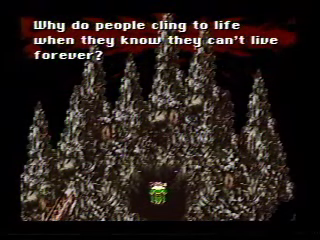
After reading, one thing that struck me was the connection to Final Fantasy III's villain Kefka. I totally missed this connection as a child but now it seems quite obvious. Everything from his theme music ("Metamorphosis") down to the extreme existentialism and absurdism of the character is clearly an homage to Kafka's philosophy. It may not be the most complimentary portrayal, but it's still quite interesting.

Squeezebox
Today's question: What's the best way to stream MP3s from my computer upstairs to my stereo downstairs? (my life seems to be beset with these sorts of problems)
Here are the network music player requirements that I was forced to work with:
- It needs to connect wirelessly to my 802.11g network
- It must support WPA-PSK encryption
- It should have S/PDIF digital audio outputs
- It should be super-easy to use once set up (minimal work required to turn the music on and off)
The first thing I tried out was an Airport Express with Airtunes from Apple. It aced the first 3 requirements, and I figured that nothing else would score better on #4. Unfortunately I was wrong on the last one.
The problem with Airtunes is that it just pretends to be a set of "remote speakers" and requires a computer to be running iTunes all the time to play the music. I ended up with two options:
- Leave the computer upstairs on all the time playing music (easier now that I have a Mac Mini Media Center). This worked, but in order to switch songs or playlists I had to run upstairs and switch them on the computer, which was annoying.
- Run iTunes on a laptop downstairs and play the music from there. This worked if I was already using the laptop, but if I was just eating breakfast I would have to go over to the laptop, wake it up, type in my password, find iTunes and hit play. Then when I was leaving I had to walk back over, stop iTunes and sleep the laptop. Far too complicated.
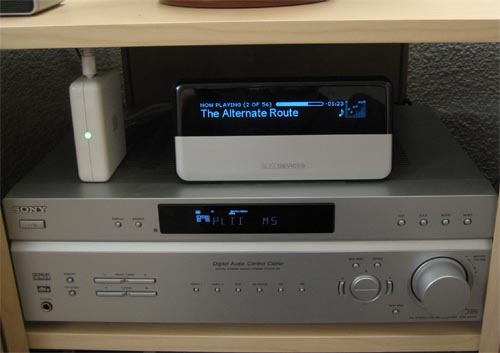
The only other network music player I could find that fulfilled the first 3 requirements was a Squeezebox (and only the very newest model supports WPA). It works by streaming the MP3 files from a network server and playing them directly. It also has a remote that can be used to browse the music collection on its big LCD and (most importantly) the ability to start & stop playback with one button push. It also runs its own web server so you can manage which music is playing from any computer on the network (including a cell phone).
It was pretty much exactly what I needed. Here's a picture of it in action:
And here's the back:
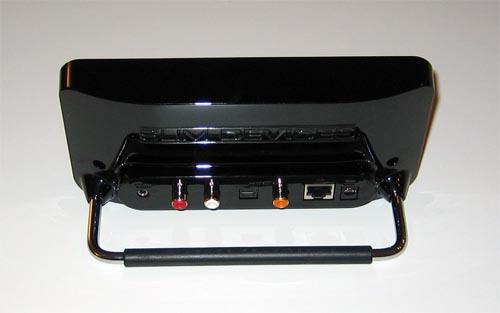
It has a headphone port, analogue RCA stereo jacks, optical and coax S/PDIF jacks, and an ethernet port (for wireless network bridging, also very handy).
So far it works great. Setting it up was the only difficult part. Typing in the 256-bit WPA key with the remote was very painful, especially since it kept crashing with a helpful "malloc failed" error message and rebooting, forcing me to start over. But, now that I have that all sorted out I haven't had any problems with it.
Hot air balloon flyover
So I'm sitting here and a huge hot air balloon flies right over my apartment, really low to the ground. By the time I got my camera out it was a ways away, so it looks small in the picture. It was a lot bigger when it was right over me:

Now I have this strange urge to take a hot air balloon ride (something I've never done). It probably costs a lot, so I need some other people. Anybody else want to go on a hot air balloon ride?? Let me know.
Synchronizing Media Center TV shows to an iPod Video
Part of my justification for getting a new iPod would be that it would have video support, and I could use it to watch recorded TV shows while I'm on the bus or waiting in line somewhere. I figured that somebody in the world must have written some software to automatically synchronize TV shows recorded on a Media Center PC to an iPod Video. I mean, right?
Apparently not. Or at least I couldn't find any software to do that, free or commercial. Sure, there are various tutorials for converting MCE videos to iPod-compatible files, but they all involve manually running 3 different programs and then importing the video into iTunes by hand. There must be an untapped marked for an MCE plugin that automatically converts and syncs TV shows to an iPod. Somebody could make a killing here!
In the meantime, it looked like I would have to write my own program to do this. These were the requirements I had:
- Plop the iPod into the dock
- Go to bed
- Wake up, the iPod automatically has all the TV shows I recorded the day before
I wrote a small C# program that does the following things:
- Check if I have deleted any recorded shows from the Media Center PC. If so, delete the iPod versions out of the iTunes library.
- Find all of the new TV shows that the MCE recorded since last syncing to the iPod.
- Take each new show and convert it from a .dvr-ms file to a .mpeg2 file using DVRMSToolbox.
- Convert the .mpeg2 file to an MPEG-4 file using ffmpeg, shrinking the video to 320x240 at 512 kbps.
- Delete the temporary MPEG 2 file.
- Save the .mp4 file into the iTunes video library folder.
- Force iTunes to update its library database and sync to any connected iPods (using iTunes Library Updater).
Next I created a Scheduled Task to run MCEiPodSync every day at 3:00 AM:
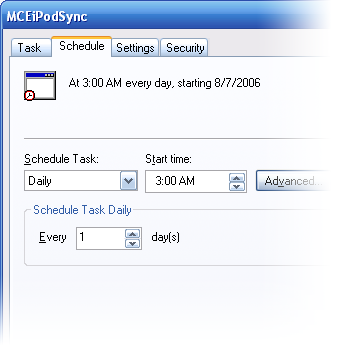
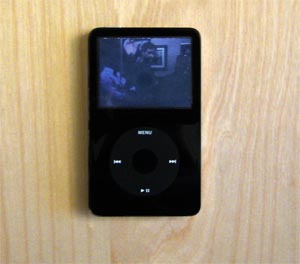
Now all I have to do is plug in the iPod and go to bed. Sweet! Here is a pic of the iPod playing Full House (it was on while I was testing):
Here's a link to the source code for my little program if anybody's interested: MCEiPodSync.cs. You just have to switch the const strings at the top to point to the correct path to your Recorded TV and iTunes library folders.
Picture of iPod adapter
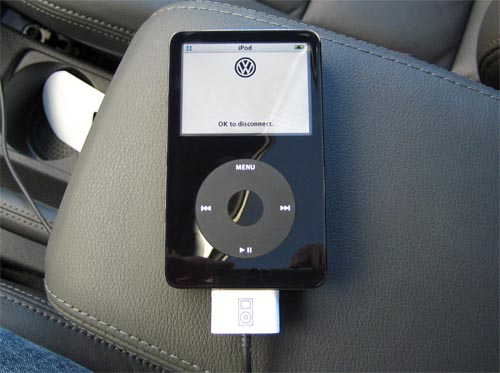
I forgot to include a picture of the iPod actually hooked up to the adapter!
Here it is, sporting the VW logo:
GTI iPod adapter install
Unfortunately the 2006 GTI does not come with an integrated iPod adapter (unlike the '07 model, grr). But, VW does make an adapter that connects the iPod to the stereo system and pretends to be an external CD changer. It's not the best solution, but at least it powers the iPod and I can control it and switch tracks from the steering wheel.
I was already pissed that I would have to pay $150 for the dumb little cable, and I refused to pay the dealer another $150 to install it, so I got one off eBay and did it myself. Unfortunately the instructions were in German and assumed that I already knew how to take apart the dashboard to get to the radio, with VW-specific tools that I didn't have.
So if anybody else is trying to do the same thing, here are pictures of how I did it:
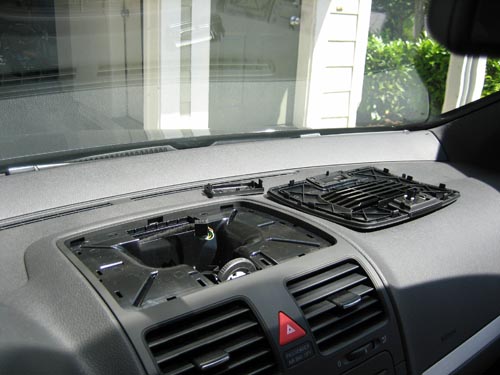
First pry off the top dash vent with an "ausdruckwerkzeug" (whatever that is - I used a credit card)
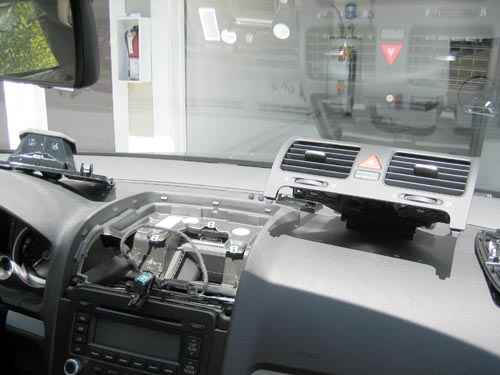
Remove the front vents and the screws holding the radio in
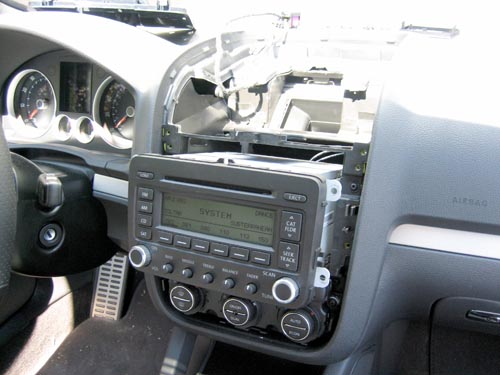
Pull the radio out and disconnect the wires in the back
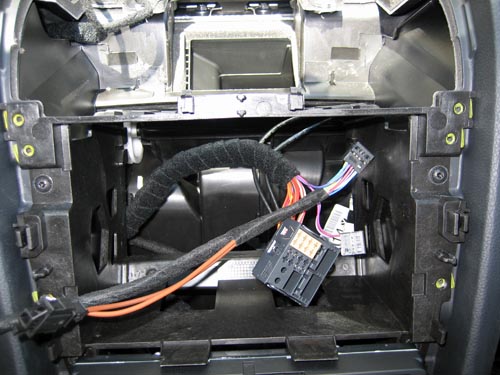
Move the audio wires from the satellite radio connector to your iPod adapter cable
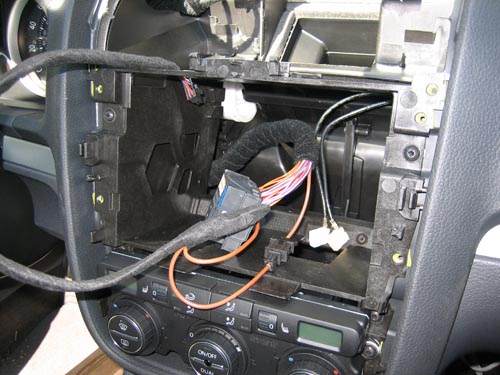
Splice the ground wire to the iPod adapter cable
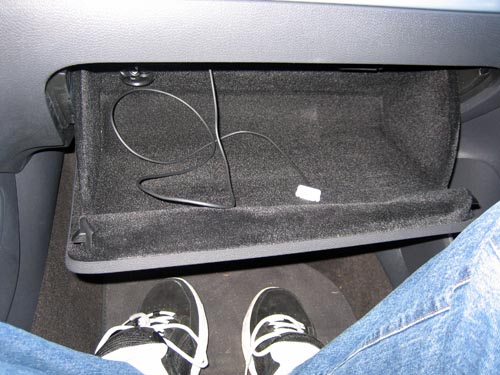
Stick the other end of the cable in through the glove box
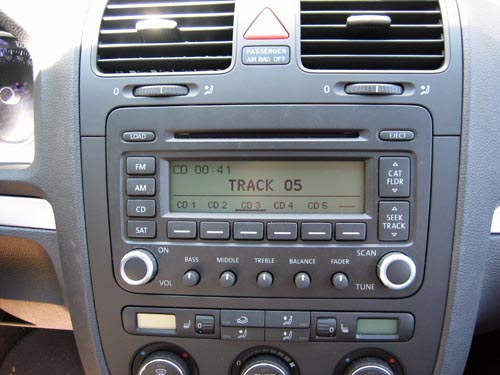
When it's all done, the iPod shows up as an external CD changer. The first 5 playlists on the iPod show up as CDs 1-5. Unfortunately the track/artist/album names don't show up on the radio or the in-dash LCD, and you can only use 5 playlists, which kind of sucks. Oh well.
Me

Apps


Search
Archives
- July 2013
- May 2013
- April 2013
- March 2013
- February 2013
- January 2013
- December 2012
- November 2012
- October 2012
- September 2012
- August 2012
- July 2012
- May 2012
- April 2012
- March 2012
- February 2012
- January 2012
- December 2011
- November 2011
- October 2011
- September 2011
- August 2011
- July 2011
- June 2011
- May 2011
- April 2011
- March 2011
- February 2011
- January 2011
- December 2010
- November 2010
- October 2010
- September 2010
- August 2010
- July 2010
- June 2010
- May 2010
- April 2010
- March 2010
- February 2010
- January 2010
- December 2009
- November 2009
- October 2009
- September 2009
- August 2009
- June 2009
- May 2009
- April 2009
- March 2009
- February 2009
- January 2009
- December 2008
- November 2008
- October 2008
- September 2008
- August 2008
- July 2008
- June 2008
- May 2008
- April 2008
- March 2008
- February 2008
- January 2008
- December 2007
- October 2007
- September 2007
- August 2007
- July 2007
- June 2007
- May 2007
- April 2007
- March 2007
- February 2007
- January 2007
- December 2006
- November 2006
- October 2006
- September 2006
- August 2006
- July 2006
- June 2006
- May 2006