Africa
Note: this is the third post in a series about my trip to India and Africa. The others are available at Amsterdam and India. The full set of pictures is also available on Flickr.
We flew from Mumbai to Tanzania on Kenya Airways. We had a long 11 hour layover in Nairobi, but we were warned not to leave the airport or else we would likely be mugged or robbed. We stayed inside.
 The first event was a big one: climb Mount Kilimanjaro. We had a great group of people to climb with - 3 Americans and two Germans.
 The climb started off in the rainforest jungle. It rained nearly every day, so we had to learn how to deal with the downpour. Ziplock bags to the rescue!
 The entire climb took 7 days: 5 up and 2 down. We climbed slowly in order to acclimatize to the 19,000 foot altitude. Some campsites had magnificent views. Some did not.
 A team of 26 porters, guides and chefs carried all the gear for us, including delicious meals, dining gear, and a "toilet tent."
 On the final day, a freak snowstorm covered the peak of the mountain in snow and clouds, freezing everyone to the bone. My glasses froze over.
 Despite the cold we successfully made it to the top! Unfortunately we couldn't see anything at all. Supposedly it's one of the most magnificent views of the African plains that can be seen. 😐
 After seven days on the mountain living in tents without showers, we were excited to get back to the hotel.
 After the climb, we went on a safari in the Serengeti National Park. The scenery was unbelievably amazing - we saw hundreds of thousands of animals.
 Lions sat by the side of the road and weren't even bothered by all the tourists snapping pictures of them.
 Due to excessive rainfall, we got a free upgrade from tents to these "luxury lodges".
 The Ngorongoro Crater is one of the most beautiful places in the world. Stunning.
 One day we saw a pride of lions eating a giraffe. The next day the giraffe carcass was almost completely gone. Here a hyena and a jackal are scavenging it.
 We were lucky enough to spot a cheetah and 3 of her cubs eating a gazelle.
 Apparently leopards are even rarer, but we saw one of those too.
 There were so many giraffes that we had to shoo them out of the road.
 Warthogs are actually fairly ugly. The Lion King was a lie.
 Herds of wildebeest were all over the place.
 Rhinos are very endangered - there were only 21 of them left in this area.
 Elephants
 When we forded this river I was sure we would get stuck.
 Yawning hippo.
 Monkeys were everywhere.
There are a lot more pictures, but I don't have room to include them all here. Head over to the Flickr set for more!
India
Note: this is the second post in a series about my trip to India and Africa. The others are available at Amsterdam and Africa. The full set of pictures is also available on Flickr.
After Amsterdam, we flew off to India.
 The first stop was New Delhi, the capital. The city is very much under construction and extremely polluted, much like Beijing. I had heard that cows idly wander the streets with no fear or harassment in India, but I was surprised at the extent to which this is true. Cows were everywhere.
 This is the India Gate - an arch built by the British commemorating WWI.
 Qutb Minar - built by the Mughals.
 Big dosa. The Indian food was very good all around. It was sometimes difficult to tell which food was safe to eat (cooked and/or boiled) if you were not familiar with what each dish was made of.
 The Taj Mahal is in Agra, a city about 400 km outside of Delhi. It was rainy and polluted on the day we went.
 The Red Fort of Agra is another attraction in the city.
 In the opposite direction is Jaipur, the capital of Rajasthan, famous kingdom of the Maharajahs.
 The Water Palace is a famous attraction.
 Elephant rides were available for a fee.
 Snake charmers huddled around touristy areas.
 Next up was Jamshedpur, a smaller mining town on the eastern side of the country. We attended the wedding of a friend. It was a traditional-style Sikh wedding.
 The groom rides a horse to the ceremony.
 Everyone wanted a picture with the funny white people.
 Kolkata (Calcutta) is another major city nearby, on the shores of the holy Ganges river. People famously come from far away to "wash" in what must be the filthiest river in the world.
 Many flowers are available for purchase to use as offerings to the gods.
 Mother Teresa's house for the sick and dying is next door to the Temple of Kali, Goddess of Destruction. It was sort of a weird juxtaposition.
 Mumbai was the last stop on the trip. This hotel is the site of the 2008 terrorist attacks. It seems to have recovered fairly well, though security was very high.
 Mumbai has a very nice waterfront and is the most clean and modern ("Western"?) of any Indian city we visited. Unfortunately we were laid low by an E-Coli infection while in Mumbai and didn't get to see much of the city.
Fortunately we recovered just in time for the next leg of the trip - Africa!
Amsterdam
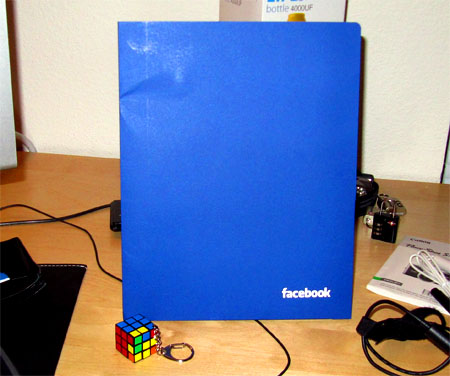
In December after leaving my job at Microsoft, I went on a trip to India and Africa for a month. I'm only now getting around to writing up a post about it since I've been super-busy recovering from the trip, moving to San Francisco, and starting my new job at Facebook (more about that later).
The full set of photos is up on Flickr for perusal now. This is the first post in a series about the trip - the others are available at India and Africa.
 On the way to India we stopped in Amsterdam for a day. It was the middle of winter, so many things were closed, including the famous Rijksmuseum, above. Had it been open, I would have apparently been able to see lots of Rembrandts, Vermeers, Van Goghs, etc..
 Here are some of the famous "fries with mayonnaise."
 The city's canal system is very extensive - it's nicknamed the "Venice of the north". The only boats I saw anywhere were tourist boats, so the canals don't seem to get much real use any more.
 We went on a tour of the red light district called "Randy Roy's Redlight Tour". It's run by an American woman from Michigan(?). It was very informative - recommended.
 This is the main train station, which provides easy access to/from the airport.
 A big attraction is the Heineken brewery and museum "experience". Unfortunately we only had one day so I didn't have time to go inside.
Next up: India!
So after a long period of soul-searching, I recently decided that it was a getting time to leave my current job at Microsoft. I definitely learned a lot during my first couple of years there and had a lot of fun. Unfortunately I haven't really been challenged on the job for at least a year, which was a sign that it was time to move on to bigger and better things.
I was looking for something with a significantly faster pace of development where I'd be able to learn a lot. I looked around at a few different tech companies, and one consistently stood out from the others as being a great place to work. The final decision wasn't too difficult - I'm pleased to announce that I'm going to be working for Facebook! I'm really excited - they have a great product and a willingness to continually improve it, which is very important in the social networking sector. They also just hit 350 million active users, which is absolutely phenomenal growth given that they were at only 100-150 million one year ago. I can't wait to learn how to work at such a massive scale.
I'll be starting in mid-January, but I'll actually be on vacation until then. Starting next week I'll be on a month-long trip through India and Africa, culminating in a climb to the top of Mount Kilimanjaro! More on that soon - I hope to be able to post pictures from the road. In the meantime I'm exceedingly busy finishing up my current job, moving out of my Seattle apartment, preparing to move to San Francisco, and getting ready for this massive trip. I'm definitely looking forward to the vacation!
Kill A Watt
I recently got a Kill A Watt, which is a device that plugs in between the wall and your electronic devices. It monitors various parameters, such as volts, amps, watts, and kilowatt-hours.
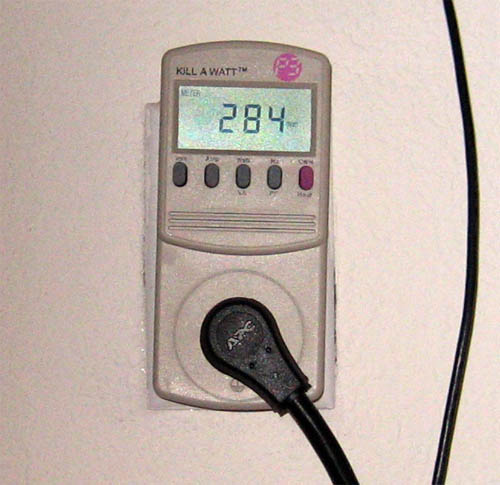
Kill A Watt power meter
It's very interesting to see how much power all of my devices are using. Without knowing these kind of details, it's difficult to accurately answer certain kinds of questions about my power usage. For example: "Is it worse to leave my computer turned on, or leave two lights on?" (answer: the computer is worse if the lights are CFLs, but not if they're incandescent) Or, "Should I turn off my computer speakers when I am gone, even if no music is playing?" (answer: probably)
Here are some measurements I just made:
- Computer, idle: 130 watts
- Computer, 1 core active: 170 watts (2 cores: 195 watts)
- LCD monitor, minimum brightness: 50 watts
- LCD monitor, maximum brightness: 110 watts
- Computer speakers: 8 watts (always)
There were several surprises just from measuring these three devices - I didn't expect to see such a wide range of power consumption even on one device. I will often absent-mindedly leave open web browser windows that contain Flash animations (such as the YouTube video player's animations after a video finishes playing). Little did I know, a few of these pages could end up using as much power as leaving on a 60 watt light bulb!
Another surprise was that my speakers always seem to be using 8 watts of power, whether they are playing sound or not. Previously I had assumed that they weren't using any power when they were silent, so I have been leaving them on all the time. Doing that for the past 4 years has apparently cost me $25 (8 watts x 4 years = 280 kWh).
That last number brings up an interesting point - I was surprised at how low the dollar number was when I calculated it. I currently live in the Northwest US, and our power is relatively cheap since a lot of it is provided by hydroelectric dams. I am currently paying about 9 cents per kilowatt-hour. If I were to move to California I'd need to be a little more careful about turning things off, since they pay about twice as much down there.
FiveFingers
I recently purchased a pair of Vibram FiveFingers after reading several positive reviews and a book extolling the virtues of running barefoot.
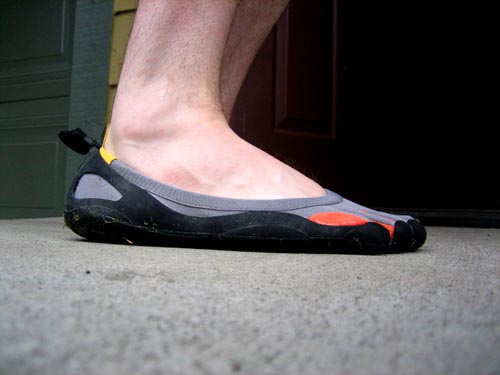
If you haven't seen them before, they're basically thin rubber soles that fit around the bottoms of your feet. They have five little "toes" on them that allow your toes to flex independently of the rest of the foot:
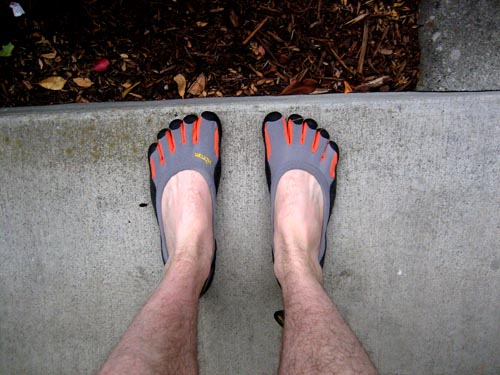
The idea is that they are as close to running barefoot as possible, while still keeping you safe from stepping on glass and rocks. Running barefoot is supposedly good because that's how human bodies evolved to run. Typical padded running shoes make it easy to run with wide strides, striking the ground heel-first. This striking action causes lots of stress and problems in your joints, particularly knees and ankles. Running barefoot forces you to run differently since you cannot strike your heel (or else it will hurt, like it is supposed to). While barefoot you automatically run with knees bent, "rolling" your foot from the front to the heel as you step. This extra flexibility reduces joint stress since your legs will automatically bend to accommodate the force of the footfall.
That's the theory anyway. I haven't had the FiveFingers long enough to tell if they will live up to the promise. When I got them I used them on my morning run, of about 3 miles. While running everything felt more or less fine, but afterward I noticed that I had gotten a blister on the bottom of my right foot, and both feet ached for a couple of days (it felt like the foot muscles were sore from not being used, rather than actual foot injuries). Some people recommend gradually switching to barefoot running (starting with only a half mile or mile each day), which sounds like good advice in retrospect. I need to build up calluses in places where I don't usually need them in shoes and socks.
The sensation while wearing them is very interesting. It's not quite like being barefoot, but you "feel" the ground much more than you do with regular shoes. You can really tell the difference between concrete, asphalt, a dirt trail and grass. You also notice little things that you'd normally miss, like sticks and cracks in the sidewalk, as well as temperature differences between different surfaces (cool wet grass vs hot dry asphalt).
I wore them to work one day and got a lot of weird looks. Most people did not know what they were and thought I was crazy. I didn't notice much difference after wearing them for a day at work, so I've stuck with regular shoes since then. Some people claim that it helps to wear them around to daily activities if you suffer from back pain, as they will force you to have more "correct" walking posture.
Managing photos with iPhoto + Flickr
This weekend I worked on setting up an organizational system for my digital photographs. Up until this point I've just been dumping pictures into folders, roughly organized by trips and dates. There were several problems with this system: there was no easy way to find pictures of specific people, it was difficult to browse through just the good photos, and they weren't automatically shared with anyone unless I manually uploaded them somewhere myself. It required too much work to upload and share photos that I often never got around to it.
I needed to find a system which would keep the photos organized and automatically share them on an internet site like Flickr for me. I looked at a lot of different photo apps and Flickr clients, and ultimately decided to use iPhoto. Its Flickr compatibility has some limitations, but it goes far beyond any other system in terms of ease of use. Here's how my setup works:
After a trip or a day of taking photos, plug in the camera to the computer. iPhoto pops up and offers to download all the pictures and automatically sort them into "Events". Events are just collections of all the photographs taken over a certain time period. It defaults to splitting by days, but you can also split the events between certain photographs:
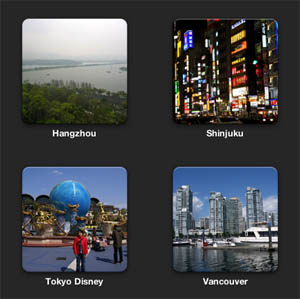
This works fairly well for a first level of organization. The events contain every single photo taken, even if you took 10 photos of a certain object in order to get the perfect shot - that's OK. We'll sort out the good photos from the rest when we get to the Album layer later. You can leave all the originals in the events and not have to worry about losing them.
While still working with the events, it's only a few clicks in iPhoto to automatically tag all the photos with the location of the event (if your camera does not have a GPS built-in). A Google Maps window pops up and allows you to search to assign the location ("Tiananmen Square"), or drop a pin on the exact coordinates. All the photos in the event are then automatically tagged with the GPS coordinates and the name of the location.
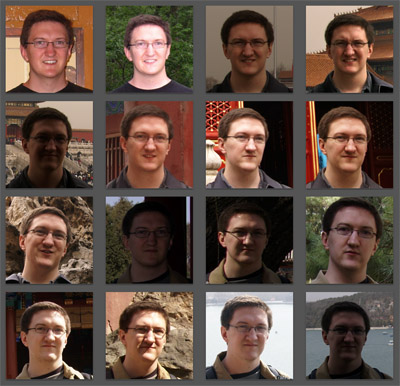
The next step is where iPhoto really shines. The "Faces" feature scans all your photos and automatically finds people's faces in the photos. If it doesn't know who a certain person is, it prompts you to assign a name to the face. Once you assign a certain person's face in a couple of pictures, it automatically recognizes that person in the other photos. Then you just need to click "Confirm" or "Reject" on all of the other suggested faces to commit them. This will automatically tag all the photos with the names of the people in them. Overall I find that this feature works surprisingly well - you'll never want to go back to manually tagging people in photos again. Here are a few pictures of me that it automatically detected:
Next I like to pull out just the good photos, for browsing and sharing on Flickr. iPhoto has "Albums" for this, and you just need to select the good photos from an event and drag them in. One album can contain photos from multiple events, or not: how you want to organize things at this level is up to you. Unfortunately there's no hierarchy between Albums. I would have liked to create a super album called "China Trip" which contains sub albums for "Bejing", "Shanghai", etc., but it's not possible to do this. That's probably just as well because most internet photo-sharing sites don't allow nested albums either (Facebook & Flickr being the two big ones).
Once everything is organized into albums, it's only a few clicks to sync all the albums to your Facebook or Flickr account. iPhoto takes care of automatically uploading all of the pictures and syncing the metadata like the location and people tags. There's very little flexibility at this point - iPhoto will sync everything in the albums without giving you many options to control the details of what gets uploaded (for example, if you had kids you might not want to sync the names or photos of the kids). However, if you keep these limitations in mind while making the albums, it works out fine.
And that's it - once you have everything set up, then there's very little "maintenance" work that you have to do with the photos. Just plug the camera in, name the event, accept the detected faces (assuming it's already been trained), and pick out the best photos for an album that automatically gets syncd up to Flickr or Facebook. You don't need to manually tag or upload anything (unless you want photo-specific tags like "street vendor" or something like that, which are significantly easier to tag right in iPhoto than on the web).
I've done all this with my recent photos and syncd them to my Flickr account, if you want to check out the results: http://www.flickr.com/photos/efaller/
Furthermore, if you use WordPress for your blog, it's easy to install a Flickr plugin which creates a new "Insert Flickr Photo" button, which makes it super-easy to insert your photos into a blog post. You just click the one you want, and it automatically chooses a thumbnail of appropriate size, inserts it, and links it to the full-res version on Flickr. No need to mess with manually resizing the photo and using the WordPress upload screen any more. Here's an example:

The plugin linked above also includes a handy sidebar widget that automatically displays a random selection of your photos, linked to Flickr:
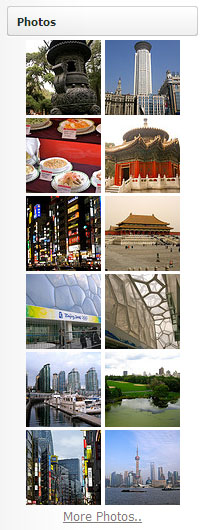
All this without needing to manually upload anything! I expect that I'll be able to keep up with this system since it's so easy. There's no more excuse not to get all my good photos uploaded with the appropriate tags.
Kindle
Before my trip to Asia I got a second-generation Amazon Kindle, which had just been released. I was too busy to write up a review at the time, but maybe that's just as well since now I have the additional perspective of having owned it for several months.
Kindle Review
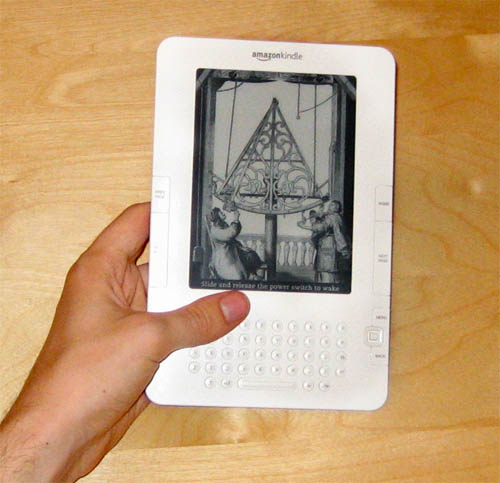
Pros
- I got it explicitly for travel reading since it's so small and light. It's about the size of a paperback book, except thinner - it's less than 1 cm thick (a little more with the case attached). It's a lot more convenient than carrying around multiple books on a long vacation. You can load it up with a whole library of books and have a lot more variety than you would otherwise.
- The battery really does last a very long time. Since it only uses battery power when updating the screen to flip pages, it can go for weeks between recharges, unlike a phone or a laptop which would die after only a couple of hours. I used it extensively on a 15 hour flight to Beijing and barely any of the battery power had been consumed at all.
- You can load it up with public domain books for free. Internet people have converted pretty much every significant book published more than 70 years ago to Kindle-compatible formats, and it's really easy to subscribe to these "book feeds". I have loaded mine up with tons of books I've been meaning to read for a long time but have never gotten around to - Thoreau, Dickens, H.G. Wells, Verne, Tolstoy, etc.. Obviously you can also read all of these books for free on the internet, but then you're tied to a computer screen or a regular laptop with poor battery life.
- When you plug it into a computer, it just shows up as a 1 GB USB thumb drive. One less gadget to worry about carrying around. This has already been handy a couple of times.
- It's easy to change the text size. Unlike a real book, if you feel like holding it farther away from your face, you can make the text bigger. Or if you feel like holding it closer, you can shrink the text and get more on one page.
- It has a built in Oxford dictionary - just move the cursor over a word and click to get the definition. Very handy for books with lots of uncommon words.
- You can buy books from Amazon right on the device and start reading instantly - no need to drive to the store or wait 3 days for them to be delivered. Most books are $9.99 or less - even the new hardcover books which would regularly be $19.99. So if you buy a lot of those you can actually save money.
- There's a companion iPhone app on which you can also read your Amazon-purchased books (but not public domain books). They both keep in sync via the internet, so you can easily change devices and pick up right where you left off.
Cons
- The screen size is pretty small - the actual screen is about 4 inches across. It's particularly annoying because there's a large 1 inch bezel on all sides of the screen. It would have been a lot better if this extra space could have been used for the screen. Of course, only weeks after I bought it Amazon announced the "Kindle DX" with a large 10 inch screen. I haven't used one of those in person, but it actually looks a little too big, particularly for carrying around while traveling around or commuting.
- It's very difficult to "flip through" a book and search for something, like you can easily do with a real book. It takes about 1 second to flip a page, which is OK when reading regularly, but it makes it pretty much impossible to casually flip back a few pages to quickly re-read something, or pick up a reference book and look up some information. There's a search function and a little keyboard, but they get to be infuriating if you're trying to do anything much more complicated than jumping to chapter headings.
- You can't give a book to a friend (obviously). I read an interesting book about a topic I know a friend is interested in, but too bad: no book borrowing (or re-selling).
- The text layout abilities of the Kindle are fairly limited. If a book uses any formatting much more complicated than a typical novel, it's probably going to get munged and look wrong, particularly if the book was "ported" poorly to e-book format. This is all doubly true for any complicated illustrations or charts, some of which are rendered completely illegible.
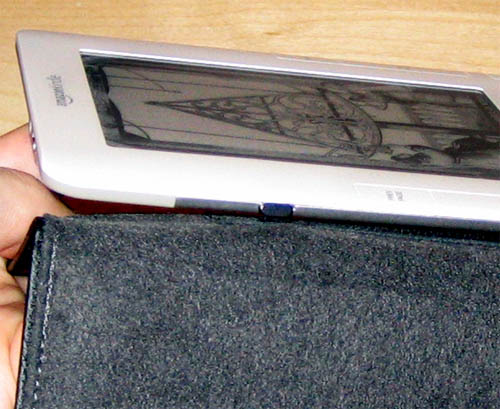
- There's a serious design flaw in the way the case connects to the device, as noted by a class-action lawsuit. It's extremely easy to get the case into a position where it will bend the plastic, and eventually break the screen. Because of this problem I always remove the case before using it:
Overall I think it's quite an interesting device, especially for people who like both gadgets and reading. However, its limitations can be quite infuriating at times, and I don't think that it's ready for the mainstream market yet. These problems will no doubt be corrected fairly soon by newer devices. E-Books and digital distribution are definitely going to be the way of the future. Hopefully the publishing industry will understand this fact better than the music and film industries do.
Personally, I'll probably use the Kindle for travel reading, fiction novels, and "pop" books that you read straight through once and never again (Dan Brown, Malcom Gladwell, etc). It doesn't work very well for more substantive books or programming & technical reference books, so I'll probably continue to get "dead tree" versions of those.
CubeCheater Updates
A couple of interesting things have been happening in the CubeCheater world recently.
First, I recently received a nastygram cease-and-desist from the Rubik's Cube company, which claims that CubeCheater infringes on its rights. Apparently they claim rights to any and all "depictions" of Rubik's Cubes.
I obviously did not use any "Rubik" names or logos in the app, so I had thought it would be in the clear, especially since the app only solves cubes and does not simulate them. I don't know enough about intellectual propery law to know whether it's legitimate to claim rights to depictions of products, but there does seem to be some precedent for trademarking the "likeness" of a product.
Either way, there's no way I could possibly afford to fight it in court, so I didn't have much of a choice. I negotiated with the Rubik's Cube company, and we came to an agreement that I could keep CubeCheater alive as long as it was available for free.
So this week I made CubeCheater available for free on the App Store. In the few days since then, it's been downloaded about 25,000 times.
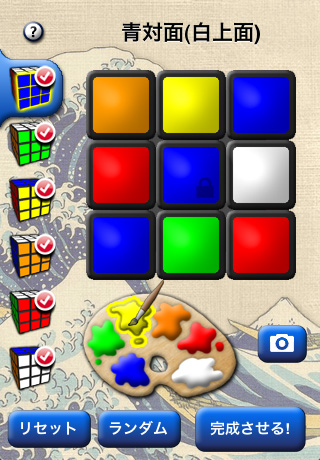
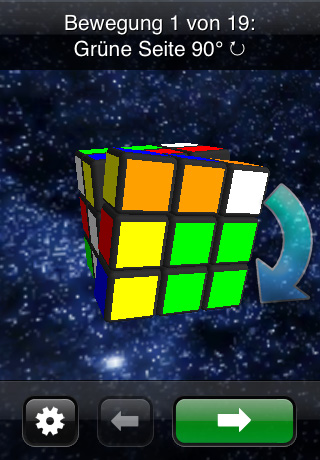
On a more positive note, version 1.2 of CubeCheater is now available, and adds support for many new languages! CubeCheater is now translated into Japanese, German, French, Italian and Spanish. Fortunately the app doesn't have a whole lot of text so it was fairly easy to translate. Still, some problems did come up, such as most of the German text strings being too long for the buttons that I had calibrated for the English version. Eventually I got everything to fit.
Here are some screenshots of CubeCheater in Japanese and German:
Lite Sales Boost
So as promised, here's more data about how the release of Piratizer Lite helped the sales of the full version of Piratizer. As expected, it did create a light (ha) boost in sales. Here's the graph - the large spike around June 1 was about when the Lite version was released:
Piratizer Sales
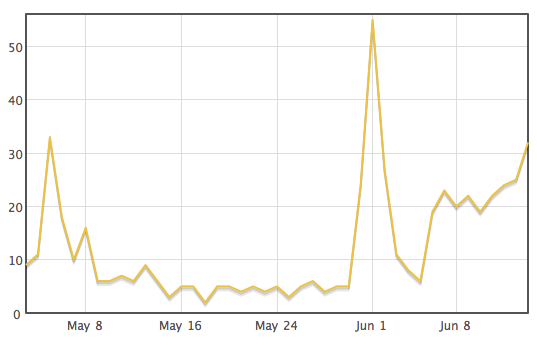
So it's still a little early to conclusively call it a trend, but the release of the Lite version seems to have boosted sales of Piratizer by about 4-5x. Sales are now around 20-25 per day.
The one thing I know the sales won't do is stay constant, but imagining that they did, 25 sales per day would be about 9000 per year. Add in say 5 more apps pulling similar numbers and you could have yourself a nice little source of passive income, which is a good thing to have during these days of recessions and layoffs.
It's looking more and more like Piratizer won't achieve the great success of CubeCheater, which is what I had feared and intended to test by making the app. Certainly with 50,000 apps now in the App Store, only a select few are going to be making any real amounts of money, given the way the system is set up.
Master
Today I graduated with a Master's degree in Computer Science & Engineering from the University of Washington. It's been a long ride since I decided to enroll two years ago. I've been super-busy with school as well as a full-time job the whole time.
I'm glad to be finished though! Now I'll have time for a little break before moving on to the next stage of my life.
I have instructed my friends to call me "Master Eric" now, but for some reason it doesn't seem to be catching on...
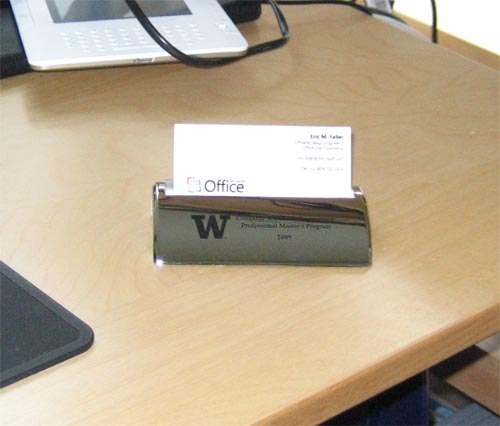
I don't have the actual diploma yet, but I did get this fancy business card holder:
Bird Poo Smell
A little more than a week ago I noticed a bad smell in my apartment, but I couldn't figure out where it was coming from. It was a vaguely familiar smell, but wasn't any of the typical things you'd easily recognize (like rotting food or mold).
Then one day I noticed a duct vent outside my apartment and realized what it was:
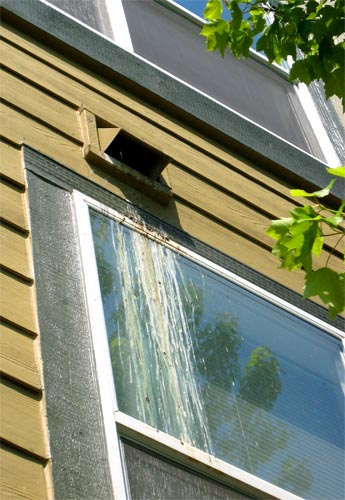
Some birds had been building a nest inside the duct and were pooping up a storm inside, so much that it spilled out, down my window. The duct connected to my clothes dryer as well as the oven fan vent.
Unfortunately this vent outlet is between the second and third floors, so it's impossible to reach without an extra-tall ladder. I called the maintenance crew and they were able to pull the bird nest out (there were no baby birds or eggs, luckily), and put a grate over it.
I think the birds must have pooped a whole lot inside of the duct (which didn't get cleaned up), because there's still a small lingering smell wafting through the apartment a week later. I'm hoping that the smell will eventually go away by itself, but in the meantime I have one of those plug-in air fresheners, which masks it so that you don't notice.
Lite
It's been a few weeks since Piratizer was released, so it's about time for an update. Unfortunately the update is not all that good - yet.
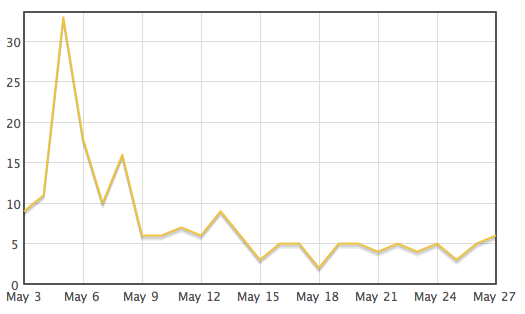
After an initial burst of purchases by friends and family (thanks everyone!), daily sales have slowed and and leveled off in the single digits:
Piratizer Sales - First Three Weeks
The problem is the same one that most other iPhone apps face: nobody knows that the app exists. With 40,000 other apps on the App Store, it's impossible to find any apps that aren't in the Top 100 lists, unless you hear about the app through some other means, and then search for it. The trick is to somehow get enough people to buy the app in one 24-hour period that it shows up on the top lists, where lots of other people will see it and then buy it (hopefully).
So far the response from existing customers has been positive, so I'm hoping that the app will be popular if it can just get onto the charts.
CubeCheater was able to really take off once it got mentioned by Wired, Gizmodo, and other high-profile sites. Unfortunately I'm not sure that Piratizer has quite the same "cool factor" required to get mentioned on one of those sites (of course I have submitted it for review to all of those sites, but no luck so far - they probably get hundreds of apps submitted every day, so it's difficult to stand out of the crowd).
Not all hope is lost, though: there are still a lot of other opportunities to increase sales. Since "app visibility" is such a large problem, enterprising developers have come up with lots of ways to tackle it. The first big one I'm going to try is the "Lite" strategy: make a Lite version of the application which has limited features and advertises the full paid version. Huge numbers of people download all the free apps they can get, so any free app is almost guaranteed to be downloaded many times, at least if it's any good. The popularity of the free app will drive some fraction of users to "convert" up to the paid app.
This "demo" strategy has existed forever, but its power on the App Store was only really quantified with the success of the iShoot app, as chronicled in this Wired article. Ethan Nicholas's iShoot tank game was selling slowly until he released iShoot Lite. The Lite version was downloaded 2.4 million times, and that caused the paid version to be downloaded 320,000 times (all numbers are from February - they are certainly higher now). He was smart, though: his app cost $3, so he pulled in a cool million dollars from those sales.
So if Piratizer Lite has even a fraction of that kind of success, then I'll be happy. It's waiting in the Apple approval queue now and will hopefully be approved soon. Once it's been out for a while, I'll make another post about the results!

Piratizer on sale!
Late last night Apple approved Piratizer for sale on the iPhone App Store! I only noticed it this morning when I unexpectedly received a sales report saying it had sold 9 copies on Sunday (I still haven't received the email notification from Apple).
Anyway, it will be quite interesting to see the total sales for the first full day it's available for sale (today). Before beginning the full marketing blitz, we need to build up a good stable of reviews and fix any critical bugs that the early users find (hopefully there won't be any). If you'd like a free promo code to download and review the app, let me know!
We finished and uploaded the website just in time. There are still a few things to tweak, but it's pretty much complete. Check it out over at piratizer.com!
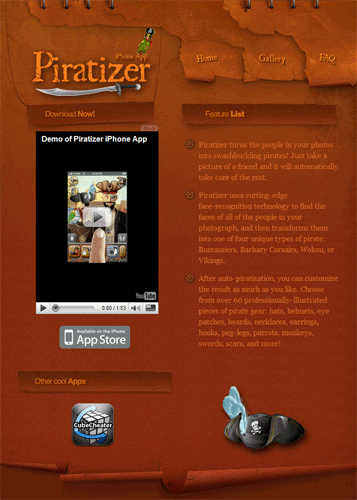
I'm still trying to figure out how to fix the thumbnail of the YouTube video to display properly, but at least the video itself works OK. Speaking of the YouTube video, here it is:
If you're reading through an RSS reader or otherwise can't see the embed, here's a link to it on youtube.com: http://www.youtube.com/watch?v=yMlJmdyy-zM.
Piratizer Preview
My trip to China and the craziness immediately beforehand and afterward delayed my new Piratizer iPhone app a little bit, but I'm pleased to note that it's back on track and should be sent off to Apple early next week! There are still a few cool features left to code up, but it's mostly all done.
Here are some sneak preview pictures:
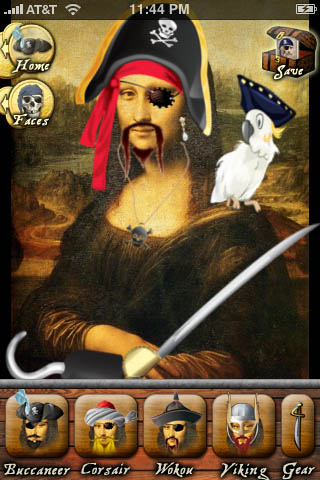
Piratizer uses face-recognition technology to find the faces of all of the people in your photographs and automatically turn them into pirates. There are all kinds of pirates - Buccaneers, Corsairs, Wokou, Vikings, and maybe a super-secret fifth pirate type if we have time.
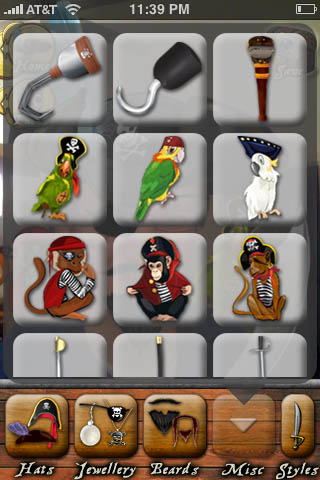
There's a large collection of all kinds of professionally illustrated pirate gear - hats, eye patches, jewelry, beards, hooks, peg legs, parrots, monkeys, swords, scars - you name it!

Once you're done editing your photo, you can save it and then email it, assign it to a contact, upload it to Facebook, etc. Here's me as a Buccaneer.
Tokyo
This is the sixth part in a series - for the others see Beijing Day 1, 2, 3, 4-5, or Shanghai.
Our plane from Shanghai to Tokyo arrived at around 4 PM. The trip from the airport to the hotel was a good example of at least one difference between China and Japan: prices and labor costs are much higher. We caught a train for $35 - a taxi would have been prohibitively expensive. In China (and most of the third world), labor is plentiful and therefore cheap, while manufactured goods are (comparatively) expensive, so it's usually cheaper and easier to just pay somebody to do something. In Japan (and the first world), labor is expensive and goods are cheap, so any tasks which can be done by an automated process or a machine will usually be done that way. In Tokyo the most visible manifestation of this was the vending machines which were everywhere - there are vending machines to sell drinks (both hot & cold), cigarettes, toys, train tickets, and even to take your order in some restaurants. In China all of these tasks would be performed by people (or just as often, several people).
Our hotel was located in Shinjuku, which is one of Tokyo's many districts. It's big on shopping & business, with lots of stores and restaurants. After settling into the hotel we explored around outside a little bit:
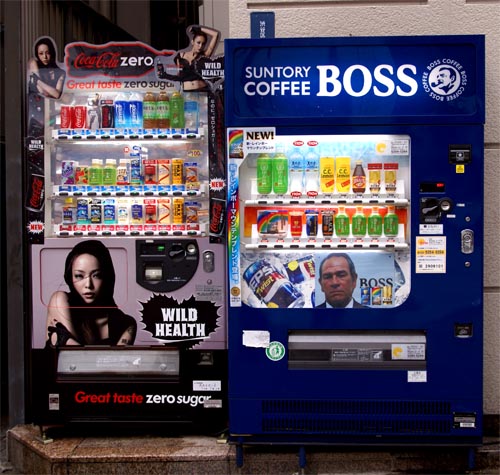
Vending machines selling all kinds of drinks are everywhere
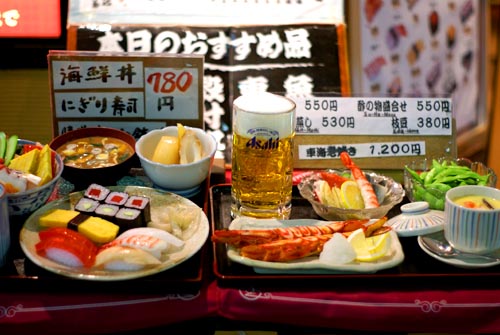
Most restaurants have displays outside the entrance with plastic versions of the food on the menu. This restaurant has plastic sushi, plastic soup, plastic vegetables, and a plastic mug of beer.
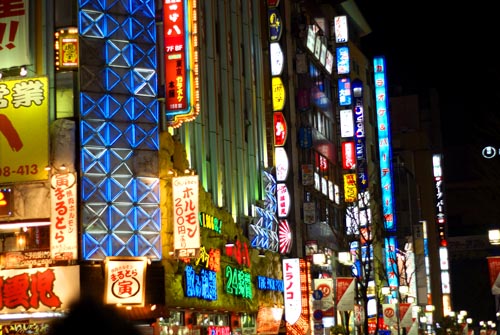
Real estate is at a premium, so things are built vertically. Any given building might have 8 floors of different businesses - effectively becoming its own mini-mall. The neon signs going up the building each advertise the shop or restaurant on the corresponding floor.
The next morning we went up to the top of the Tokyo Metropolitan Government building, one of the taller skyscrapers in the area. The view was impressive - the city stretched on in all directions as far as the eye could see, which unfortunately wasn't too far since it was overcast that day:
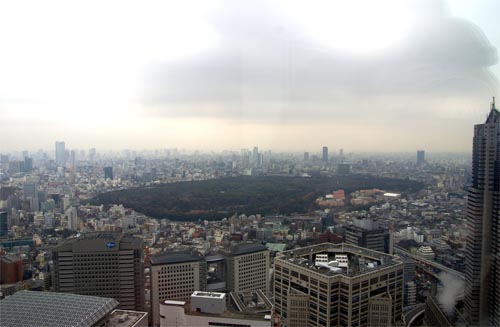
Supposedly Mount Fuji is visible on the horizon on clear days. The large park in the picture above contains the famous Meiji Shrine, which I visited later on. Unfortunately the original shrine was destroyed by American firebombing in WWII (like most of Tokyo), though while I was there I was able to get a glimpse of some cherry-blossoms:
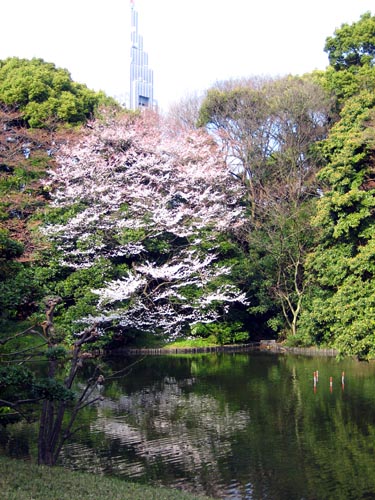
Apparently the cherry-blossoms are much more plentiful and impressive in early April, so we missed them by a couple of weeks.
After Shinjuku was Shibuya, another big shopping district, but with more emphasis on fashion. The train station has a popular statue of the famous dog Hachiko:
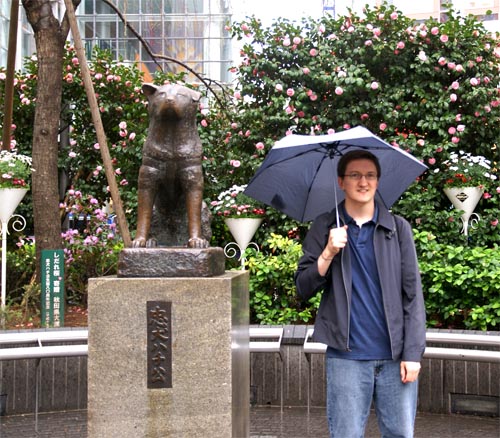
According to legend, he would meet his owner at the train station every day. One day the owner died while at work, but Hachiko faithfully went to wait at the station every day until his own death 10 years later.
Shibuya also has a large pedestrian crossing, supposedly the busiest in the world:
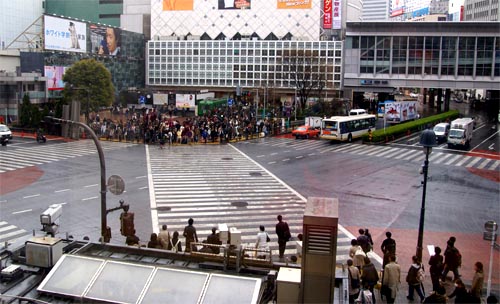
People amass on the sidewalks..
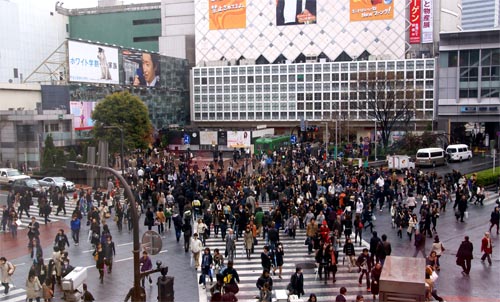
..until it's time to cross
The above two pictures show another big difference from China - there's nobody jaywalking, and the cars are stopping for the people. Street traffic is very orderly and predictable in Tokyo, which I much preferred to the chaos of the streets of Beijing. People seem to take rules much more seriously in Japan - almost as if it is a point of pride. I felt a little more at home when walking around, though it did take a while to get used to the cars driving on the left - people were even rigorous about walking on the left side of hallways or sidewalks.
On the next day I saw the sights in the central downtown district. The first stop was the famous Tsukiji fish market, which sold every kind of seafood you can imagine:
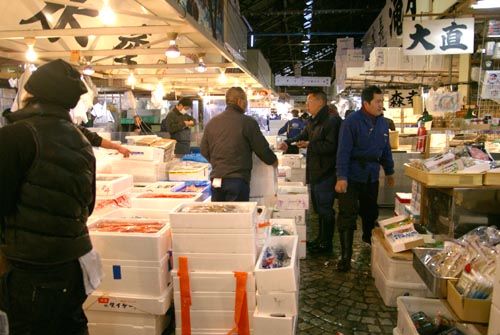
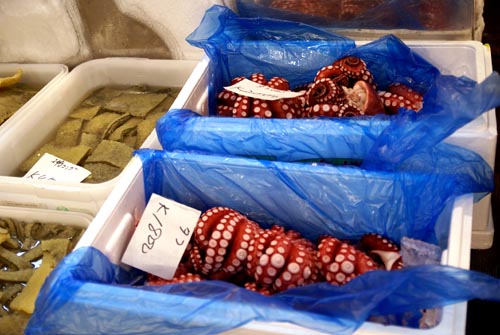
I didn't get up in time to see the big tuna auctions at 5 AM, but apparently they are impressive as well.
Next up was Ginza and the Imperial Palace. Unlike the Forbidden City in Beijing, the palace in Tokyo is closed to the public since the Emperor still lives there. You can walk around outside and get glimpses over the walls and moat:
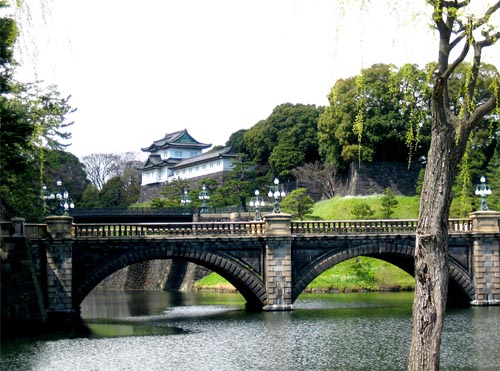
The imperial palace takes up a large swath of the city - it's large enough that in the bubble of the 80's, Tokyo land prices implied that the palace was worth more than all the land in California. Needless to say, that bubble eventually popped, leading to a 20-year recession from which the real estate and stock markets still haven't recovered (hmm..).
After that was Akihabara, which is the "nerd Mecca" of the world: an entire city district devoted to video games, electronics, computers, manga, etc. This is the place where things like the Humping USB Dog are born (.. yes.. I bought one - but it was for a friend.. yeah.). The electronics stores were humongous - imagine a Best Buy, and then imagine it being 7 floors tall, stocked to the brim with all the gear you could ever want. One store had two long aisles devoted completely to USB hubs (Hello Kitty hubs, Star Wars hubs, etc.). I kept seeing rows of tiny Japanese laptops, and I eventually broke down and bought one (it had been getting pretty annoying browsing the web on my iPhone, so I was in need of a travel netbook, or at least that's how I rationalized it):
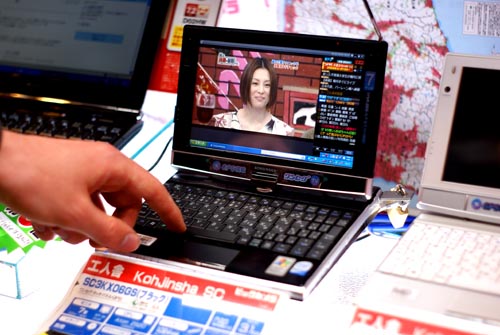
The laptop has a 7 inch 1024x600 screen (same rez as a 10" netbook), a 1.33 GHz Intel Atom w/ hyperthreading, a GPS, touch screen, webcam, swivel tablet screen w/pen, TV tuner, SD/CF card readers, an ExpressCard slot, and 1 GB of RAM (because of Microsoft's restrictions for selling XP - I've already ordered an upgrade). The keyboard is in Japanese, but fortunately also has the roman letters. All that for only 39,000 Yen, or about $390 (duty free - no tax!). So far I'm pleased with it, but ironically it's almost too small - it's hard to type on such a tiny keyboard.
On our last day in the city we had exhausted our list of things to do (again, mostly because we had failed to properly research ahead of time), so we did the most pathetic thing possible and went to Tokyo Disney. It's in the bay outside the city on a large plot of 'reclaimed' land. They have built a near-exact replica of the Disneyland in California - it's sort of surreal. On the other hand it sort of felt right - the dual crazinesses of Disney and Japanese culture were practically made for each other. Fortunately we finally had a sunny day:
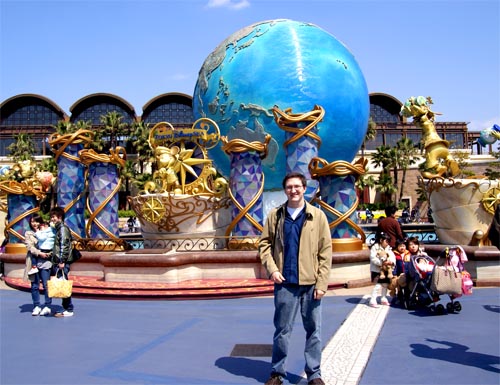
Tokyo Disney was bearable and even fun, provided that you maintained a certain ironic detachment (or a childlike naivete and curiosity). One of the resorts is "DisneySea," which is unique to Tokyo and has a maritime theme:
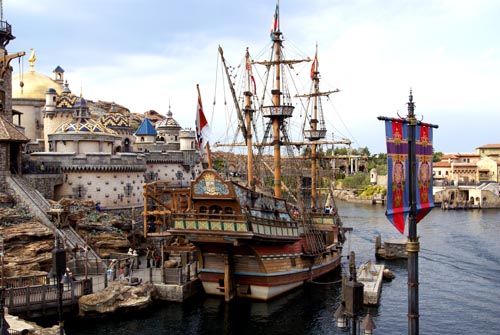
At one point it got almost a little too weird when we ate lunch in the little "fake America" town and had NY deli sandwiches. One thing which did not work was the tendency for immense lines to form at each ride. I waited two hours for one ride and then decided that that was enough waiting in line for the day. At one point the line for the Indiana Jones ride was four hours long. I'm not sure that would happen even at Disney World in Florida at peak season. I could only surmise that Japanese people are much more patient and willing to wait in lines than Americans are.
On the last day our flight to Seattle left at 3:40 PM, so we didn't have time to do much other than check out and take the train back to the airport. The flight was 8 hours, and arrived at 8 AM, technically on the same date. Going 16 hours back in time made it a little hard to get back on a normal sleep schedule, but with a strategically timed nap on the first day back (and some Tylenol PMs for a couple nights..), I was able to get back to normal pretty quickly.
Shanghai
This is part 5 in a series - for the others see Beijing Day 1, Day 2, Day 3, or Days 4-5.
We arrived in Shanghai via train at 7:30 in the morning. We weren't quite sure what to do with our bags at that point so we just took a cab to our hotel, hoping that they would allow us to store them until check-in time. Luckily, they had the room already available and we were able to check in at 8:00 AM. There didn't even seem to be any surcharge or fee.
The hotel was pretty centrally located in downtown Shanghai, so we were able to walk out and see pretty good views of the Huangpu riverside:
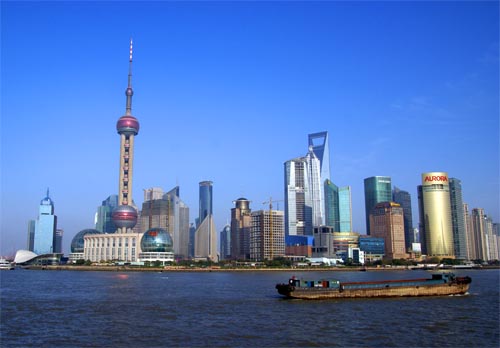
On the east side of the river is Pudong, which is the ultra-modern business/financial district of the city. Most of it has been constructed within the last 15 years. On the west side is "The Bund", which is the old part of the city:
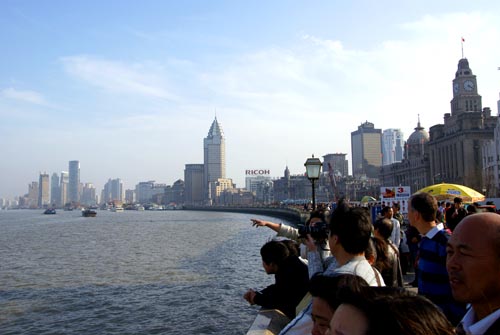
Many of the buildings along the waterfront here were built in the British/French colonial days of the 19th Century. This gives Shanghai a weird sort of architectural vibe - it's split between the new and the old, yet neither is traditionally "Chinese" in character.
The city has a distinctly different feel than Beijing. It's very Westernized and there's relatively little in the way of Chinese cultural history behind it. Before the Opium Wars, Shanghai was just a small port village at the mouth of the Yangtze River. After the wars it was conceded to the foreign powers, who built it into a big city. Even though it was eventually taken over by the communists, there are still large numbers of foreigners living in the city, often living in their own little isolated enclaves, surrounded by millions of Chinese people.
On the first day we walked around nearby the hotel. The city extends farther than the eye can see, and so does the space-age sort of architecture:
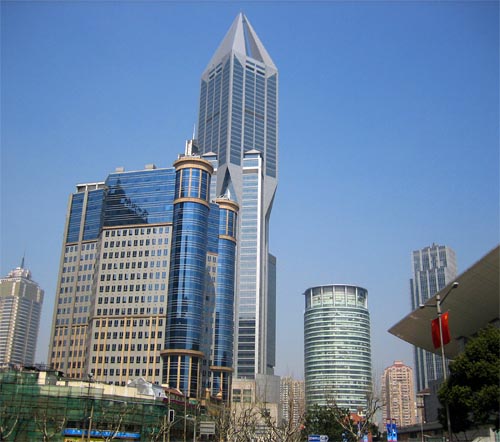
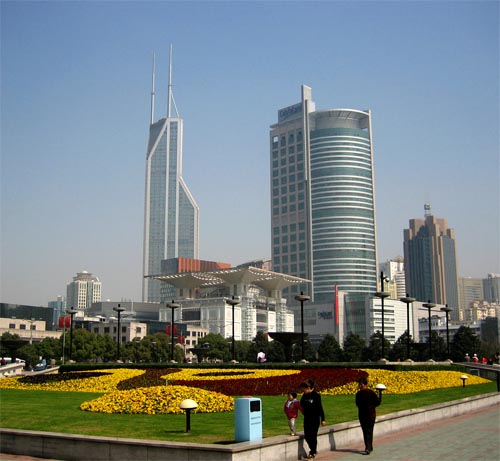
I visited the Shanghai Museum, which is supposedly one of the best in China. It did have a large collection of ancient Chinese artifacts, but the variety of displays was somewhat disappointing (after you've seen a few porcelain bowls, another 200 look pretty similar). It didn't really compare to visiting the Louvre or the Met - I'm not sure whether this was because all of the interesting works of art were plundered by foreigners, or because historical Asian culture just didn't place as much emphasis on venerating the Artist as an individual (I wouldn't be able to name Chinese equivalents of Van Gogh, Michelangelo, etc). Or maybe the true explanation is something my insensitive Western mind is unable to grasp - it was sort of an interesting question to ponder.
On the second day we visited the Yu Gardens, which is a nice little oasis of green in the middle of the city:
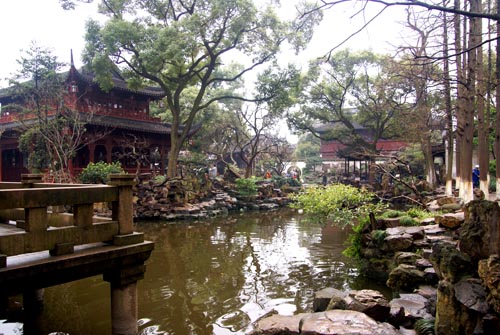
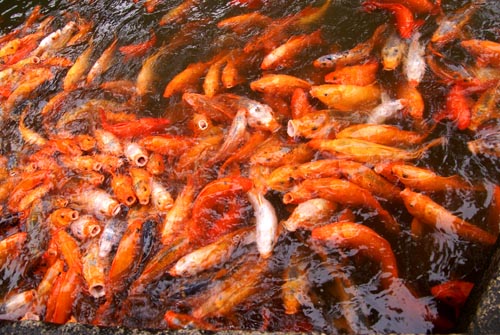
Unfortunately it turned out that the gardens were built for a rich landowner "in the style of" a traditional Chinese garden, so they lost a few authenticity points there. Still, there were some interesting sights, like the Koi pond:
Next to the gardens was a bazaar with all kinds of shops selling various things:
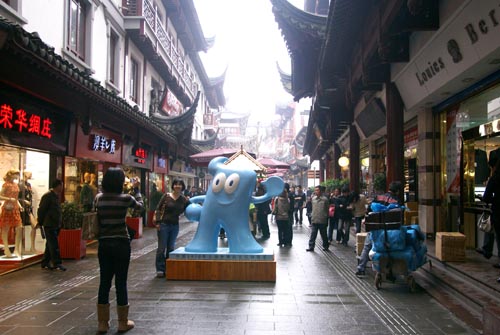
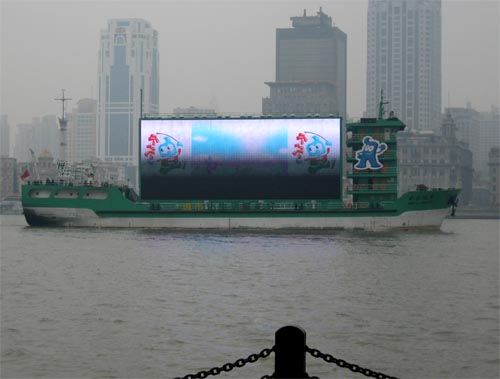
The blue character in the picture above is the mascot for the Shanghai World Expo 2010. He was plastered all over the city, half of which was under (re-)construction in preparation. I imagine that Beijing was similar a couple years ago in preparation for the 2008 Olympics. It's clear that the Chinese government wants the Expo to do for Shanghai what the Olympics did for Beijing - i.e. be a sort of international coming-out party. Even the propaganda boats on the river got in on Expo-fever:
On the third day I went to explore Pudong and the other side of the river. I wanted to visit the Shanghai World Financial Center (the building with the big hole in the top) and see the city from the "tallest observation deck in the world," but unfortunately it was overcast and foggy that day so you couldn't see very far:
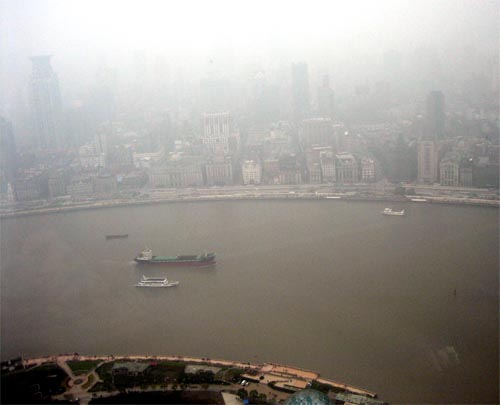
View of the Bund from Pudong
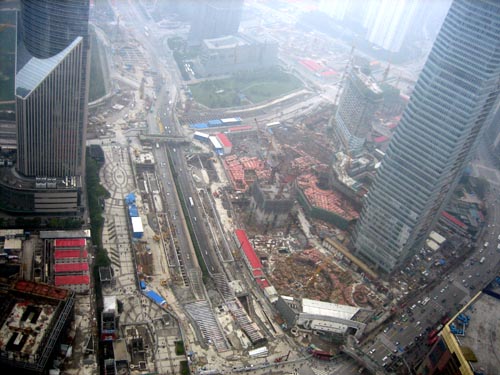
Pudong could be summed up as "under construction"
Other than the skyscrapers, Pudong is mostly a financial & business district, so there wasn't a whole lot else to see.
That evening we went to visit our former co-worker Roland who was in Shanghai working for Microsoft. Unfortunately we only had his address in English, which didn't work too well for the cab drivers. We tried to pronounce the name of the street for one driver, but he got angry and kicked us out of the cab - presumably he was saying "you can't just give me the name of the street, it's very long so I wouldn't know where to stop!" With a second cab, we got the hotel porter to read off the address in Chinese and the driver agreed to try to find it. We finally did make it and our friend took us to a fancy Australian restaurant (yes, we ate Australian food, with our German friend, in China - wait, what?). Unfortunately they were out of ostrich, so he had to settle for an emu steak. We also had crocodile appetizers:
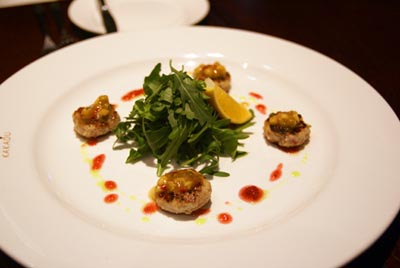
Crocodile sort of tastes like chicken.
On the fourth day in Shanghai we had sort of run out of things to see (more because we failed to fully research ahead of time, rather than because Shanghai did not have enough sites to see). We took the advice of a couple of different people and took a train ride to Hangzhou, a "small" city (only 6 million people!) about an hour and a half away by train. Apparently it's widely revered for its great natural beauty, which probably wouldn't be the first thing you'd say about Shanghai or Beijing. The city's West Lake is the original lake which the Summer Palace in Beijing was modeled after.
Alas, it was also raining and overcast on that day too, but we were able to get a few pictures:
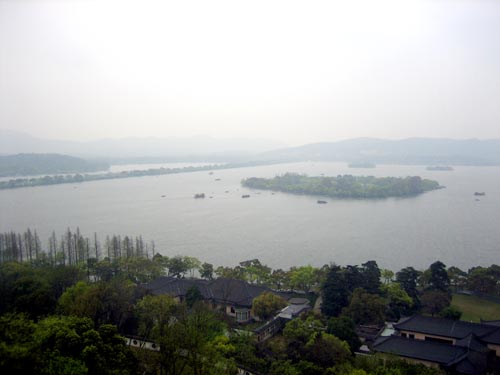
The lake has several islands and pedestrian causeways
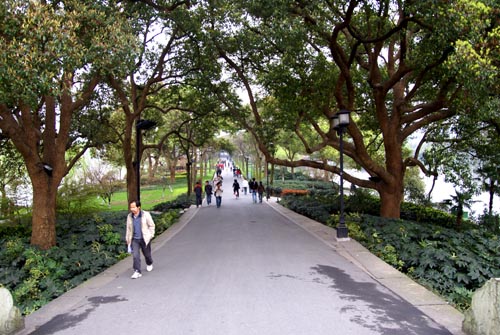
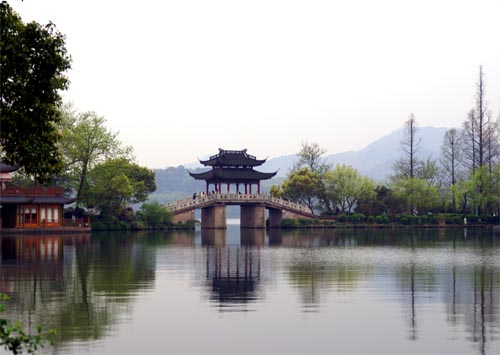
Overall Hangzhou was a nice side trip for the day - it would have been even more so had it not been raining.
On the fifth day we flew off to Tokyo. While in China we had accumulated so much stuff that it wouldn't all fit in our original bags on the flight, so we needed to buy an additional suitcase. We went to the shopping district on Nanjing Road, which is where all the fake knock-off merchandise can be found. Pretty much any piece of expensive designer clothing or apparel can be found as a knock-off in China. There are apparently even several different quality levels of fake goods, ranging from dirt-cheap knock-offs that wouldn't fool even a child, all the way up through really good-looking fakes that would be hard to tell apart from the real things unless you had expert knowledge. For our luggage, we only needed something that functioned, so we picked up this "Samsonmte" suitcase for $14:
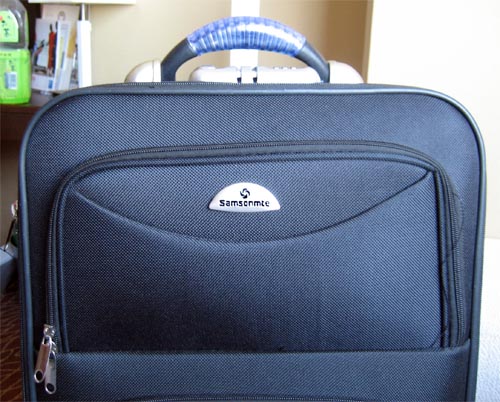
It's the most cheaply-made suitcase I have ever seen - the pockets on the side aren't even real pockets, they just open up into the main compartment. Still, it did the job.
Tomorrow's post: Tokyo!
Beijing Days 4-5
This is part 4 in a series - for the others see Beijing Day 1, Day 2 or Day 3.
On our fourth day in Beijing we went to see the 2008 Olympic Venues. The first stop was the "Water Cube" building where the swim events were held:
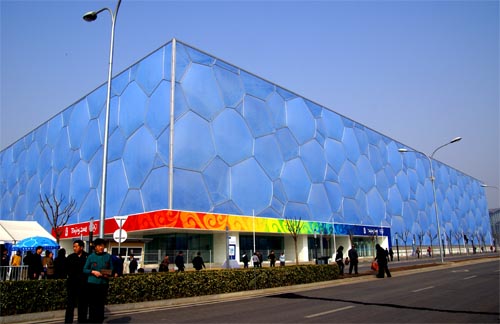
The semitransparent blue walls were an interesting sight, though it would probably have been even more impressive to visit at night when they are lit up from within. The ticket to get in was 120 RMB and we had to wait an hour and a half before our timeslot came up. For some reason the tickets were sold on the opposite side of the building from the one entrance - it was rather confusing because most of the English signs in the area were left over from the Olympics and directed you to entrances which are no longer open now that it is a tourist attraction.
The main pool inside the building was fairly impressive:
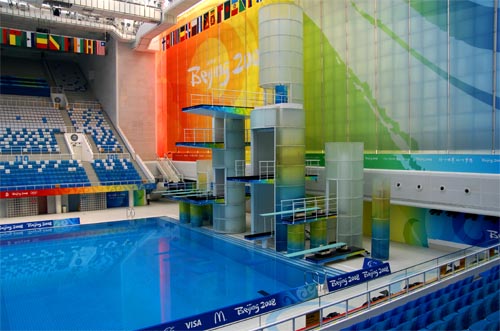
You could only walk around in the stands and take pictures, so there wasn't a whole lot to do. Somewhat surprisingly, it turned out that this was basically the only pool in the building (there was one smaller "warm-up" pool, but it was closed off). Other than the main pool, the only other things to see were a bunch of gift shops hawking 2008 Olympics merchandise.
Next up was the "Bird's Nest" Olympic stadium, for another 120 RMB:
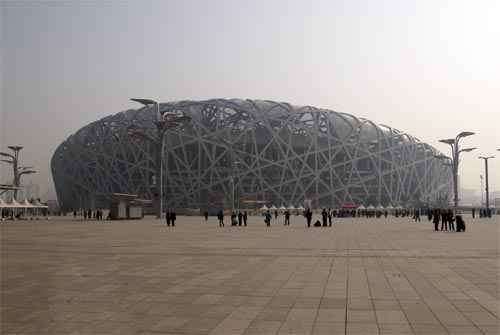
Again the architecture was fairly impressive, but unfortunately the Beijing pollution subdued the sight a little bit. Inside the stadium, only the lowest level of the seats and the field were open to tourists:
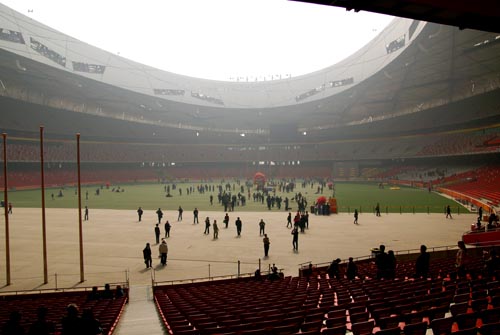
There were some big inflatable "Fuwa" Olympic mascots on the field, but not much else. It turns out that walking around an empty sports stadium is about as boring as you might imagine it to be. I had hoped that there would be some sort of displays or interactive attractions set up for visitors, but there weren't. Overall the Olympic venues were sort of a disappointment.
That afternoon we went to the Temple of Heaven, which is a large Taoist landmark in southern Beijing:
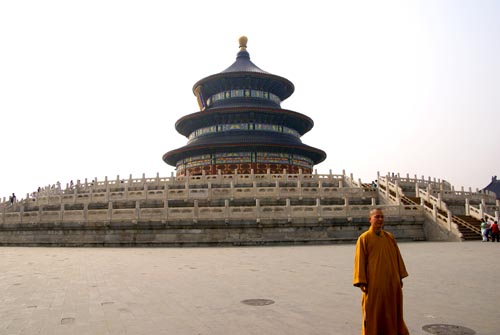
Inside was an altar of some sort, but it was hard to get a good look because of the huge crowd pushing and shoving around the door:
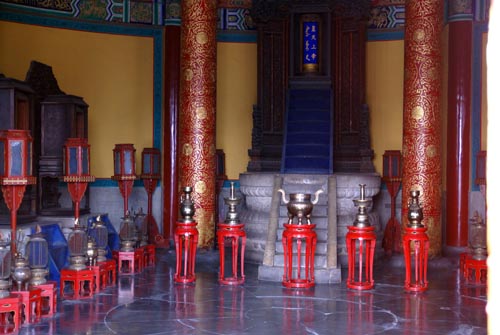
There was a large park around the temple, which seemed to be a recreational area which locals used as a meeting place to get away from the hustle of the city. There were large numbers of people playing cards and other traditional games, as well as people singing and playing musical instruments:
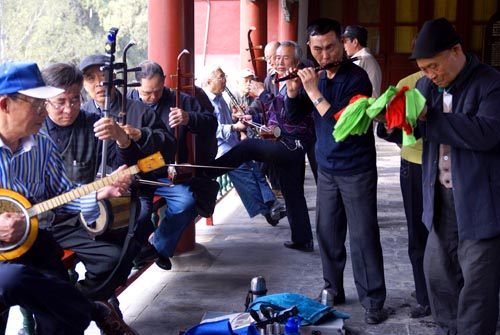
It was an interesting and brief glimpse into a more traditional part of Chinese culture, which is sort of rare in the big cities.
On Day 5 we had a ticket to leave for Shanghai in the evening, so we just went to the Beijing Zoo in the morning. The zoo is famous for its panda bears, and we weren't disappointed:
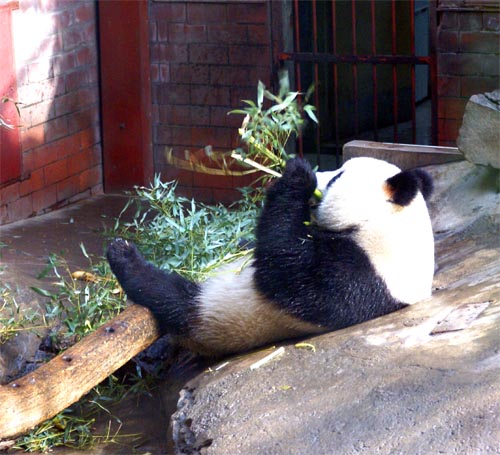
Chewing Panda
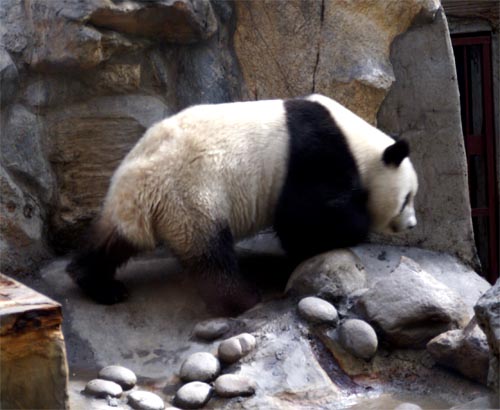
Walking Panda
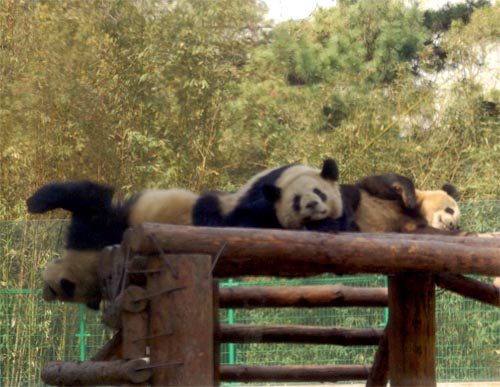
Napping Pandas
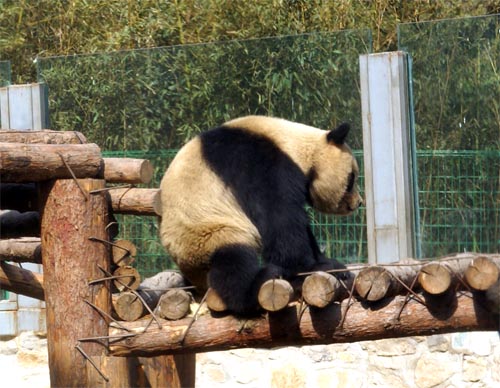
Back-scratching Panda
Other than the large collection of pandas, there was pretty much the standard collection of animals you'd expect to see in any regular zoo.
After the zoo we got ready for the train trip to Shanghai. Our tickets were on the "Z" train, which is a new express line with fancy "soft" sleeping berths (the alternatives were "hard sleepers," which didn't sound too fun). The express trips are 11 hours rather than the typical 20. The tickets were about 500 RMB ($75) each, depending on whether you got the top bunk or the bottom. The bottom bunk is considered to be better since it's easier to get in and out of, and it's cooler since the hot air flows to the top of the room (along with the cigarette smoke, as we discovered).
The train station was pretty crowded and was fairly confusing since none of the signs were in English. Our tickets were in Chinese and had 4 numbers on them. I knew that they were probably the train #, platform #, car # and seat #, but I couldn't be sure which was which. Fortunately there was an information booth which was able to point us in the right direction.
On the train we had an enclosed room with 4 bunks:
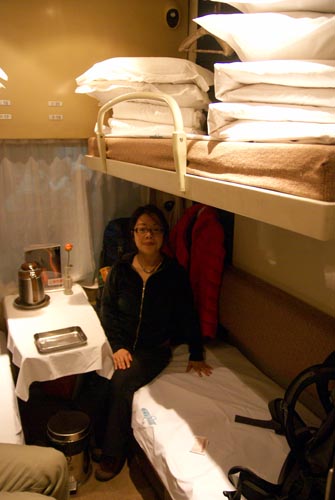
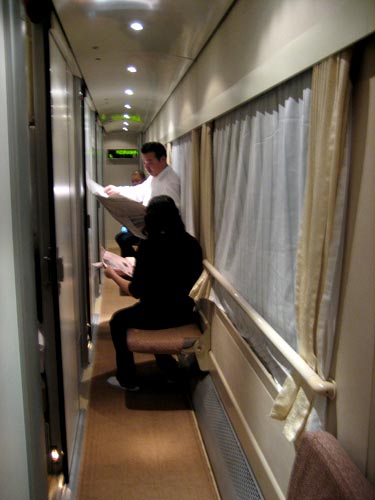
We shared the room with another man and woman. They were friendly, though we weren't able to communicate with them beyond simple gestures. In the room it was pretty tight, so many people sat outside in the hallway, where there were fold-down chairs:
This was the bathroom:
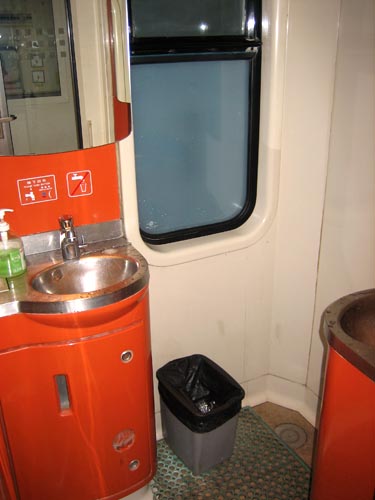
You don't see the toilet, because it was basically just a hole in the floor, just off camera.
Unfortunately the train left after dark, so there wasn't much that could be seen outside. I was interested to see the Chinese countryside between Beijing and Shanghai, but I wasn't really able to - I slept well enough that I woke up without much time to spare before the train arrived at 7:30 AM the next morning.
Beijing Day 3
This is part 3 in a series - for the first two parts, see Beijing Day 1 and Beijing Day 2
On the third day in Beijing we went to see the Great Wall of China. Our Lonely Planet guidebook didn't have too many details about the best way to go to the wall, so we followed its suggestion to catch a bus near Tiananmen Square. In retrospect we should have done more research beforehand (more on that later).
We found a bus depot labeled "Beijing Hub of Tour Dispatch," which looked official enough. It was hard to know whether the company was run by the government or was just a private firm, but I think we would have had that problem even if we had been able to read Chinese. In China it is difficult to tell where the government ends and where private enterprise begins. In the goold ol' communist days, the state was omnipresent and ran everything. As China has opened up, that grip has loosened and private companies have sprouted up all over the place. However, many 'independent' companies are still owned and/or controlled by the central government anyway, so it can be somewhat deceiving. It turned out that this bus tour company was actually run by the government, but we weren't able to determine this until we looked it up online later.
We bought the most expensive tour ticket, which was the "Great Wall + Lunch + Ming Tombs" ticket, for 150 RMB (~$20). We were shortly herded onto the next bus with a bunch of other tourists. All of the other tourists were Chinese citizens - we were the only Westerners on the tour, which was completely in Mandarin (that probably should have set off some alarm bells, but it didn't at the time).
A side note on tourism in China - while we were there (late March), most of the attractions we visited were very crowded with tourists. The surprising part was that the vast majority of the other tourists were Chinese people, presumably visiting from the many other parts of China. I expected to see a lot of Americans and other foreign tourists, but they were actually quite rare. In retrospect it makes sense - China has 1.3 billion people, many of which probably want to visit Beijing, much like American tourists flock to Washington D.C. or Hawaii.
Anyway, the bus tour started and turned out to be a tour of Beijing for the first little while. There was a tour guide at the front of the bus pointing out landmark buildings and explaining all kinds of interesting things (we presumed) in Mandarin. We didn't understand any of it, and had to hope that we weren't missing anything important. Here's a picture of what it looked like from our perspective:
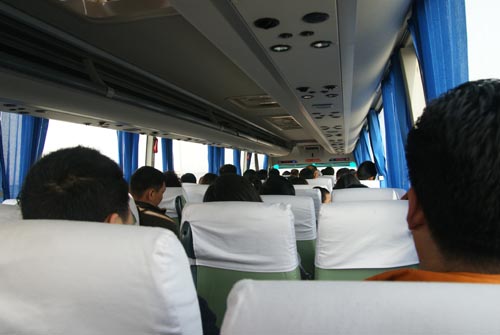
Eventually the bus stopped off somewhere and we all got off. I thought we were at the Great Wall, but we learned several minutes later that we were actually at the Ming Tombs, which are naturally the tombs of the Ming dynasty emperors. Apparently they are situated along the way to the Wall, so it is common to stop by and see them as well. They were in a hilly wooded area, which provided a nice break from the city:
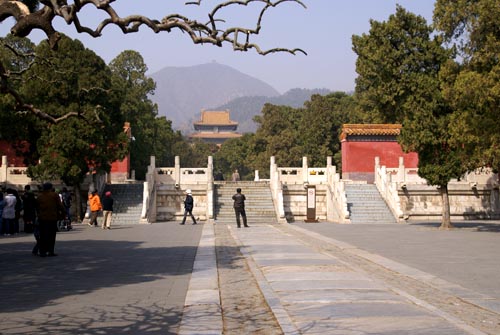
The main attraction was the underground tombs, which turned out to be a somewhat-disappointing large room with some coffins:
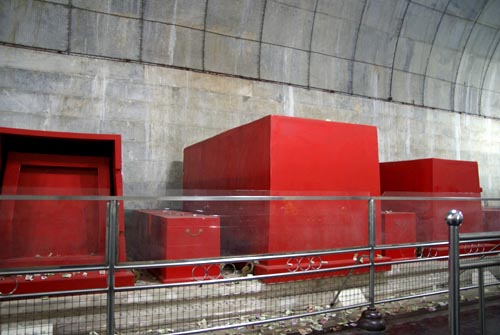
If we had been students of Chinese cultural history, it may actually have been quite interesting. For us, though, it probably wasn't quite worth the time taken away from visiting the Great Wall. We waited around for an hour and a half before getting back on the bus, which we almost missed due to a miscommunication about where to meet up and the fact that my watch was about 5 minutes different than the tour guide's watch.
After the tombs the bus drove us to a sort of shady-looking industrial area where we got dropped off for the "free lunch." The lunch turned out to be a forced tour through a jade museum/shop. We were told (as far as we could tell) all about how jade is a valuable, precious mineral that conveys good luck and status to its owner. Apparently there are a lot of people selling fake jade, so you should only buy the expensive authentic jade, which, as it turned out, they had a whole bunch of right there, and lots of saleswomen to sell it to you. The lunch consisted of steamed rice buns and some sort of meat. All in all it wasn't very filling, but if you wanted more food you could buy it at the overpriced shops conveniently right next door.
Eventually we finally made it back onto the bus and started off for the Great Wall at around 2:30 PM. The bus drove for a while dropped us off at the bottom of a valley below the Great Wall. I thought we'd be able to just walk up to it, but that wasn't the case. Our tour guide talked to us for a couple of minutes and then herded us into a line to buy 70 RMB tickets for a little train ride up the hill to the wall (for some reason we didn't remember reading anything about having to buy another ticket once we actually got to the wall). We had no idea what the tour guide had actually said, so we just got in line along with everybody else - it's possible that she had explained that it was possible to walk around a different way and climb up to the wall without needing to buy a train ticket, a fact we realized only after we got to the top.
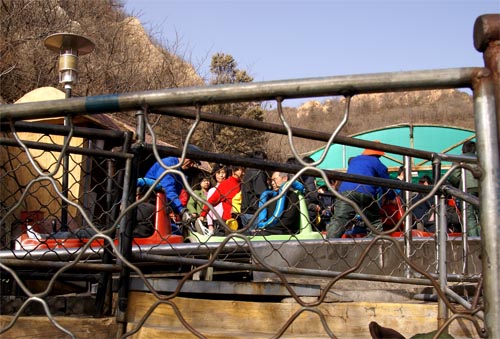
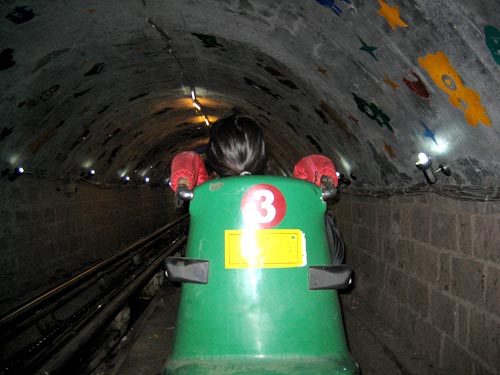
Next we went to go stand in line for the train. The line looked pretty short, until we got around the first corner and noticed that it was actually quite long. We didn't think that we had any other options, so we just waited in the line, which moved incredibly slowly. After about an hour and a half, we finally got up to the ride to the top. The ride was quite a rickety contraption - it certainly didn't look like it would meet the safety standards of any first-world country. We didn't get a good picture of it, but you can sort of get the idea from these shots:
When we finally got to the top we were able to actually go onto the Great Wall. At this point we were able to see that the "real" entrance to the Wall was on the other side of the hill. That entrance had a large parking lot, bus depot, and only a slight hike to the top. Our tour had dropped us off on the back side of the hill, probably as part of some sort of arrangement with the people running the train ride. We also now had about 30 minutes left out of our "2 hours" at the wall, and we still had to get back down to the bus.
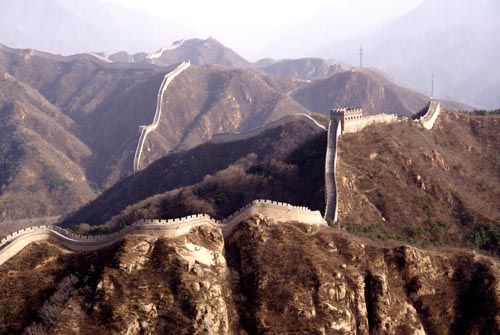
Our dropoff spot along the wall was actually a pretty good viewing point, and the wall itself was an impressive sight (though perhaps a bit less so if you were aware of the fact that the original, historical Great Wall has long since completely collapsed or been eroded away, and the current wall has been reconstructed for tourists and only runs for a couple of miles).
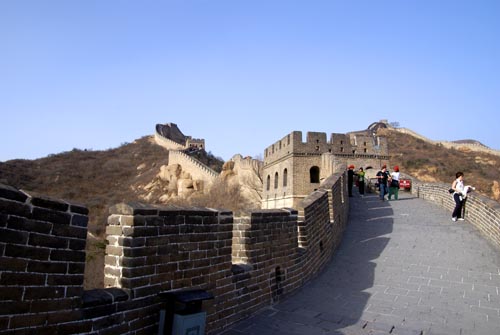
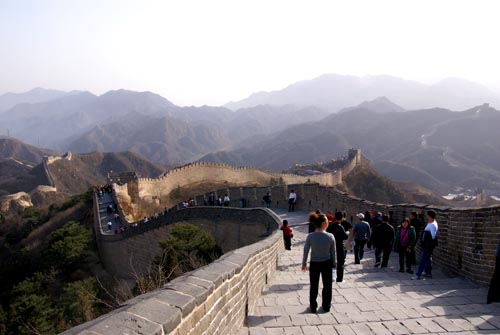
Apparently if you hike down along the wall a little way you can get away from the tourists and have a great view all to yourself. Unfortunately in our case, we only had enough time to snap a few pics before heading back to ride back down to the bus. While on the wall we found and asked a couple of Americans how they had gotten there. They said that their tour group had rented a private bus that drove to the main entrance, and that they had been there for 6 hours ("so far"). In retrospect, we clearly should have done something more like that. C'est la vie..
Anyway, the trip back to the city was fairly uneventful, though we were lucky enough to experience the joys of Beijing rush-hour traffic while trying to get back to Tiananmen Square. We were curious how the other people on our trip felt about getting ripped off, but we didn't really know how to ask them. There didn't seem to be much anger or displeasure, and certainly nobody was screaming and demanding their money back, as surely would have happened in the U.S.
Later our Chinese friend told us that we shouldn't have felt too bad about the whole thing since whole busloads of local people also went along with it - clearly we weren't suckered in because we didn't know Chinese. We also learned that we should have been tipped off by the cheap price (20 USD for a day's tour) - anything so cheap is almost guaranteed to have lots of stop offs at jade shops or herbal medicine clinics. Apparently the government set up this particular company in order to clean up the tour business, which was actually even worse beforehand.
Later that evening our friend took us to a 5-star restaurant which is apparently famous for its Peking Duck. He ordered a bunch of food for us in Chinese, so we had only a vague idea of what we were getting. Here are a couple of the appetizer dishes:
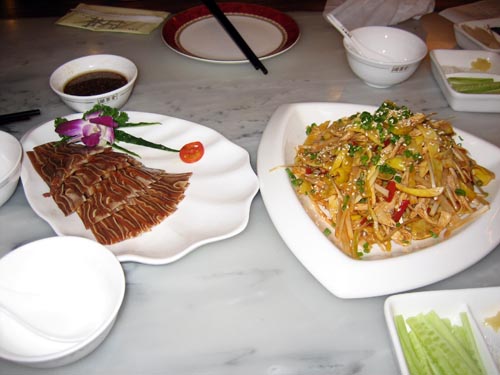
The one on the left was supposedly some sort of "pork dish." After I had a piece, it was revealed that it was actually pork hoof, which explained why it was sort of chewy.
After a while the Peking Duck arrived, roasted on a platter. Unfortunately we didn't get any pictures of it until it had already been chopped up into nice little pieces:
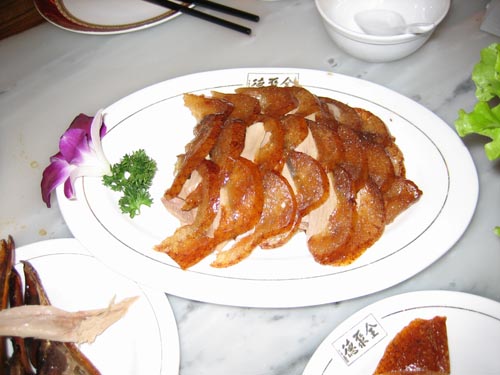
Overall it tasted pretty good. The duck even came with an ID card, which listed the duck's number and history up until the day it was killed and roasted. The meal also included the head of the duck, chopped in half:
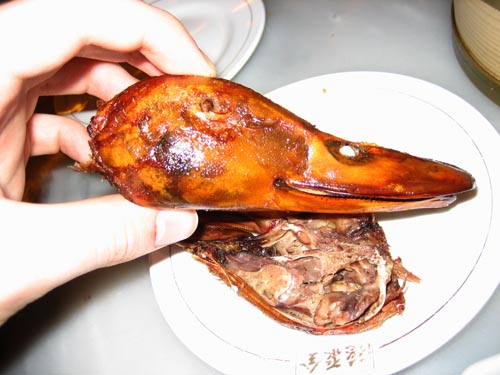
Apparently the brain of the duck is some sort of delicacy. Alas, I wasn't quite brave enough to find out how it tasted.
Beijing Day 2
This is the second post in a series - for the first, see Beijing Day 1.
On the second day in Beijing we went to the Summer Palace, a former imperial palace in the hills on the edge of the city. It was used as a retreat from the crowds and heat (both for the imperial court as well as modern-day tourists). The main attractions are a hill overlooking a large lake - the former apparently built out of the land excavated while digging the latter (requiring the work of 100,000 laborers).
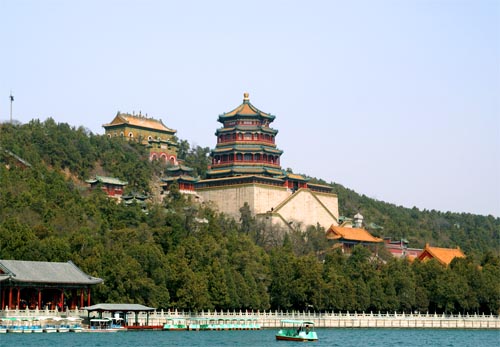
The buildings and a large Buddhist temple overlook the lake.
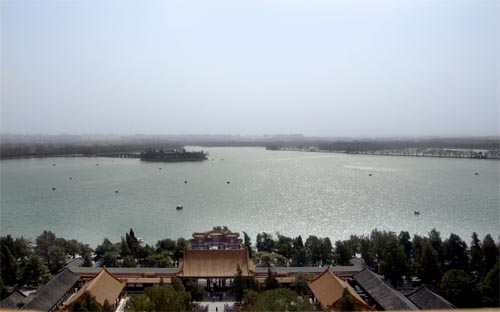
The view from the top of the temple shows the lake, whose causeways and islands were patterned off the West Lake in Hangzhou (about which there will be more in an upcoming post on Shanghai).
As with the Forbidden City, much of the original architecture and artifacts have been destroyed - this time during the Opium Wars by British and French troops. After the wars, the Empress Dowager Cixi rebuilt much of the Summer Palace to her own liking, including this large marble boat:
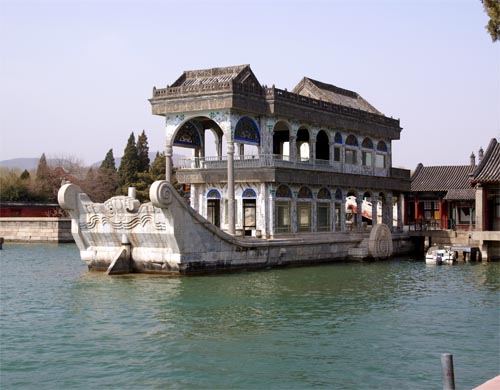
Along with other things, it was built using funds meant to be used to rebuild the Chinese armed forces. Not surprisingly, what remained of her empire was overrun by the revolution of 1911 only a few years later.
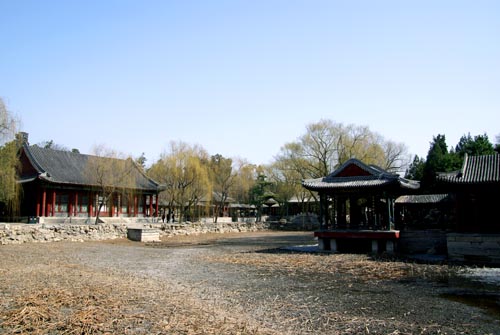
This garden would likely have been much more impressive with water in it.
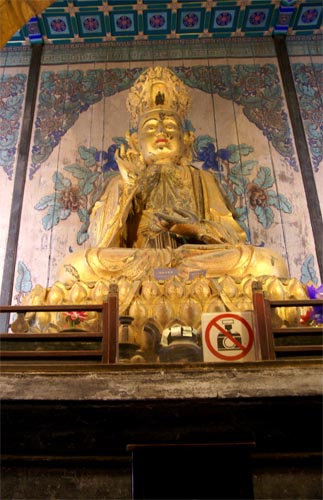
A large Buddha statue, with a "No Pictures" sign.
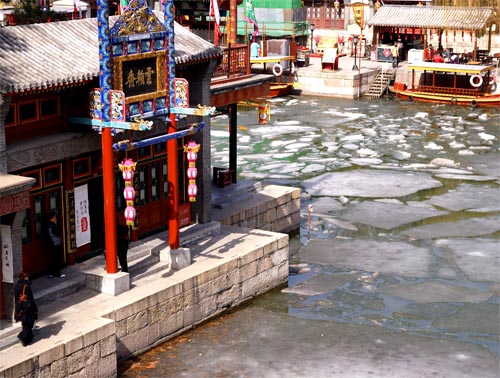
Behind the hill there was a river with a small "town," which turned out to be a trap - once inside, you could not get out until you walked along the whole thing, past lots of little shops hawking various things.
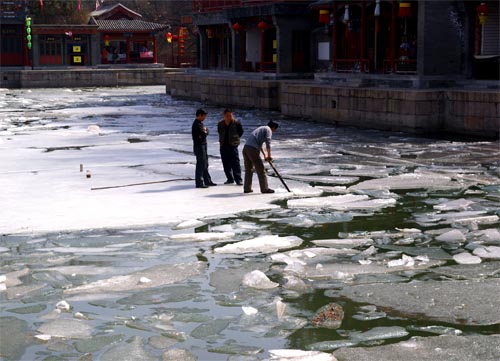
Apparently breaking the ice is a manual process, requiring one guy to do the work and two to watch.
After the Summer Palace we decided to explore around town by foot for a bit. This turned out to be a more interesting experience than I had expected. It quickly became apparent that pedestrians do not have the right of way anywhere near the streets - in fact, the "right of way" is a somewhat nebulous concept in China. If a car is coming, it's not going to stop, so you had better get out of the way. There are occasionally "walk" signals at intersections, but these seem to be mere suggestions. It took me a while to get up the nerve to cross large streets until I realized that I would just need to accept a higher level of risk of bodily harm than I am accustomed to. Once you get past that, it feels sort of like playing a video game (like Frogger), except if you lose a life, it is your own.
Unfortunately we didn't stop to take many pictures that really captured the experience, but it was very much like the famous "Driving in India" YouTube video that made the rounds a couple years ago (an interesting one to watch if you haven't seen it). Here are a couple pictures we did manage to take:
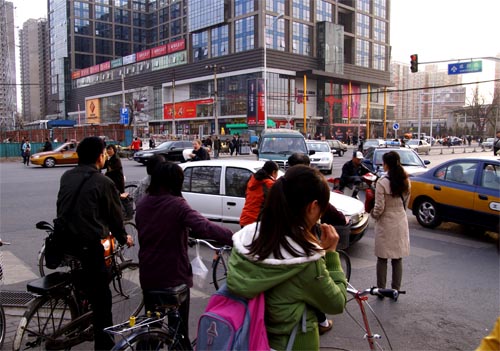
Still pictures don't really capture how cars were just going in all directions at all times.
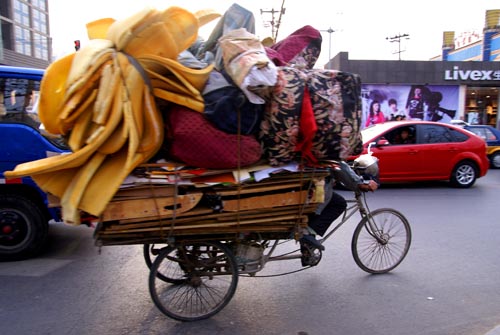
Scenes like this were common - people would carry what appeared to be entire apartments' worth of furniture on their bikes, sometimes with assist motors but just as often without.
Once in a car, things felt a little safer, but not by a whole lot. About the only traffic rules which really seemed to be followed were: drive on the correct side of the road, stop if a stoplight has been red for a while, and mostly try to stay within the marked lanes, although these rules were pretty flexible. Turn signals are not used - if you want to change lanes, you just go for it and stick your hood in, trusting that you will not be hit by the car formerly occupying that space. Riding in a Taxi was often a harrowing experience, only abated by the fact that most of the time you were traveling fairly slowly due to the terrible traffic. There were no seatbelts in the back of the taxis. Once I became quite worried when it looked like the driver had actually decided to put on his seatbelt while flying down a highway at high speed, but he was actually only just reaching to answer his mobile phone.
Taxis are very cheap - they cost 10 RMB plus 2 RMB per km traveled, meaning that you can travel halfway across the city for only a couple of USD. We ended up taking taxis everywhere we went in Beijing since they were so cheap, fast and direct. There weren't many other good options (the subway system is still mostly under construction, and it was impossible to decipher the Chinese schedules for the buses, which were overcrowded anyway). Apparently many tourists find it cheap enough to actually hire a private car and driver while in Beijing. We didn't do that because the taxis worked fine as long as we had a written Chinese version of the address where we were going. We never really encountered any problems with the taxi drivers. Apparently if any complaints are made against the drivers, they will be fined a couple months' worth of salary, which keeps them in line (a friend also told us a rumor that the communist government recently executed some drivers for scamming tourists, but The Google wasn't able to confirm that one). Still, there were a couple of times when we would ride somewhere for 20 RMB, and the return trip would cost us 11 RMB (so clearly at least one driver had "accidentally" gone the completely wrong way), but we never bothered to make a fuss.
That about wrapped up Day 2 in Beijing, though we also stopped by MSR China:
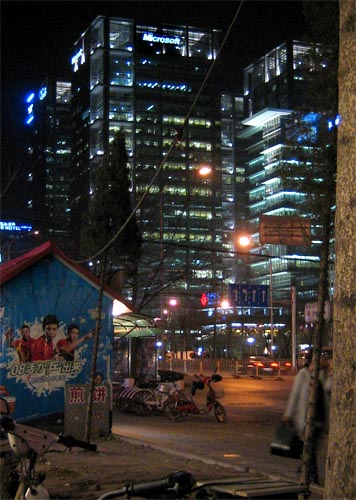
It's not visible in the picture, but immediately behind the Microsoft building is a giant Google building.
Beijing Day 1
Here's the first part in a series of more detailed write-ups of my trip to China and Japan. The first city we stopped in was Beijing.
Our flight left Seattle around 2 PM on Friday and had one stop-over in Tokyo for a total flying time was about 15 hours. I was a bit worried about flying with Northwest Airlines because of their terrible reputation (worse than Comcast and Exxon, is that even possible?), but everything actually went pretty well. The flight was an hour late into Tokyo, but they held the flight to Beijing until everyone was aboard. We had to go through another security check in Tokyo before re-boarding, and I had to quickly chug a 1 liter water bottle which I had foolishly refilled after the previous checkpoint.
We arrived in Beijing around midnight local time, so it was difficult to see much. The first thing I noticed was how immensely huge Beijing Capital Airport is - it was expanded for the Olympics to be the largest airport in the world (size-wise). The tarmac went on and on for what appeared to be miles. I don't know how many people's homes were destroyed to make room, but it was probably quite a large number.
At the airport we bought a China Mobile simcard to get a local Chinese phone number and caught a cab without too much problem. We stayed in Haidian (the university district), nearby the competing Microsoft Research and Google offices, approximately here: map link. Unfortunately we had the wrong address, but we eventually found the right place after calling our local contact and having him talk to the cab driver. The total cab ride was about 30 km and cost about Y35, or around $5.
I was traveling with my friend Angela from work and we stayed at the apartment of one of her friends, who is running a software startup in Beijing. He wasn't in town while we were there, so we were able to use his room. Fortunately his Chinese-speaking roommate was around and was able to help us out. They live in a small apartment in a building which appeared to be some sort of student housing, run by the government (as far as I could tell from reading the signs on the doors).
Unfortunately we didn't get any pictures of the apartment, but I wish we had. The doors were particularly interesting - there was an outer security door which opened into a hallway for two apartments. The inner door used locking and latching mechanisms unlike any I have seen before. It used a 4-sided key (shaped like a plus symbol) and appeared to be descended from Soviet designs. The inside of the apartment had three bedrooms (one used as an office), and a tiny kitchen and tiny bathroom off the main room. The bathroom was European-style with no separate shower or tub region - instead there was a drain in the middle and you had to avoid splashing water all over the toilet, mirror and sink. Fortunately the bathroom did have plumbing and a sit-down toilet (unlike most public and/or older restrooms in China, which use "squat" style hole-in-the-ground toilets).
As soon as we arrived we went to sleep since we had been awake for about 20 hours. Fortunately during the entire trip I never had too much trouble with jetlag and I was able to sleep pretty well (possibly due to the careful use of some Tylenol PM sleeping pills :)).
The next morning we woke up and took a cab ride to Tiananmen Square. During the cab ride we got our first glimpses of the city during the day, although it was difficult to see much of anything farther than 10-15 blocks because of the pollution. Without the pollution I'm sure Beijing would have looked much larger and grander.
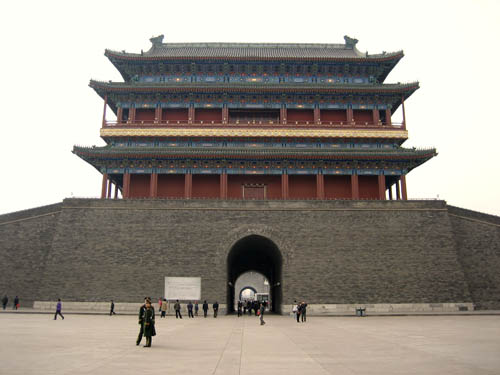
Tiananmen Square was about what you'd expect - a large open square in front of the Forbidden City. There were a few buildings like the Mao mausoleum, but they were closed for renovations. One surprise was that there was a security check in order to get onto the square, with a bag-scanner and metal detector. The employees didn't seem to be too serious about their job, though - the metal detector buzzed when I went through it, but nobody checked me (there were two girls with wands, but they were talking to each other off to the side). At one point there wasn't even anybody manning the bag scanner at all. This seemed to be typical of security checks throughout China - they clearly did not care about someone who was obviously a tourist, but anyone who looked like a poor, local Chinese person seemed to get checked more rigorously.
Here are a few pictures from Tiananmen Square:
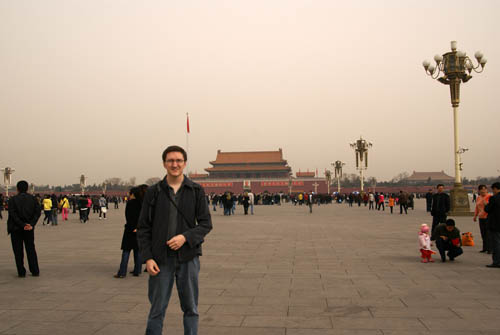
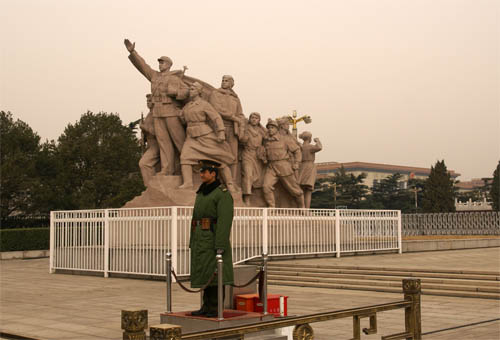
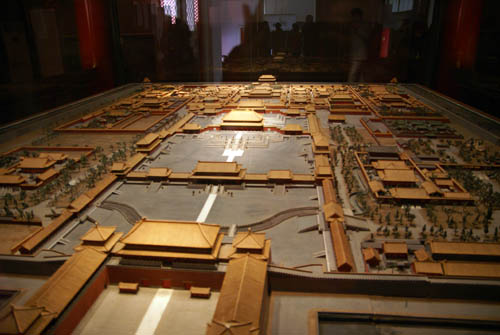
North of Tiananmen Square is the Forbidden City, the former palace of the Ming and Qing dynasties. It was most impressive for its sheer size, which can sort of be glimpsed in this picture of a model:
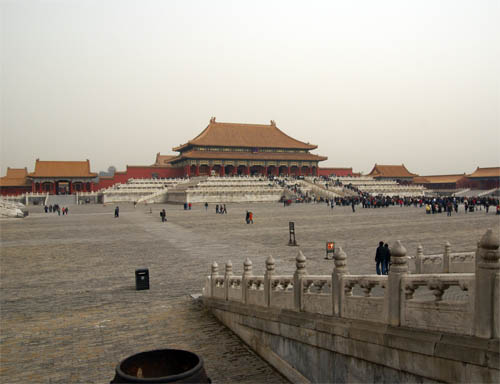
Several times we walked across a large courtyard thinking we had seen the main buildings, only to find an even larger courtyard and set of buildings on the other side. The largest building in the center is the Hall of Supreme Harmony, which is where the Emperor lived:
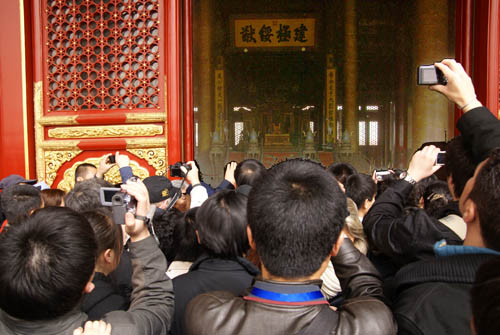
As you can see from the picture there was an immense crowd streaming up to the entrance of the building, where you could take pictures of the imperial throne. We didn't feel like pushing and shoving our way through the throngs of people, so this was the best picture we were able to get (the contrast for the indoor section has been adjusted):
Our Lonely Planet guidebook (from 2007) claimed that there was a Starbucks inside the Forbidden City, so we searched high and low but were unable to find it. Apparently in the run-up to the Olympics, the government decided to kick Starbucks out and replace it with a "China Coffee" stand.
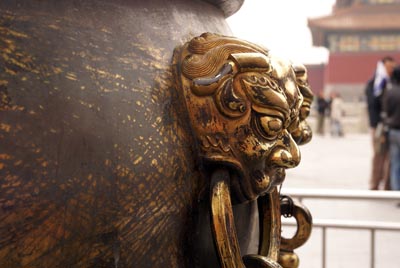
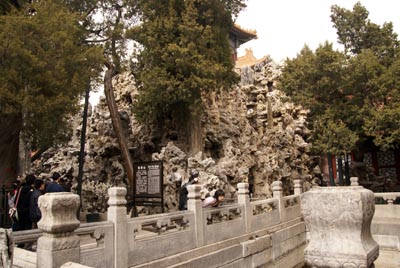
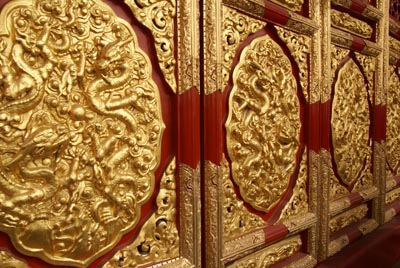
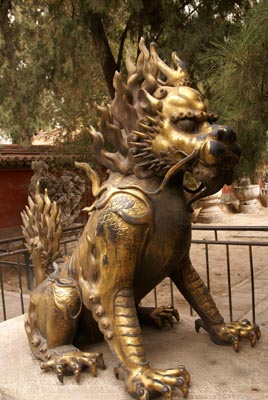
Aside from the architecture, there was unfortunately not a whole lot else to see in the Forbidden City. The majority of the imperial collection was destroyed, looted, or shipped off to Taiwan during the Chinese civil war. That said, we were still able to find a few interesting things to snap pictures of:
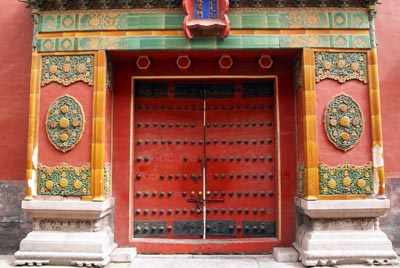
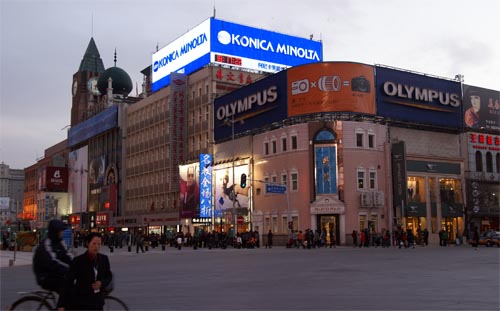
Once we were satisfied that we had seen everything, we wandered over to see a "night market" that the guidebook raved about. There were still a few hours before night, so we checked out a nearby shopping mall. It had a lot of expensive Western and Japanese stores in it, so it must have been mainly for tourists or rich people:
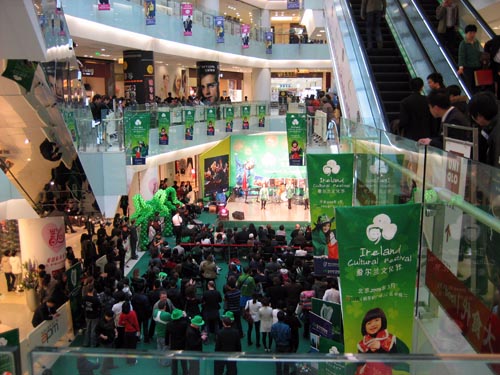
Strangely enough, there was an "Ireland Culture Festival" happening at the mall that day, complete with harp performances and jig dancing. It was apparently put on by the Irish embassy:
Once it got dark, the Wangfujing Night Market opened up. It's famous for having all kinds of crazy foods, like scorpions and starfish:
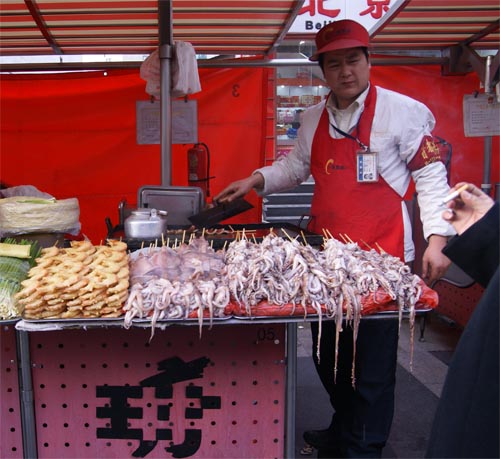
Octopus on a stick, anyone?
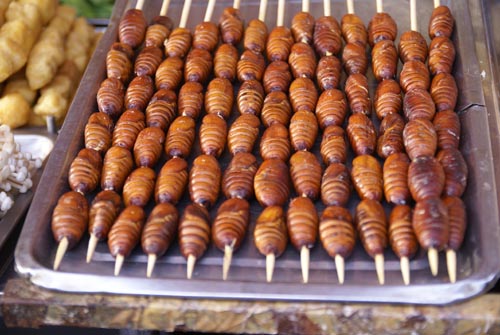
Or bugs on a stick
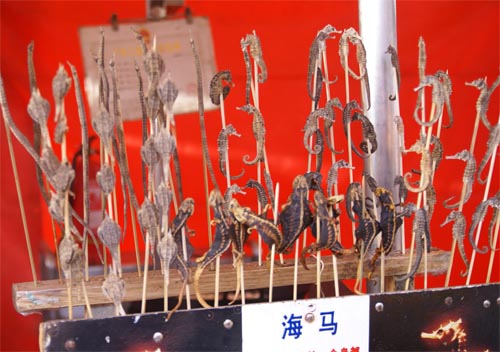
Seahorses on a stick
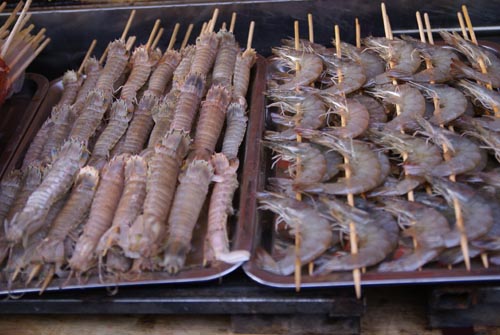
I'm not even sure what these things on the left are, but they're on sticks
I didn't eat anything much crazier than something described as "fish balls." The most surprising thing about the night market was how extremely organized it was. Each vendor had a clean, organized stall, and everyone was wearing the same uniform. Our friend later told us that the Chinese government heavily regulates this particular market and forces it to be extremely clean and organized since it is a large tourist attraction. He even described it as "un-China-like" because a regular street market (for the locals) would be much different.
That about wraps up Day 1 in Beijing - I'll post Day 2 next.
Rubik's Cubicle
More vacation pictures are still on the way, but this was too good to pass up.
At work there is a tradition of playing a prank with somebody's office when they go on vacation. So it wasn't a total surprise that when I got back to work, I discovered that my co-workers had transformed my office into a "Rubik's Cubicle":
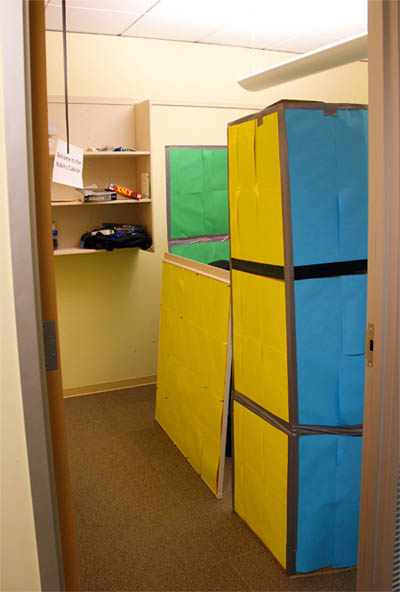
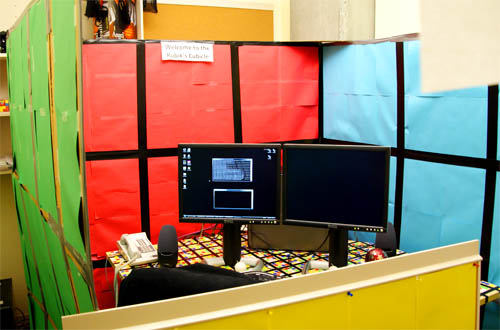
It's quite an elaborate construction job, with 4 double-sided walls and a "door" to go in and out.
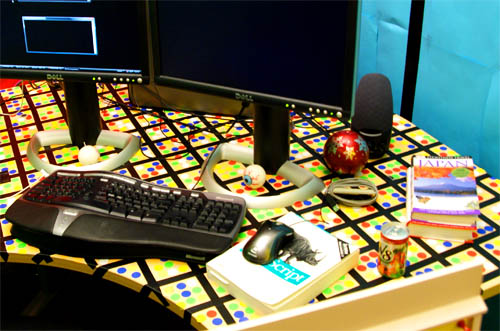
Even the desk is covered in hundreds of stickers to make Rubik's Cube-like patterns. I'm sure they will be lots of fun to peel off..
China & Japan
Update: I've written up more detailed posts about the trip: Beijing Day 1, 2, 3, 4-5, Shanghai, and Tokyo.
I haven't posted for a few weeks because I've been on a trip to China and Japan. I got back today but I'm still on Tokyo time and pretty tired and jetlagged. I'll write up some much more detailed posts later, but in the meantime here are a few pretty pictures to look at:
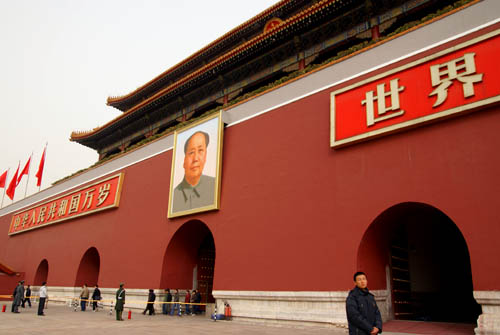
The omnipresent portrait of Mao
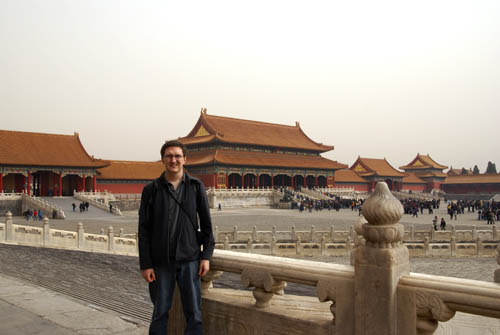
The Forbidden City is no longer forbidden under the communists. I wish I could say that this is just a bad picture, but it really looked this bad (or worse) around Beijing due to the pollution.
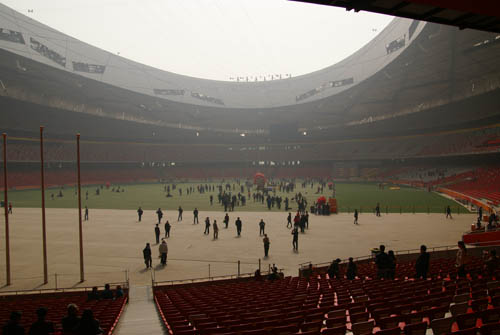
The "bird's nest" Olympic stadium - again the pollution is so bad that you can see it even in the stadium.
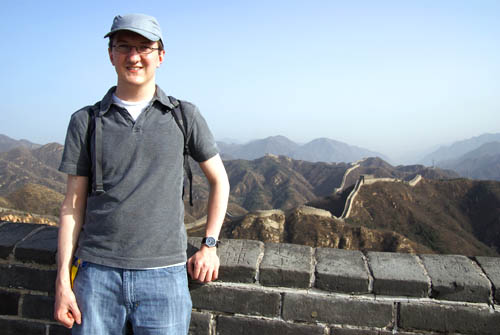
The Great Wall of China is up in the hills, so it's a little bit clearer.
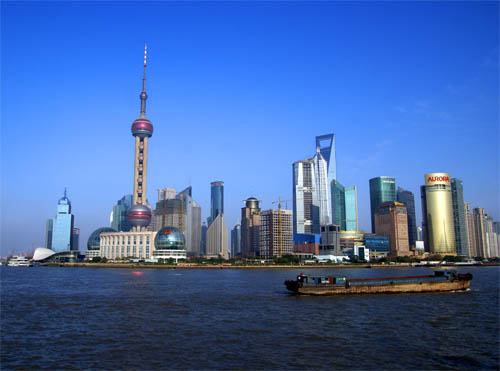
One morning in Shanghai was actually very clear and we were able to snap this nice pic of the modern skyline.
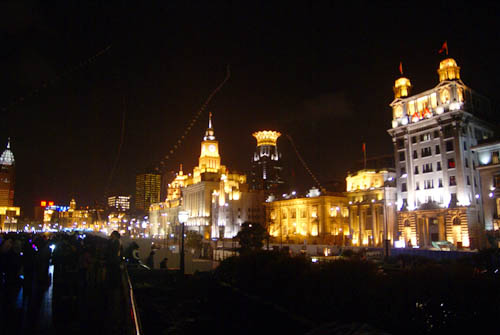
The buildings on the opposite side of the river are all left over from British colonialism, which creates a strange juxtaposition.
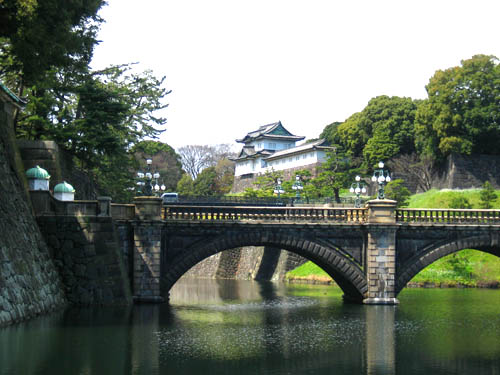
In Tokyo the Imperial Palace is still off-limits, but you can sort of peek in.
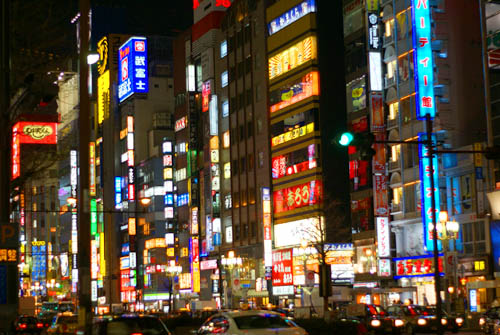
Nighttime in Tokyo is a sea of neon light.
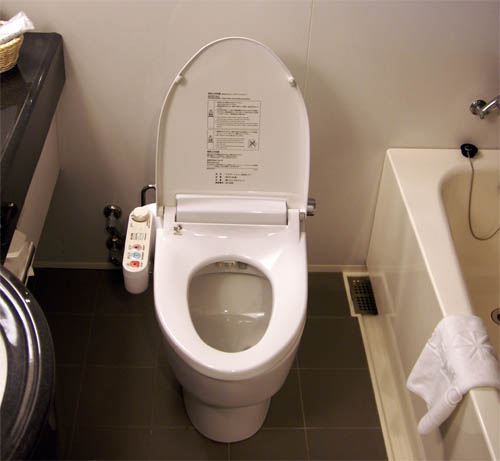
Japanese toilets take a little getting used to. This one in our hotel was a simple model that only had two water jets and a pressure control (no aim control, heated seats or blow-dryer).
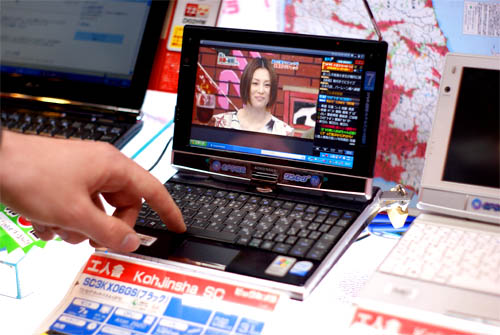
Netbooks in Japan are even smaller and crazier than in the US - this one has a touch screen, swivels into a Tablet PC, has an antenna for watching TV, a GPS, and a dual-core processor.
Staff Favorite
My parents noticed this today on iTunes and sent it along:
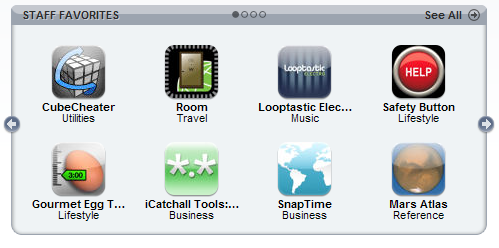
CubeCheater is a Staff Favorite today (and maybe all week - I'm not sure how this process works yet)! An unknown Apple employee has smiled upon my app, which is exciting (it's tempting to assume it's Steve Jobs himself, but that's of course extremely unlikely).
It'll be interesting to see how this affects sales. For the most part, I personally get apps directly on my phone rather than through iTunes on the computer, so I'm not browsing the Staff Favorites very often. Getting onto the "Featured" or "What's Hot" lists would probably be more beneficial since those lists are browsable on the device itself.
Piratizer
UPDATE: Success! After 3.5 days, here are the Google results for 'piratizer':
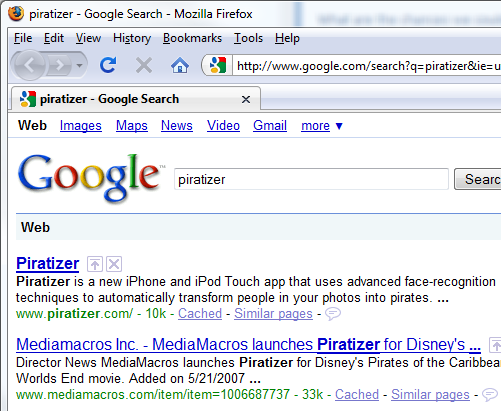
A sneak preview of Piratizer in action is coming soon :).
--------
Wouldn't it be cool if you could take a picture of your friends with your iPhone and it would recognize their faces and automatically turn them into pirates? A couple of my friends and I thought it would, so we got to work on a new iPhone app called Piratizer.
The app is still weeks away from being complete, so the site is currently only a teaser. When it does launch, it's important that the number one web search result for "piratizer" returns our site rather than any of the random things it returns right now. To make that happen we need to seed the web with links to the Piratizer iPhone app web site several weeks in advance.
In case you haven't figured it out, that's what this post is about :). If you're a human reading this, then you can move along - there's not much to see here. If you're a crawlbot, welcome! Please crawl all the links in this post, particularly the ones to piratizer.com.

Me
.svg)
Apps


Search
Archives
- July 2013
- May 2013
- April 2013
- March 2013
- February 2013
- January 2013
- December 2012
- November 2012
- October 2012
- September 2012
- August 2012
- July 2012
- May 2012
- April 2012
- March 2012
- February 2012
- January 2012
- December 2011
- November 2011
- October 2011
- September 2011
- August 2011
- July 2011
- June 2011
- May 2011
- April 2011
- March 2011
- February 2011
- January 2011
- December 2010
- November 2010
- October 2010
- September 2010
- August 2010
- July 2010
- June 2010
- May 2010
- April 2010
- March 2010
- February 2010
- January 2010
- December 2009
- November 2009
- October 2009
- September 2009
- August 2009
- June 2009
- May 2009
- April 2009
- March 2009
- February 2009
- January 2009
- December 2008
- November 2008
- October 2008
- September 2008
- August 2008
- July 2008
- June 2008
- May 2008
- April 2008
- March 2008
- February 2008
- January 2008
- December 2007
- October 2007
- September 2007
- August 2007
- July 2007
- June 2007
- May 2007
- April 2007
- March 2007
- February 2007
- January 2007
- December 2006
- November 2006
- October 2006
- September 2006
- August 2006
- July 2006
- June 2006
- May 2006