Kindle
Before my trip to Asia I got a second-generation Amazon Kindle, which had just been released. I was too busy to write up a review at the time, but maybe that's just as well since now I have the additional perspective of having owned it for several months.
Kindle Review
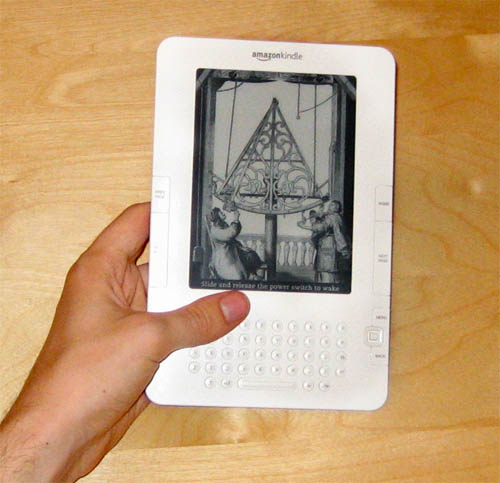
Pros
- I got it explicitly for travel reading since it's so small and light. It's about the size of a paperback book, except thinner - it's less than 1 cm thick (a little more with the case attached). It's a lot more convenient than carrying around multiple books on a long vacation. You can load it up with a whole library of books and have a lot more variety than you would otherwise.
- The battery really does last a very long time. Since it only uses battery power when updating the screen to flip pages, it can go for weeks between recharges, unlike a phone or a laptop which would die after only a couple of hours. I used it extensively on a 15 hour flight to Beijing and barely any of the battery power had been consumed at all.
- You can load it up with public domain books for free. Internet people have converted pretty much every significant book published more than 70 years ago to Kindle-compatible formats, and it's really easy to subscribe to these "book feeds". I have loaded mine up with tons of books I've been meaning to read for a long time but have never gotten around to - Thoreau, Dickens, H.G. Wells, Verne, Tolstoy, etc.. Obviously you can also read all of these books for free on the internet, but then you're tied to a computer screen or a regular laptop with poor battery life.
- When you plug it into a computer, it just shows up as a 1 GB USB thumb drive. One less gadget to worry about carrying around. This has already been handy a couple of times.
- It's easy to change the text size. Unlike a real book, if you feel like holding it farther away from your face, you can make the text bigger. Or if you feel like holding it closer, you can shrink the text and get more on one page.
- It has a built in Oxford dictionary - just move the cursor over a word and click to get the definition. Very handy for books with lots of uncommon words.
- You can buy books from Amazon right on the device and start reading instantly - no need to drive to the store or wait 3 days for them to be delivered. Most books are $9.99 or less - even the new hardcover books which would regularly be $19.99. So if you buy a lot of those you can actually save money.
- There's a companion iPhone app on which you can also read your Amazon-purchased books (but not public domain books). They both keep in sync via the internet, so you can easily change devices and pick up right where you left off.
Cons
- The screen size is pretty small - the actual screen is about 4 inches across. It's particularly annoying because there's a large 1 inch bezel on all sides of the screen. It would have been a lot better if this extra space could have been used for the screen. Of course, only weeks after I bought it Amazon announced the "Kindle DX" with a large 10 inch screen. I haven't used one of those in person, but it actually looks a little too big, particularly for carrying around while traveling around or commuting.
- It's very difficult to "flip through" a book and search for something, like you can easily do with a real book. It takes about 1 second to flip a page, which is OK when reading regularly, but it makes it pretty much impossible to casually flip back a few pages to quickly re-read something, or pick up a reference book and look up some information. There's a search function and a little keyboard, but they get to be infuriating if you're trying to do anything much more complicated than jumping to chapter headings.
- You can't give a book to a friend (obviously). I read an interesting book about a topic I know a friend is interested in, but too bad: no book borrowing (or re-selling).
- The text layout abilities of the Kindle are fairly limited. If a book uses any formatting much more complicated than a typical novel, it's probably going to get munged and look wrong, particularly if the book was "ported" poorly to e-book format. This is all doubly true for any complicated illustrations or charts, some of which are rendered completely illegible.
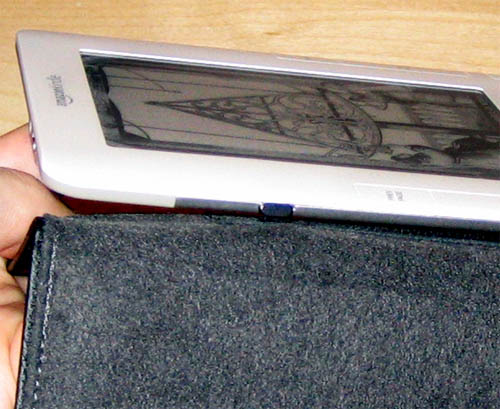
- There's a serious design flaw in the way the case connects to the device, as noted by a class-action lawsuit. It's extremely easy to get the case into a position where it will bend the plastic, and eventually break the screen. Because of this problem I always remove the case before using it:
Overall I think it's quite an interesting device, especially for people who like both gadgets and reading. However, its limitations can be quite infuriating at times, and I don't think that it's ready for the mainstream market yet. These problems will no doubt be corrected fairly soon by newer devices. E-Books and digital distribution are definitely going to be the way of the future. Hopefully the publishing industry will understand this fact better than the music and film industries do.
Personally, I'll probably use the Kindle for travel reading, fiction novels, and "pop" books that you read straight through once and never again (Dan Brown, Malcom Gladwell, etc). It doesn't work very well for more substantive books or programming & technical reference books, so I'll probably continue to get "dead tree" versions of those.
Another Dead Laptop HD
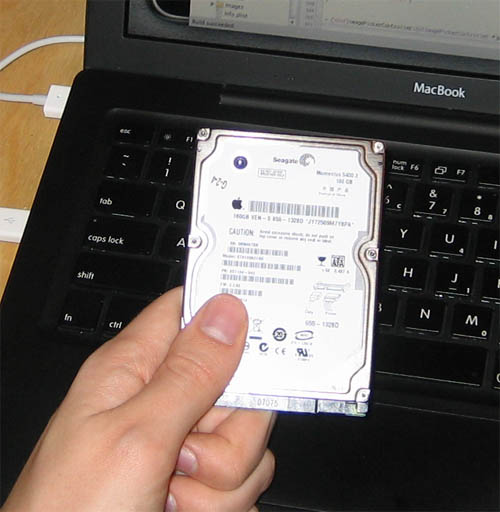
On Thanksgiving day my laptop decided to boot up with the "flashing question mark folder" error of doom. No amount of recovery tricks helped - it looks like the disk just mechanically failed.
The laptop hadn't been bumped around too much, but it did get its fair share of everyday jostling. Still, failing after one year still seems pretty bad (of course it was just over one year, and the warranty was for 1 year). It reminded me of the recent CMU study which showed that real disk failure rates are 15 times what vendors claim..
Fortunately I had properly backed up all of my data and didn't lose anything important, other than 3 hours of work since my last CVS commit. Unfortunately I hadn't actually backed up the entire system, so after I replaced the disk with a spare I had to reinstall all the software and re-tweak all of the settings, which took several hours. Lesson learned: I have now applied the hack to enable Time Machine backup to network shares and am fully backed up. Unfortunately, Time Machine is basically incompatible with FileVault (unless you log out and back in every day), which sort of makes it impossible to either back up or encrypt your important stuff (and on laptops especially, you want both to work).
Anyway, my next laptop will definitely have one of the new Intel SSDs, which should theoretically be much more resilient to mechanical failure since they have no moving parts. They haven't been on the market long enough to get any good reliability data, but it would be hard to do worse than the Seagate drives I've had recently.
Computer Graveyard
A local recycling center is having a special tomorrow, with free recycling of old computers. I have a few old ones lying around, so tonight I decided to drag them all out and get them all ready to go.
I was surprised at how much old computer junk I have accumulated over the past few years. It's really sort of embarrassing to consider how many physical resources were used up to manufacture these things, and now I am getting rid of them. Fortunately they will be recycled as much as possible and the nasty pollutants won't go into a landfill.
It's probably a bit late for this, but if you see anything you would want before tomorrow afternoon, let me know (Seattle-area people only).
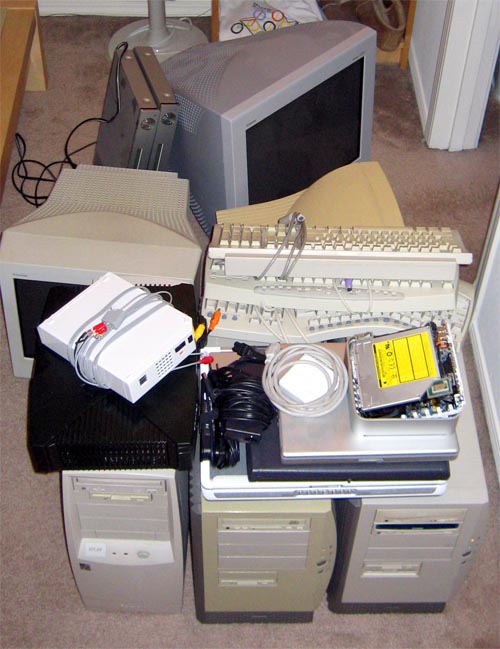
The pile includes:
- 3 old desktop PCs
- An old 200(?) MHz Pentium I computer which my brother found when some local business went bankrupt (If I remember correctly).
- A 500 MHz Pentium III desktop - the first computer I was able to buy and build for myself in high school, after saving for years.
- A 1.8 GHz Pentium IV desktop - the computer I built while in college.
- 3 laptops
- A 500 MHz PIII Dell Inspiron - my first laptop (now dead)
- A G4 12" Apple PowerBook, with bad hard-disk controller (dead)
- Another Dell laptop, this time a P4, with a bad motherboard (dead)
- G4 Mac Mini (dead integrated power supply)
- One extra original XBox (functional - I randomly won it in a contest, keeping the other one)
- One dead Nintendo Wii (killed by my homemade component cable)
- 3 CRT monitors
- 15" Gateway (bad condition, but functional)
- 17" Sony Trinitron (good condition)
- 21" Sony Trinitron (functional, except for a big gash across the glass screen - I filed a BBB complaint against UPS and then got it for free)
- 2 identical Samsung DVD players (the first one got lost by FedEx for 4 months, during which time I had complained and gotten another one for free)
- Bunch of keyboards
Now that I have started preparing to get rid of all the computers, it's taking a surprisingly long time to shred all the hard-disks with a Knoppix CD. I should have started this earlier..
BenderCam
I was updating the links on the ol' resume page and realized that I didn't have a page about any EE stuff, so I decided to write one up.
My final EE project in undergrad was to build an embedded computer system from scratch, and my team decided to build a digital video camera, called "BenderCam" (Bender didn't really have anything to do with anything, other than that one guy just really liked Futurama).
Here's a picture of the final system:
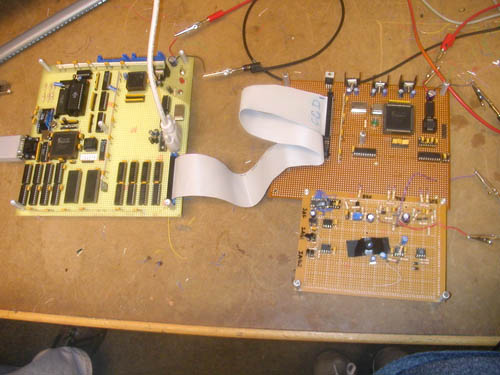
The circuit board on the left has the main CPU circuit, which was composed of a Motorola 68HC11 microcontroller, a 32K ROM with the system software, 32K of runtime RAM, and 512K of auxiliary VRAM. It also has a Spartan II FPGA with some DACs that ran the VGA interface, as well as the RS-232 serial interface to a computer workstation. It's connected via an old IDE cable to the second circuit board on the right that has the CCD video sensor and another FPGA to drive the video capture.
Here's a picture of the back of the main board:
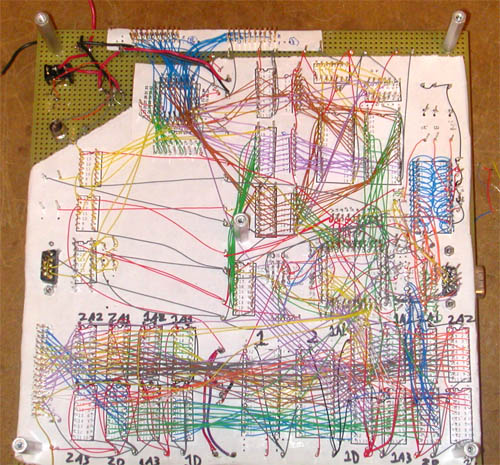
This was mostly hand wired by me, which almost caused me to go crazy since every wire had to be perfect or else the chips could all fry. The wires at the top are for the CPU and its two 16-bit buses, and the nasty mess at the bottom is the 24-bit buses for the VRAM double-buffer. If I had to do it all again I would almost certainly go with a PCB rather than hand-wiring the whole thing.
The system captured 640x480 video in black & white (we used a CCD sensor from a security camera) and displayed it on a VGA monitor. After some tricky optimizations in the firmware, I was able to get the framerate up to about 15 frames per second, though the bandwidth at that rate was too high for the hand-wiring to handle, and EM interference started to introduce random bit errors into the video stream. Here's a picture of it taking a video of us taking a picture of it:
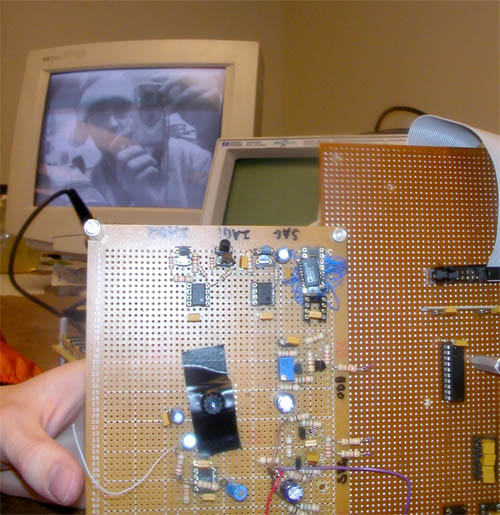
The CCD sensor is the thing with the electrical tape all over it, to prevent light from leaking in. On top it has a lens that we cracked out of an old dead cellphone (high quality all around).
The microcontroller also hooked up to a computer via a serial connection which could be used to download new firmware as we were debugging it, as well as upload pictures back to the computer. The connection was only 56 kbps so it could transfer about one frame every 10 seconds. Here's the software after it has taken a picture of us and some random dude who jumped into the picture:
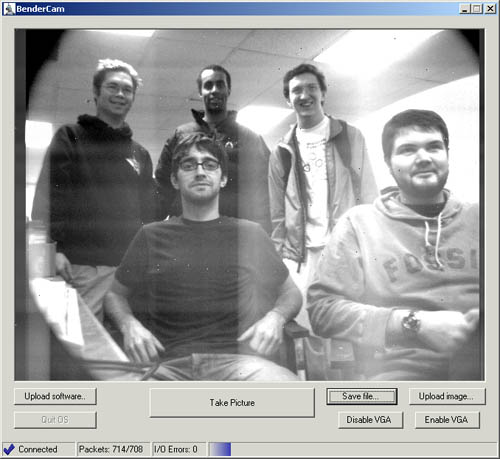
The random white and black pixels in the image are examples of the bit errors that happened at high speeds. The "washed out" vertical lines near the ceiling lights were caused by excess capacitive charge building up on the DAC, which could be easily temporarily fixed by licking your finger and using it to short out the DAC's voltage supply line.
Server noise
Unfortunately, after a couple of months of operation, my Windows Home Server has started to make a lot of noise. The case fans were always pretty loud, but now the hard disk has started making a high-pitched whining noise. Normally this wouldn't be too annoying since you could eventually get used to it, but the noises fluctuate in pitch at seemingly random intervals. This is irritating since you can't habituate to it and ignore it.
My first thought was to put it in the garage with a little Linksys WiFi bridge:
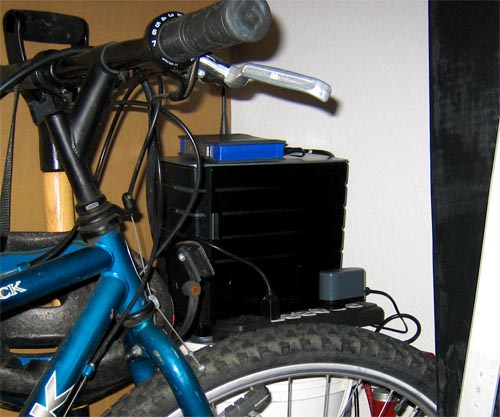
This worked pretty well and it certainly took care of the noise problem. Unfortunately it was a little far away from the AP, so the wireless connection went out every once in a while when doing things like using the microwave. It wouldn't normally really be noticeable, but it interrupted things like streaming music to the Squeezebox.
Another problem with the garage setup was that an outlet shortage forced me to run a power extension cable across the ceiling on a water pipe, right next to a fire sprinkler:
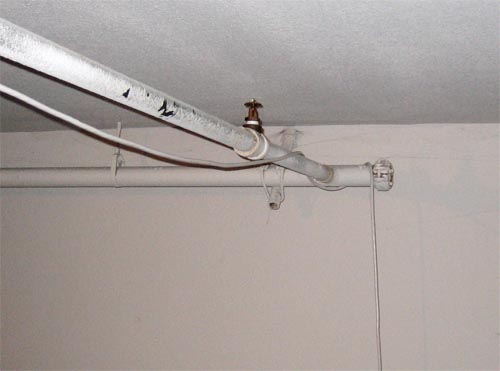
This was a disaster waiting to happen in more ways than one, and it also irked my inner-Electrical Engineer.
Now I'm trying a new solution, which is to stick the server in the laundry closet. This looks like it's working better so far (it's also a lot closer to the AP), but I'm waiting to see if it might overheat the closet or computer when the dryer is running.
RAM Upgrade
One of the problems with the HP MediaSmart windows home server is that it only comes with 512 MB of RAM by default. This is probably sufficient for a file server, but it gets pretty slow when you load it up with other stuff and try browsing the web. Here's my Task Manager results after two weeks of normal usage:
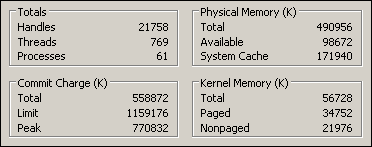
The way to check if your computer doesn't have enough RAM is to compare the Physical Memory and Commit Charge numbers. In this case, the server has 512 MB of RAM (Physical Memory = 490956 K), but the operating system has currently allocated about 545 MB of memory (Commit Charge = 558872 K), which means that it's 6.5% over-allocated even when it's idle and doing nothing.
The 'Peak' Commit Charge reflects the heaviest usage the system has seen since it was booted, which probably happened when I was using Firefox. In this case it was about 753 MB (770832 K), or 241 MB (47%) over-allocated. When this happens the system grinds to a halt as it tries to move unused blocks of memory to the hard disk in order to keep the 'Available' physical memory (98672 K here) high enough for programs to run smoothly. These are the kinds of slowdowns we want to avoid since they are the ones that happen when you are actually trying to use the computer.
Fortunately these days RAM is cheap and a 2GB stick can be had on NewEgg for only $50, which should be more than enough for the foreseeable future. I was surprised at how easy it is to upgrade the RAM in the HP server - it just required removing a couple of screws and sliding the motherboard out of the bottom of the case:
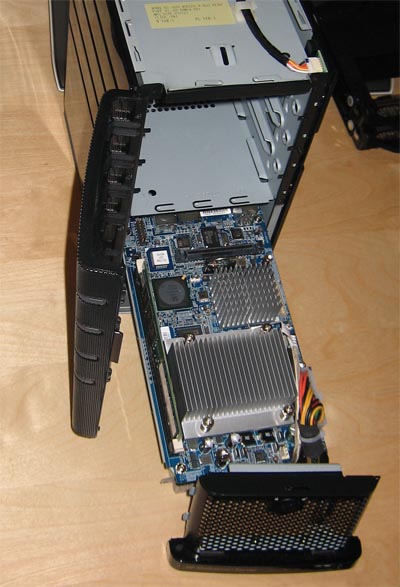
With the new RAM the system is running a lot faster, but the bottleneck is now the relatively weak 1.8 GHz AMD Sempron processor, which doesn't appear to be readily upgradeable. One of the reasons to go with a Sempron is the power/heat savings, so it's probably an acceptable tradeoff at this point.
Dead cable modem
While I was gone on my brief Christmas vacation over the last week, my computer back at home disappeared from the internet - the IP address did not respond to any connection attempts at all.
Naturally I feared the worst, namely that some thieves broke into my apartment and stole all my stuff, or something like that. Fortunately, when I got home I discovered that the cable modem had simply stopped working, and everything else was fine.
There may have been a power outage or some other electrical anomaly while I was gone, because the cable modem seemed to be fried. When I plugged it in, all the LED lights turned on but it didn't seem to do anything else. I searched around on the internet but couldn't really determine what these symptoms meant, or how to fix the problem (for the reference of anybody searching for the same thing in the future, it's a Terayon TJ 715x cable modem).
What happened next was the most amazing thing I have experienced all week. I thought for sure that I would have to call Comcast, argue with them ("yes, I tried rebooting the computer.."), make an appointment for two weeks in the future, which they would be late for, causing me to miss work, etc. (being without internet access the whole time, of course).
What actually happened was that I called Comcast, immediately got a real person on the other end, explained the problem, and got a maintenance appointment scheduled for "right away". A half hour later, the guy showed up, swapped out my modem with a new one, and now everything works again. In total, it took about 45 minutes.
So I am pleasantly surprised that Comcast had such good customer service and I was able to get the problem fixed so quickly. Of course, this doesn't excuse them blocking our, uh, bible, downloads, but there has definitely been a lot of improvement since my last encounter with them.
Windows Home Server
This week I got a HP MediaSmart server, which runs the new Windows Home Server software. It's a small, quiet headless computer about the size of two six-packs stacked vertically:
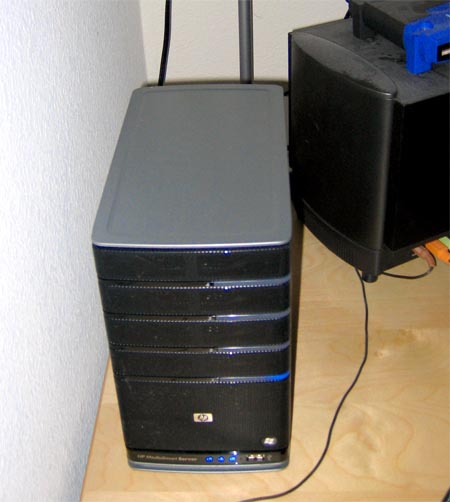
Fortunately I was able to get an employee discount of a few hundred dollars off the list price. I don't think it would be worth it otherwise, compared to just re-using an old desktop computer as a server. The advantages of this hardware are that it's small, quiet, consumes very little power (it has an AMD Sempron), and has server-class parts designed to be running all the time (SCSI .5 TB drives, etc). The disadvantages of the hardware are that it is headless (can't be used as a small media center or DVD player), and that it has only 512 MB of RAM.
I got it to replace my Mac Mini, which I had been using as my media center, MP3 server and remote-login server. The Mac Mini hardware apparently wasn't up to the task of running all the time, since it died a horrible death after running continuously for about a year and a half. I'm hoping this new computer will fare better.
I would use my normal desktop computer for server stuff, but the problem is that it's extremely loud, noisy, and sucks a lot of power, so I usually have it turned off at night and while I'm gone. This creates the problem that I can't log into my home network while I am away, in case I need to access an important file or do other, uh, tasks that can't be done at work.
One nice feature of Windows Home Server is that it is essentially a stripped-down version of Windows Server 2003, with some unnecessary parts removed (Active Directory server, etc), but useful things kept in, such as IIS. It gives you a free *.homeserver.com domain name, and automatically updates the DNS records whenever Comcast changes your IP address on you. At that address it serves up a little web page that allows you to log in and access files on the server, upload new files to it, and TS into the server itself or other computers on your network with Remote Desktop Proxy. Using the normal server administration tools, you can use Wake-On-LAN to boot up any of your computers, even if they are turned off or are sleeping (which is cool). You can also run whatever ASP.NET 2.0 apps you want on it (I'm trying to think of a cool one to write).
Another of the big features is that it can automatically back up your Windows computers every night with Volume Shadow Copy, and allow you to restore the entire OS to any point in time by booting off a CD and copying the image off the network. You can set it to back up the important data on multiple disks, so that if one of them fails in the server, you're still safe. These kind of regular backups are things that everybody knows they should do, but few really do, myself included. Up until now, my current backup strategy was "burn a DVD every 6 months or so", so this should be a lot better.
Unfortunately I am hitting one problem with the way it does the automatic backups. It sets your computers to automatically wake themselves up at 3:00 AM via ACPI and connect to the server to do the backup. After that, it seems to assume that the computer will automatically fall back asleep after 30 minutes of inactivity, or whatever the Windows default is. Of course, I have automatic sleeping disabled on my computers, so that doesn't work. For the last two days I've woken up to find that my computer woke itself up at 3:00 AM and stayed on all night. I made a small scheduled task that should put the computer back to sleep after it finishes backing up, so we'll see if that works tonight.
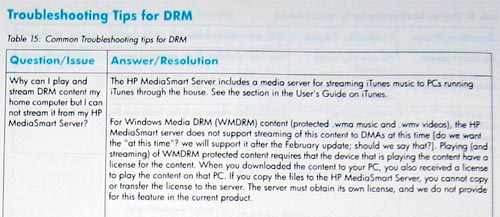
One of the interesting things about the HP server is the printed manual that comes with it. I don't know if they just never copy-edited it, or accidentally published the first draft instead of the final one, but it's absolutely terrible (almost 'Made in Taiwan'-bad). Here's a little gem on the DRM-troubleshooting page:
Dead Mac
There were some power outages and fluctuations this week due to wind, and one of the casualties seems to have been my Mac Mini media center (and yes it was plugged into a surge protector):
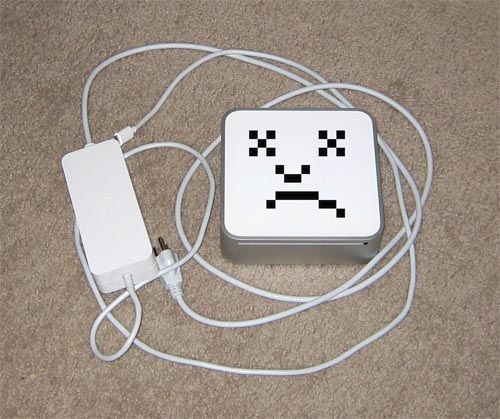
It refuses to boot or do much of anything at all when I push the power button (the only button or switch on the entire thing). I don't know whether it is the computer or the power supply. The AC adapter reads 0 Volts when probed, but it may just be waiting for a load to be applied. I suppose I can probably take it to the Apple store and see if they have a spare power supply I can test it with. It's out of warranty (of course), so I doubt it would be worth paying the repair fee if it's not just the power supply..
MacBook
Last weekend I got a new black 13" MacBook:

I didn't get a MacBook Pro because 15" or 17" is just too big. I like smaller laptops that you can actually fit on your lap. If they had smaller MacBook Pros like the old 12" PowerBook I used to have, I would have gotten one of those.
The MacBooks are also a lot cheaper than the Pros, so it was much easier to justify financially since I my old laptop (now dead) was only about 2 years old. The $100 UW student discount didn't hurt either (the Microsoft employee discount was also $100 so I could have used that too, but it just seems weird to use a Microsoft discount to buy an Apple laptop).
Fortunately it has 2 GB of RAM so I can run XP on it OK. I am using the 30-day trial of VMware Fusion and so far I am not impressed. I might try Parallels Workstation to see if that's better, but I doubt it will be.
Fusion's "Unity" mode runs Windows apps as native Mac OS windows, like so:
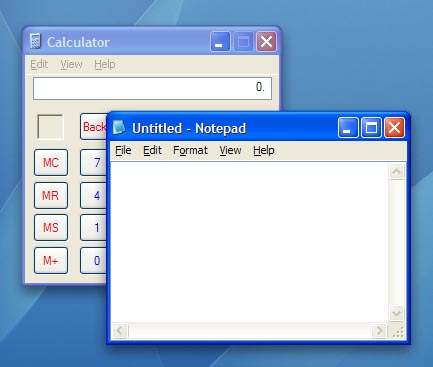
This all works fine and dandy until you try to do anything fancy, such as activate Exposé:
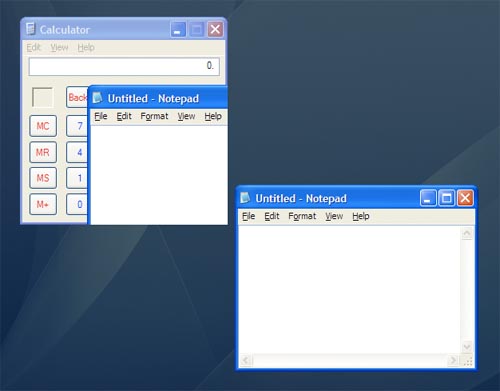
Doh! Look at the Notepad window overlapping the Calculator window. This is obviously due to limitations of the GDI rendering model (namely, windows cannot paint themselves when they are obscured by other windows), but I think VMware might be able to work around it in a future patch. In the meantime, however, it looks really bad. There are a lot of other weird bugs like this that make the overall experience very poor.
The other main adoption-blocker for VMware Fusion is that when you boot up your Boot Camp partition, Windows detects that your hardware has changed, and prompts you to re-activate. You can eventually get it activated, but every time you switch between Boot Camp or VMware, it forces you to re-activate. VMware has instructions in their support forums for supposedly fixing this problem, but they do not work. This essentially makes it unusable, which is really too bad.
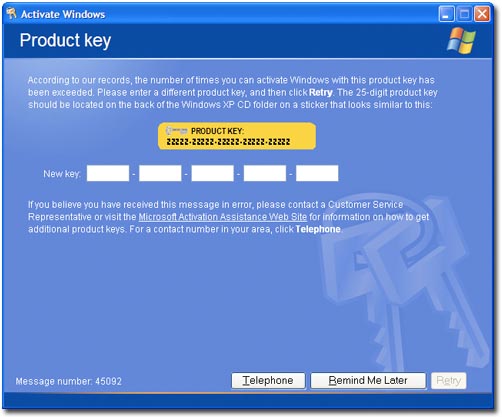
Oh WGA, how we hate you
Eyeball Security Camera
As many people noted, the Eyeball Security System is very vulnerable to attack since it can easily be turned off or unplugged, rendering it useless. Little did they know, that was all part of the plan!
You see, the actual tripwire alarm is just a decoy, and is just one part of the whole system. Most people see only the alarm and completely miss the webcam conveniently positioned to catch them in the act of stealing the eyeballs or trying to disable the alarm:
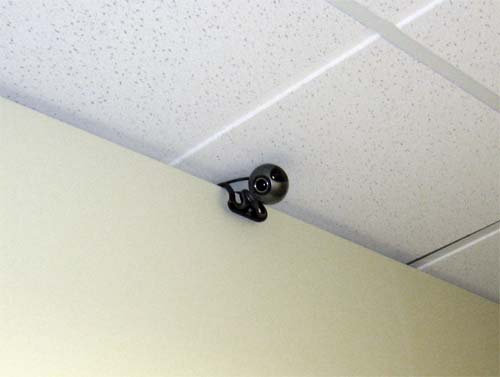
The webcam caught many people red-handed, though eventually its presence was discovered and disclosed to other would-be thieves.
Here's a YouTube video of the interesting bits of the security camera footage:
Eyeball security system
After a recent rash of Wallmonster eyeball thefts, it became clear that I needed to install an Eyeball Security System:
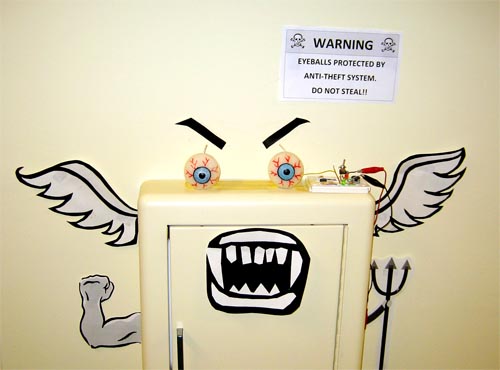
It's wired up to set off an alarm if anybody steals the eyeballs.
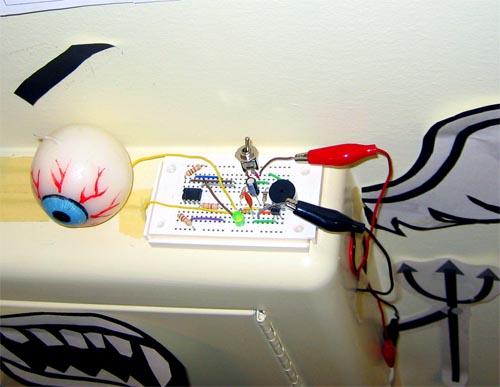
With such a disorganized circuit design, it might look like it was wired up by a mental patient, but it's all part of the protection scheme. If it's confusing looking, nobody can crack it (don't listen to Schneier and his claims that security-through-obscurity will never work, bah).

Each eyeball is coated with tin foil, which completes an electric circuit when it's in place touching the two wires.
Here's the obligatory YouTube video of the system in action:
Broken Wii
Doh. While fooling around with my homemade Wii component cables I accidentally broke off the Pb and Pr pins of my Wii's YPbPr connector:
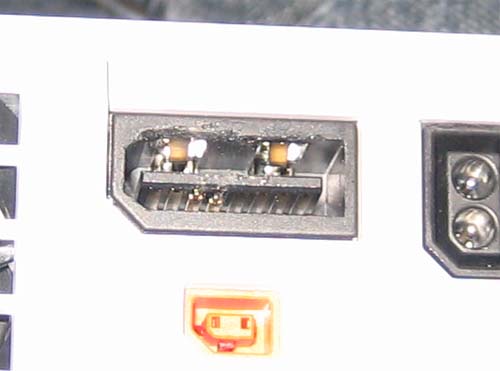
Trying to fix it just made it worse. I only have the Y signal left, so mini-Mii is angry now that he only shows up in black & white:

Homemade Wii component cables
I still haven't been able to get real Wii component cables in order to display in progressive scan (Nintendo seems to be thumbing their nose at their most loyal fans with the Wii), so I found a guide online for making your own homebrew cables. It works, but the main problem is that you have to destroy your composite A/V cable to do it.
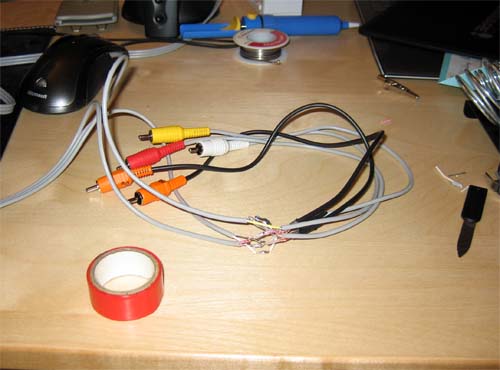
Wiring like this is the moral equivalent of goto statements and spaghetti code. My E.E. professors would be ashamed..
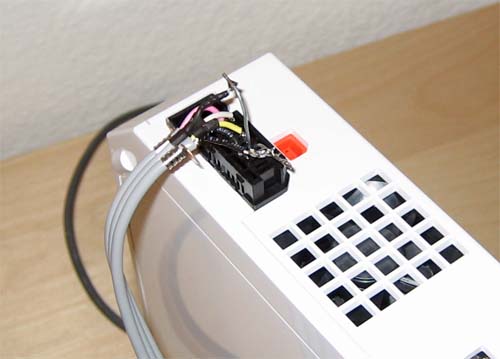
Paperclips to the rescue! Obviously not a long-term solution, but it works.
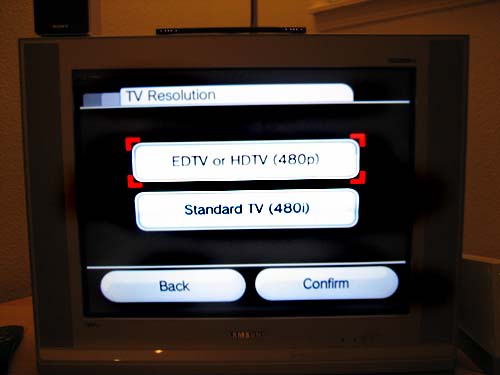
Yay for finally being able to select 480p! I just noticed in this picture that my camera has no IR filter, so you can see all the LEDs in the Wii 'sensor bar.' I am surprised that it has 4 on each side..
Dead bulb
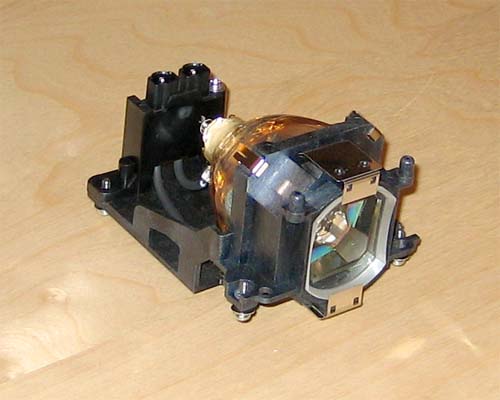
My projector's bulb died this week after 600 hours, when it was rated for 2000 hours. Grr! Nobody seems to have them in stock right now, and I'm not going to pay Sony the full retail price for a new one ($350!?), so it looks like I'll be stuck for a couple of weeks unable to play Wii or watch Netflix movies. Oh well.. It's a good thing I just canceled my cable TV.
The actual bulb looks pretty weird - here's a pic:
Monome Apps
Here's a video (below) of a few of the more interesting monome apps I've made so far (see this post for an explanation of what a monome is).
- "Grid" game: I haven't thought of a better name, but this game is sort of like Othello or Go. Players play as "light" or "dark" and try to capture the opponent's territory by toggling his/her pieces and then capturing any surrounded squares. It's interesting to play at first, but after playing several people without finishing a game, we determined that it's probably not actually winnable as long as both players always make intelligent moves. But, interestingly enough, a "greedy" AI that plays against itself will often end up winning (and losing), as long as it doesn't get stuck in an infinite loop.
- "Raindrop": this is a raindrop ripple simulator. You can create ripples by pushing buttons - the more you push, the bigger the ripples. It's pretty cool.
- Pong: the classic. The resolution (8x8) is a little low, but it actually works pretty well since the computer simulates the board at higher resolution. The main problem I see with Pong is that each player has only 2 inputs (up and down), so it's not using the full power of the 64 buttons, which it seems like good monome apps should.
Here's the YouTube video:
Monome 40h
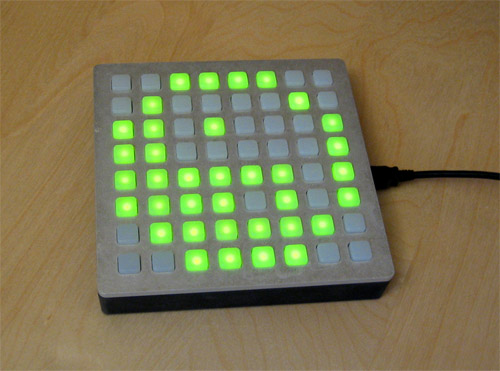
I recently got a Monome 40h, which you might recognize from Engadget or Maker Faire. It's a USB grid of 64 backlit buttons (40h, 64, get it? ..is it sad that I do?).
The best part is that it doesn't come with any software in the box, no CD or even a slip of paper with a download URL on it. You have to write your own software from scratch to use it. How awesome is that? It pops up as a USB serial port when you plug it in and it uses a dead-simple 2-byte protocol so it's pretty easy.
So what does it do? It doesn't do anything ... in particular. It does whatever you make it do. It seems that most of the apps people have written so far deal with using it as a sort of MIDI sequencer (see this video for an example).
I have a ton of ideas for cool little games for it, but I'm not yet sure how well they'll work. The main problem I see is that there are only 2 states for the LEDs: on or off. So even a simple 8x8 game like checkers wouldn't work, since you need at least 3 states (5 with kings). "Blinking" could be used as a third state for those kind of games, but I think it would get kind of distracting.
I'm going to start off by making an Othello/Go-type game and a Pong game and go from there.
If I played WoW it could be useful as a gigantic macro pad or something like that, but I don't (fortunately?).
Magic LED Box
On Sunday I was bored, so I built a box with some LEDs and mirrors inside of it:
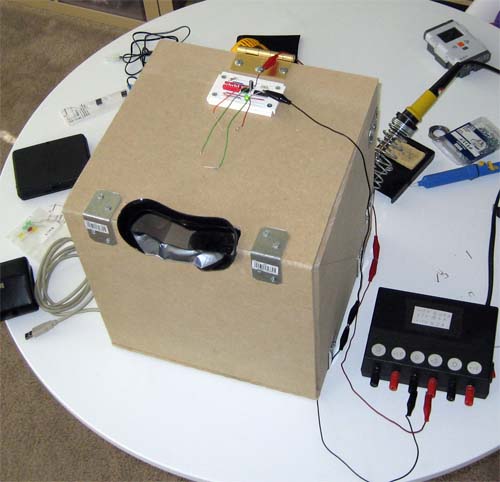
It has blinking LEDs on the ceiling and a couple of convex mirrors on the bottom which reflect the LEDs and make it look like there are more than there really are.
Since it's dark inside the box, the blinking LEDs distract you from noticing the water nozzle in the middle hooked up to a squeeze-ball behind the box. When I activate the squeeze-ball it squirts you in the face:
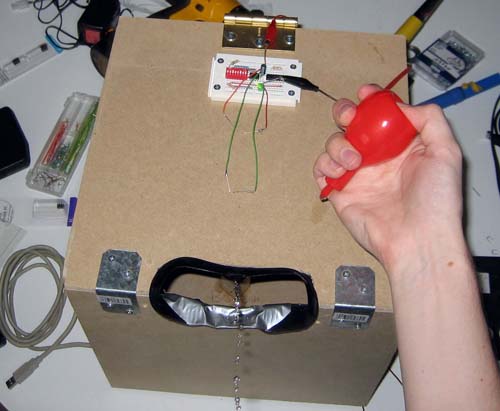
I brought it to work and had moderate success showing it to co-workers. Many were initially suspicious of the weird-looking box, but I was eventually able to prank everybody that came by (except one guy who recently had an eye operation that I decided not to squirt).
It turned into a sort of a social experiment in how to get people to stick their faces into a box. I had some interesting observations:
- People were much more suspicious if I said "hey, come look into my magic box" "what's in it?" "oh, you'll see.."
- Instead, if I waited until they walked by and asked about the box they were much more gullible, especially if I said something like "oh, do you want to see the LED light show too? ok, let me turn it on..."
- Everybody was expecting to get an electric shock when they looked in (probably because of the circuits and LEDs on the top). Nobody guessed that it would squirt water
- It's probably a good idea to ask people if they wear contacts before squirting them in the face with water (of course that would ruin the surprise in this case..)
Here's a video clip with some highlights. I got a bunch of other people too but forgot to turn on the webcam in time:
Squeezebox
Today's question: What's the best way to stream MP3s from my computer upstairs to my stereo downstairs? (my life seems to be beset with these sorts of problems)
Here are the network music player requirements that I was forced to work with:
- It needs to connect wirelessly to my 802.11g network
- It must support WPA-PSK encryption
- It should have S/PDIF digital audio outputs
- It should be super-easy to use once set up (minimal work required to turn the music on and off)
The first thing I tried out was an Airport Express with Airtunes from Apple. It aced the first 3 requirements, and I figured that nothing else would score better on #4. Unfortunately I was wrong on the last one.
The problem with Airtunes is that it just pretends to be a set of "remote speakers" and requires a computer to be running iTunes all the time to play the music. I ended up with two options:
- Leave the computer upstairs on all the time playing music (easier now that I have a Mac Mini Media Center). This worked, but in order to switch songs or playlists I had to run upstairs and switch them on the computer, which was annoying.
- Run iTunes on a laptop downstairs and play the music from there. This worked if I was already using the laptop, but if I was just eating breakfast I would have to go over to the laptop, wake it up, type in my password, find iTunes and hit play. Then when I was leaving I had to walk back over, stop iTunes and sleep the laptop. Far too complicated.
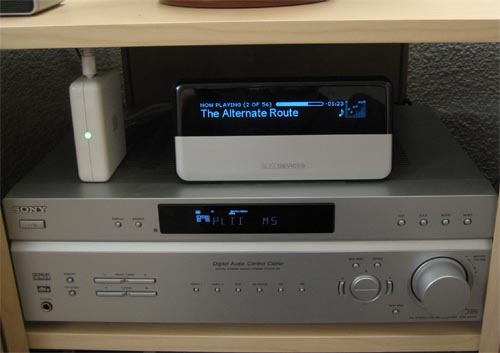
The only other network music player I could find that fulfilled the first 3 requirements was a Squeezebox (and only the very newest model supports WPA). It works by streaming the MP3 files from a network server and playing them directly. It also has a remote that can be used to browse the music collection on its big LCD and (most importantly) the ability to start & stop playback with one button push. It also runs its own web server so you can manage which music is playing from any computer on the network (including a cell phone).
It was pretty much exactly what I needed. Here's a picture of it in action:
And here's the back:
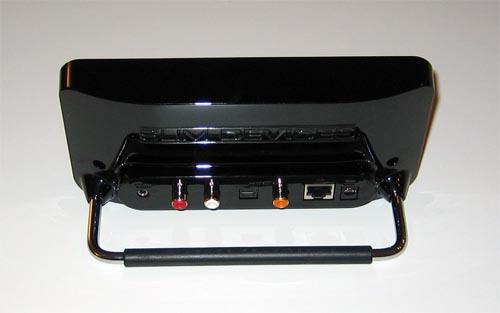
It has a headphone port, analogue RCA stereo jacks, optical and coax S/PDIF jacks, and an ethernet port (for wireless network bridging, also very handy).
So far it works great. Setting it up was the only difficult part. Typing in the 256-bit WPA key with the remote was very painful, especially since it kept crashing with a helpful "malloc failed" error message and rebooting, forcing me to start over. But, now that I have that all sorted out I haven't had any problems with it.
GTI iPod adapter install
Unfortunately the 2006 GTI does not come with an integrated iPod adapter (unlike the '07 model, grr). But, VW does make an adapter that connects the iPod to the stereo system and pretends to be an external CD changer. It's not the best solution, but at least it powers the iPod and I can control it and switch tracks from the steering wheel.
I was already pissed that I would have to pay $150 for the dumb little cable, and I refused to pay the dealer another $150 to install it, so I got one off eBay and did it myself. Unfortunately the instructions were in German and assumed that I already knew how to take apart the dashboard to get to the radio, with VW-specific tools that I didn't have.
So if anybody else is trying to do the same thing, here are pictures of how I did it:
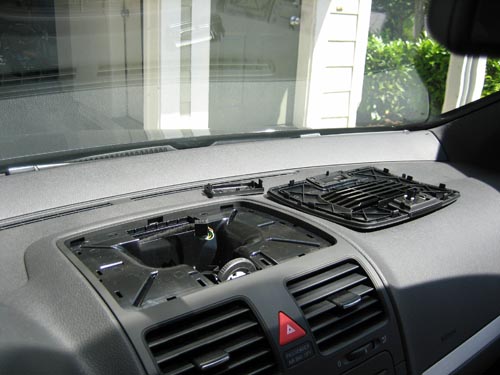
First pry off the top dash vent with an "ausdruckwerkzeug" (whatever that is - I used a credit card)
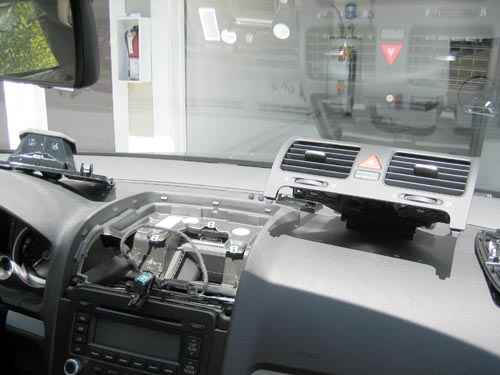
Remove the front vents and the screws holding the radio in
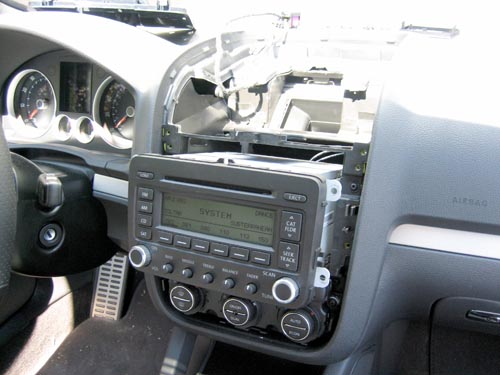
Pull the radio out and disconnect the wires in the back
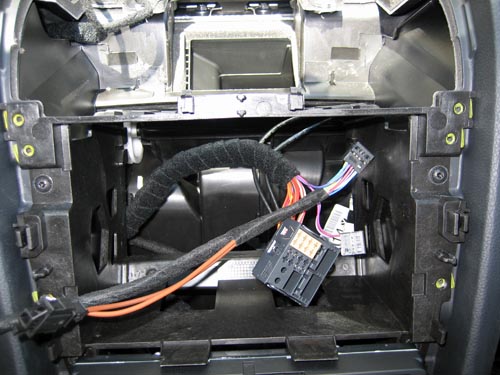
Move the audio wires from the satellite radio connector to your iPod adapter cable
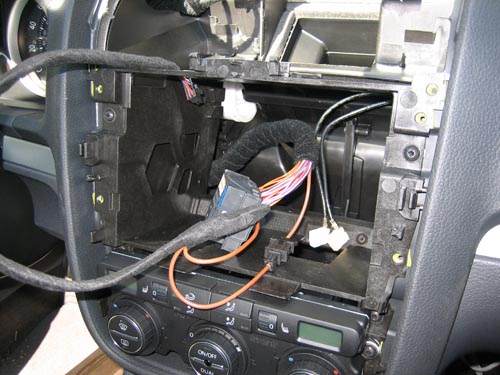
Splice the ground wire to the iPod adapter cable
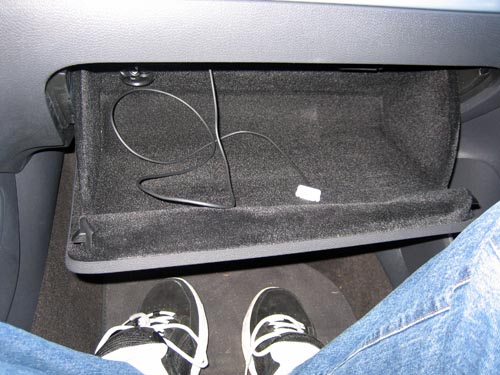
Stick the other end of the cable in through the glove box
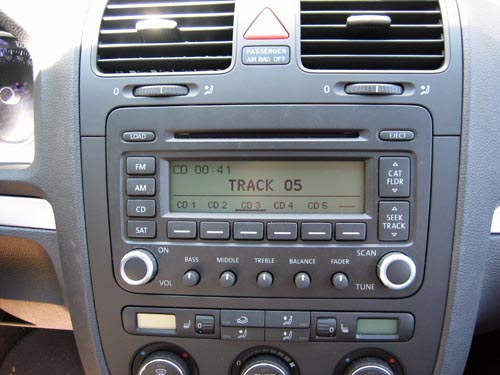
When it's all done, the iPod shows up as an external CD changer. The first 5 playlists on the iPod show up as CDs 1-5. Unfortunately the track/artist/album names don't show up on the radio or the in-dash LCD, and you can only use 5 playlists, which kind of sucks. Oh well.
The day the music died
Today my iPod decided to die with the "folder and exclamation point" error:
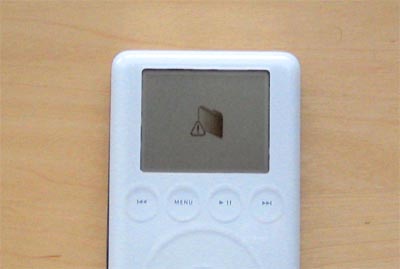
Unfortunately none of Apple's troubleshooting suggestions worked (typical), and I couldn't get my computer to recognize it as a Firewire device any more. The hard disk seemed to be dead since I couldn't hear it spinning or seeking when turning on the iPod.
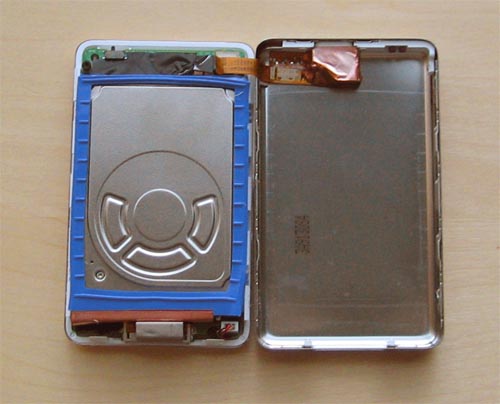
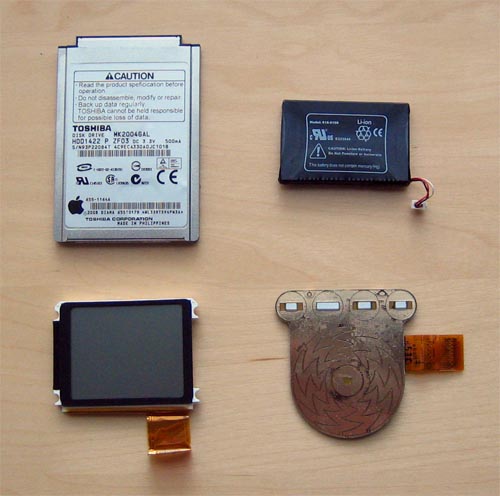
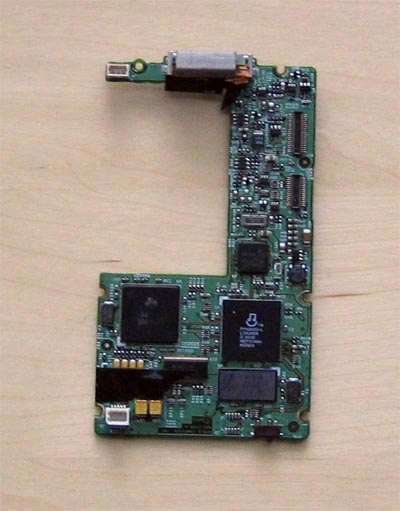
The warranty expired a long time ago, so I opened it up to see if there was anything loose or obviously wrong. I didn't see anything, so I guess I'll be getting a new one. I was planning to anyway, but I wanted to wait until the next version, with the rumored full-size screen. Oh well.
Here are some pictures of the insides of the iPod:
SD vs HD
Fortunately, my problems with the video quality of the DCT-3412 cable box ended up not being so bad, for the simple reason that all of the channels I receive seem to be digital, so they can all be recorded via Firewire (as long as they are not protected with DRM). Also, connecting the MCE via S-Video instead of the RF tuner increased the video quality for shows I can't record with Firewire.
Once that was all working, I did some tests to see how noticeable the difference between SD and HD really is. Here are some pictures:

Standard Definition

High Definition
Obviously the HD screenshot has been shrunk to SD, so they look about the same here (except that the HD shot is in 16:9). Click the HD thumbnail to see it in its full resolution (HD 1080i).
Here are the two shots scaled to the same size, for an easier comparison:

Standard Definition

High Definition
The last shot clearly shows HD's better picture quality, but ironically the newscaster actually looks a bit better and younger in the SD shot, since the blurriness of SD masks wrinkles and imperfections, while HD hides nothing. (I'm definitely not the first to note this irony)
Mac Mini Media Center
Last week I finally caved to peer pressure and got cable TV installed. Instead of actually watching any TV shows, I went right to work on getting the TV signal hooked up to my computer so that I could record and watch TV on it.
Unfortunately my computer is very loud and heats up my room whenever it's on, so I couldn't imagine leaving it on all the time in order to record TV shows. So I looked around for a small & quiet, yet still somewhat powerful computer. I decided to get one of the new Intel Mac Minis:
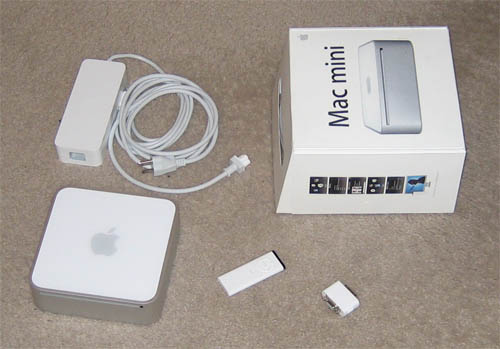
So far it has been pretty good. It has its pros:
- Small
- Quiet
- Intel Core Duo processor
- DVI & digital audio out
and cons:
- Weak integrated graphics
- No CD eject button
- Some of the hardware doesn't work under Windows
- No expansion capabilities (i.e. for a TV tuner)
Surprisingly, it was fairly easy to install Windows XP Media Center Edition 2005 on it. I only had a couple of problems:
- I had to burn my own install DVD since Apple's Boot Camp software only likes XP Home & Professional
- I hit the infamous and deceiving "Setup cannot find the EULA" error message, which was caused by the large hard drive getting formatted incorrectly by Mac OS X, so I had to re-partition it by hand
For the TV tuner I got a Hauppauge Win-TV-PVR-USB2-MCE:
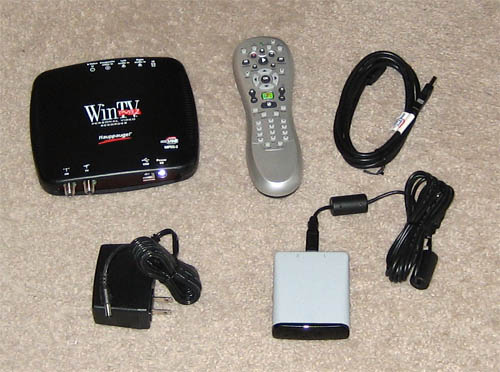
I thought this would be a good tuner (even though it's USB), but unfortunately I was disappointed. The video quality is noticeably blurry when compared to component output from the cable box. I haven't figured out yet whether it is the fault of the RF encoder on the cable box or the USB tuner, but it could probably be either one (or both).
The tuner quality was not supposed to be a problem in either case, since I was planning to grab the raw digital video directly off of the cable box using Firewire and Tim Moore's set-top box controller software (recommended by my friend Mike). Unfortunately that plan didn't work out so well either, because Comcast gave me the new cheapo Motorola DCT-3412 STB, instead of the good DCT-6412, which included an MPEG2 encoder and could output any channel over Firewire:

So I can only record analogue channels using the blurry tuner, although digital (and HD) channels should work fine over Firewire, once the kinks are all worked out.
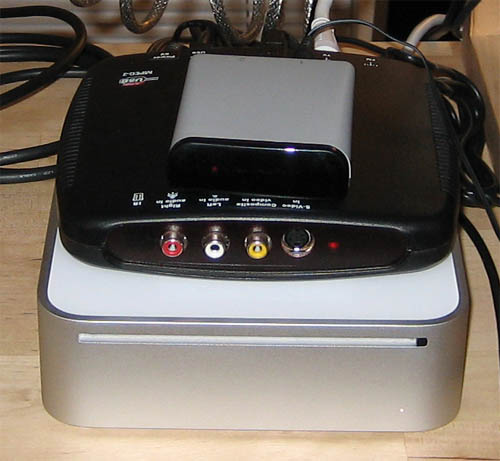
Ultimately it didn't work out as well as I had hoped, but it should still be OK since I can always record analogue shows on the Comcast box and watch them there. Here's a picture of the final 'Mac Mini Media Center':
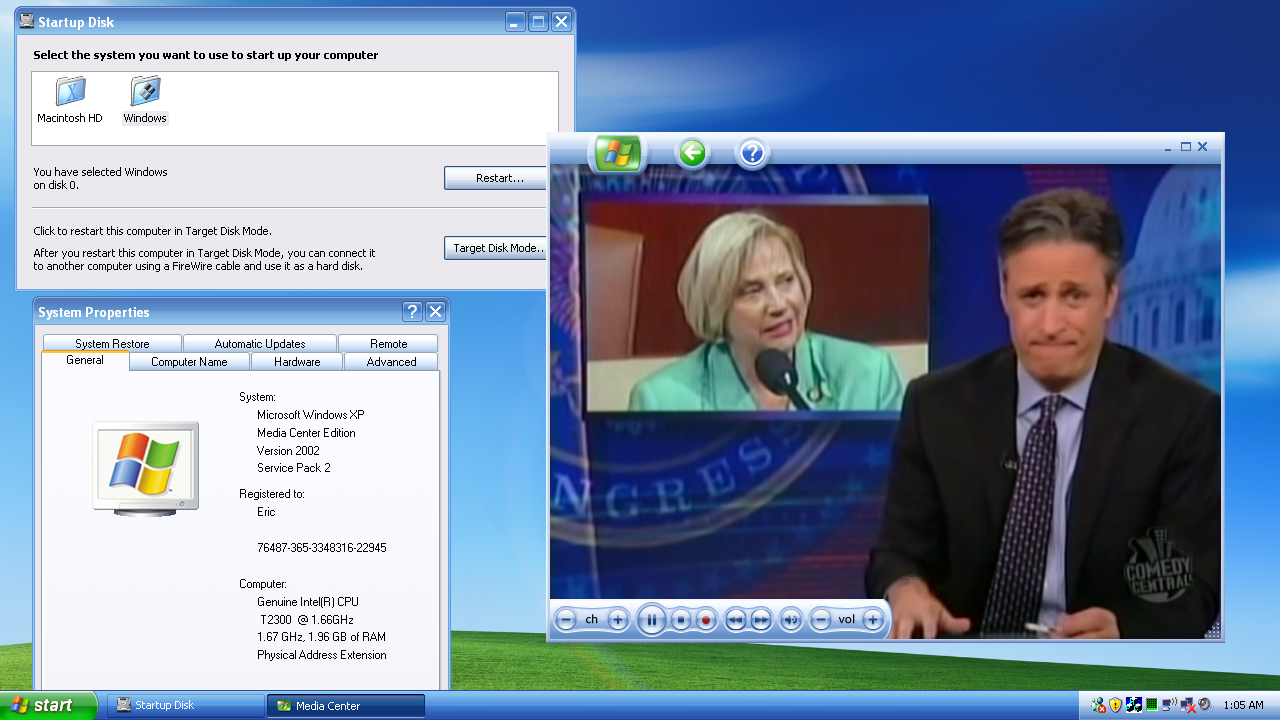
And here is a screenshot at 720p (linked to full version):
LEGO Robot
A few weeks ago I was at the mall and I walked by a LEGO Store. I had heard of these, but I did not realize that there was one nearby. Naturally, I had to go in. When I came out, I had $200+ worth of LEGOs, and a membership in their "Loyalty Discount Card" program.
The most interesting thing I got was a Mindstorms kit. The Mindstorms kit lets you build little LEGO robots out of electric motors, wheels, gears, and things like that. Somehow I missed out on them when I was a kid, but I have them now.
I always wanted to make a wireless rover bot that could drive around the floor and take pictures of things. I was able to make a robot like that in college, but it had a bunch of wires hooked to it for power and control, so it wasn't as cool as it could have been. Now, with the Mindstorms kit I realized I had everything I would need. I could build a little robot out of LEGOs and attach my cell phone to it. The cell phone would direct the robot and send pictures back to my laptop, where I would be controlling the whole thing.
It ended up being more difficult than it sounded, primarily because the LEGO computer could only communicate via infrared, and it was a proprietary protocol (not IrDA), so the IR port on my cell phone would not work. I solved the problem by ripping the IR PCB out of the Mindstorms transmitter, attaching it to a handy Bluetooth serial port, and hooking it up to a RC car battery pack. Unfortunately the IR transmitter required 9V and the Bluetooth receiver required 5V, so I had to add a regulator into the mix, but it turned out OK:
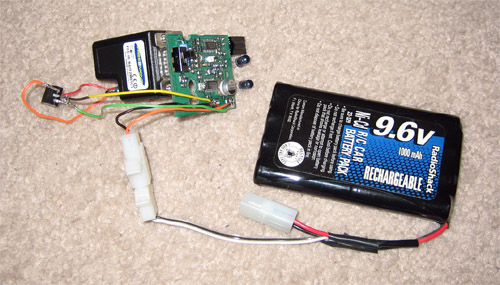
Now my phone could communicate wirelessly with the LEGO controller over Bluetooth. Luckily the protocol had already been previously reverse-engineered by a Stanford student with far too much time on his hands, so I didn't have to do that too.
The next thing to do was to build a robot that could house the battery and hold the cell phone up. I wanted it to be able to turn around and rotate in place, so I came up with a 3-wheeled design:
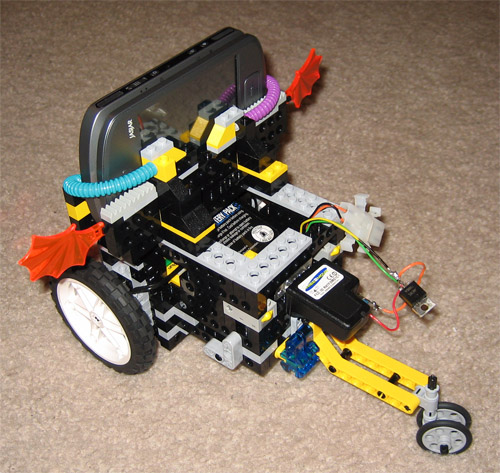
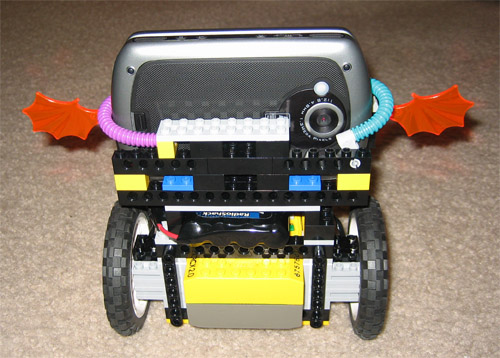
It ended up being a bit top-heavy, but it works pretty well.The last thing to do was to get a video-conferencing program to run on the phone and transmit video back to my laptop. I figured this would be the easiest part of the project, but it ended up being the most difficult, because I had to write my own by hand. I was shocked to find that there were no Pocket PC video conferencing programs that worked with Windows Mobile 5.0 over WiFi. Microsoft Portrait was almost exactly what I needed, but unfortunately it had not been updated in several years and did not work with my phone's camera.
I started from an SDK sample that captured JPEG images and made a little program that sends a stream of images to a PC over WiFi. It's a bit slow since it doesn't use a real video codec, but it's still surprisingly fast. It updates at about the speed of a USB webcam. Here's a screenshot of the PC half of the software:
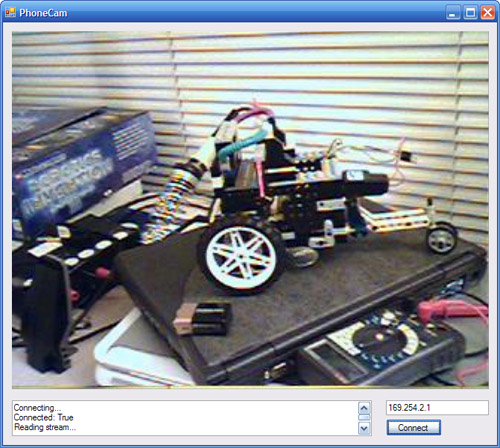
Finally I had everything in place and was able to drive the robot around and see where it was going from my computer. Awesome!
Here is a video of me driving it around:
Me

Apps


Search
Archives
- July 2013
- May 2013
- April 2013
- March 2013
- February 2013
- January 2013
- December 2012
- November 2012
- October 2012
- September 2012
- August 2012
- July 2012
- May 2012
- April 2012
- March 2012
- February 2012
- January 2012
- December 2011
- November 2011
- October 2011
- September 2011
- August 2011
- July 2011
- June 2011
- May 2011
- April 2011
- March 2011
- February 2011
- January 2011
- December 2010
- November 2010
- October 2010
- September 2010
- August 2010
- July 2010
- June 2010
- May 2010
- April 2010
- March 2010
- February 2010
- January 2010
- December 2009
- November 2009
- October 2009
- September 2009
- August 2009
- June 2009
- May 2009
- April 2009
- March 2009
- February 2009
- January 2009
- December 2008
- November 2008
- October 2008
- September 2008
- August 2008
- July 2008
- June 2008
- May 2008
- April 2008
- March 2008
- February 2008
- January 2008
- December 2007
- October 2007
- September 2007
- August 2007
- July 2007
- June 2007
- May 2007
- April 2007
- March 2007
- February 2007
- January 2007
- December 2006
- November 2006
- October 2006
- September 2006
- August 2006
- July 2006
- June 2006
- May 2006